Identifying Wireless Interference from Channel Overlap
Short answer
C Frequency overlap between Wi-Fi channels is causing interference that leads to intermittent connectivity for IoT devices.
Question
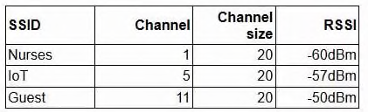
Which of the following is most likely causing the performance issue?
Key Takeaways
The main trap is confusing general connectivity issues with specific RF phenomena; recognizing that overlapping channels (like 1, 2, and 3) cause co-channel and adjacent-channel interference is key.
This question tests your ability to diagnose wireless performance issues caused by frequency overlap in the 2.4 GHz band. The correct answer is C, as overlapping channels create interference that disrupts connectivity.
Common mistake: Choosing 'Poor RSSI' because it's a common cause of dropouts, but failing to notice the specific channel configuration details in the exhibit that point to spectral interference instead.
Expert Analysis
The scenario describes intermittent connectivity for IoT devices on a hospital wireless network, supported by an exhibit showing overlapping Wi-Fi channels. The core issue is interference caused by multiple access points (APs) operating on the same or adjacent channels within the same RF environment.
Frequency Overlap Analysis: In the 2.4 GHz band, standard channel spacing is 20 MHz. However, only channels 1, 6, and 11 are non-overlapping. If APs are configured on channels 1, 2, 3, etc., their signal spectra overlap significantly. This creates co-channel interference (CCI) and adjacent-channel interference (ACI), forcing devices to retransmit packets due to collisions and noise. This results in the reported intermittent connectivity and poor performance for IoT devices, which often have limited radio capabilities compared to smartphones or laptops.
Evaluating Other Options:
- Poor RSSI (A): While weak signal strength can cause issues, the specific mention of channel configurations in the exhibit points directly to spectrum management rather than distance or obstruction.
- Incorrect channel size (B): While wider channels (e.g., 40 MHz) reduce available non-overlapping channels, the fundamental problem depicted is the overlap itself, not necessarily the width setting alone.
- Roaming misconfiguration (D): Roaming issues typically manifest as sticky clients or slow handoffs between APs. They do not explain the general intermittent connectivity across the network segment unless specifically tied to AP coordination, which is less direct than the interference shown.
The comments highlight that channel overlap is the primary culprit in such scenarios, particularly in dense environments like hospitals where many APs are deployed.
Official Reference
This link opens the official vendor documentation in a new tab.
Exam Strategy
When analyzing wireless troubleshooting questions, always look first at the RF environment details provided in exhibits or descriptions. Check if channels are listed (e.g., 1, 2, 3, 4, 5). If they are sequential or close together in the 2.4 GHz band, assume overlap/interference is the primary issue before considering signal strength or roaming.
Frequently Asked Questions
Why are only channels 1, 6, and 11 non-overlapping in 2.4 GHz?
How does channel overlap affect IoT devices specifically?
Community Votes
50% of anonymous learners picked answer C. Votes are pick records left by other test-takers — they are not the verified answer.
Discussion 2 contributions
Compiled from public community threads and reader submissions, lightly edited for clarity. Handles and vote tallies are shown as recorded, and comments reflect the views of individual contributors.
From public community threads 2
-
ERB14 👍 1 Answered CChannel Overlap Issue: In the 2.4 GHz spectrum (using standard 20 MHz channel sizes), the only three non-overlapping channels are 1, 6, and 11.
-
Skri113xX 👍 1 Answered DPretty sure it's D. This pattern is very common.
Reader comments & corrections
No reader corrections yet — spotted an error or have a note? Share it below.
Related Analysis
Practice All N10-009 Questions
Access 100 questions with complete answers and detailed explanations.
View Full N10-009 Practice Test →