Duplicate 192.168.1.10 ARP Entry Causes Intermittent Connectivity
Short answer
C The ARP table shows 192.168.1.10 bound to two MAC addresses on eth4 and eth6, so another PC manually configured with that IP is causing the conflict.
Question
IP address: 192.168.1.10
Subnet mask: 255.255.255.0
Default gateway: 192.168.1.254
The network switch shows the following ARP table:
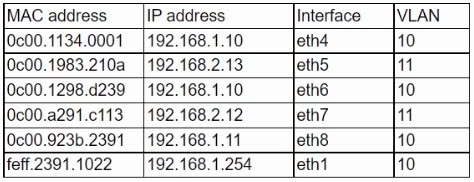
Which of the following is the most likely cause of the user's connection issues?
Key Takeaways
The key is recognizing that one IPv4 address mapped to two MAC addresses on different ports is an address conflict, not a VLAN, STP, or routing fault.
This N10-009 scenario tests reading a switch ARP table for an IP address conflict. The correct answer is C because 192.168.1.10 appears with two MAC addresses, indicating another PC manually configured with the same address.
Common mistake: A port with an incorrect VLAN assigned (A) is tempting because VLAN errors also cause connectivity problems, but it would not produce duplicate IP-to-MAC bindings for 192.168.1.10 in the ARP table.
Expert Analysis
The decisive clue is the duplicate IP
The exhibit is the center of this question, not the user's IP configuration. It shows 192.168.1.10 associated with two different MAC addresses on two switch ports, eth4 and eth6. The user's mask /24 and default gateway 192.168.1.254 are normal for that subnet, so the addressing values alone do not explain the intermittent failures. A switch ARP table binding one IPv4 address to two MAC addresses is the signature of an IP address conflict.
“Intermittent” fits ARP contention
Intermittent connectivity is the qualifier that points toward two hosts answering for the same address. As ARP entries age or are refreshed, traffic for 192.168.1.10 can be sent to one MAC and then the other, so connectivity appears to work and fail. The user may also see duplicate-address warnings. A static misconfiguration on another PC is the most likely way to create this situation; DHCP would normally avoid handing out an address already in use.
The other options fail the exhibit test
Option A, a port with an incorrect VLAN assigned, can break connectivity, but it does not put two MAC addresses against the same IP in the ARP table. Option B, a spanning tree conflict, might cause intermittent forwarding or topology instability, yet it does not create an IP ownership conflict. Option D, overlapping route tables on a router, is a Layer 3 routing problem; the user is on the local /24, and the ARP table already shows the local conflict. Therefore, option C is the best answer.
Official Reference
https://www.comptia.org/certifications/network
This link opens the official vendor documentation in a new tab.
Exam Strategy
When an exhibit shows an ARP table, look first for an IP address mapped to two MAC addresses or a MAC appearing on multiple ports; that pattern signals an address conflict, not a routing or VLAN fault. Here, “intermittent” matches ARP cache entries alternating between two hosts, while a wrong VLAN usually isolates a port and spanning tree problems create loop or topology symptoms. Choose the option that explains duplicate ownership of 192.168.1.10, and discard any answer requiring evidence absent from the exhibit.
Frequently Asked Questions
How does a duplicate IP address cause intermittent connectivity?
Why is an incorrect VLAN not the best answer?
What is the fix for the 192.168.1.10 conflict?
Community Votes
100% of anonymous learners picked answer C. Votes are pick records left by other test-takers — they are not the verified answer.
Discussion 3 contributions
Compiled from public community threads and reader submissions, lightly edited for clarity. Handles and vote tallies are shown as recorded, and comments reflect the views of individual contributors.
From public community threads 3
-
chupapi_001 👍 14 Answered CThe correct answer is C. Another PC with manually configured IP. Looking at the ARP table provided in the image, we can identify the issue: There are two devices with the same IP address (192.168.1.10): One device with MAC address 0c:00.1134.0001 on eth4 Another device with MAC address 0c:00.1298.d239 on eth6 This is a clear case of an IP address conflict where: Both devices are trying to use 192.168.1.10 Both are on VLAN 10 Different physical ports (eth4 and eth6)
-
Roselaure 👍 2 Answered CIP conflict two MAC address using the same IP addr
-
Dese_2point71 👍 1 Answered CC. Another PC with manually configured IP
Reader comments & corrections
No reader corrections yet — spotted an error or have a note? Share it below.
Related Analysis
Practice All N10-009 Questions
Access 100 questions with complete answers and detailed explanations.
View Full N10-009 Practice Test →