DNS Server Connectivity: UDP 53 Open, TCP 53 Closed
Short answer
C Because UDP 53 is reachable while TCP 53 is closed on the DNS server, investigate the firewall rules filtering that traffic rather than URL filters, unused services, or 802.1X.
Question
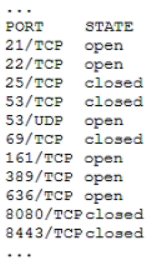
Which of the following should the systems administrator investigate?
Key Takeaways
The question tests whether you can separate a DNS reachability fault from general server hardening; the trap is treating every unexpected open port as the cause of the connectivity issue.
This N10-009 scenario tests reading a remote port scan for a DNS server; the open UDP 53 and closed TCP 53 point to firewall rules as the item to investigate (C).
Common mistake: Option B is tempting because the scan also shows FTP, SSH, SNMP, and LDAP/LDAPS ports, but those are hardening findings; they do not explain why UDP 53 is reachable while TCP 53 is blocked.
Expert Analysis
The scan symptom, not the noise The decisive detail in the remote scan is the asymmetry at port 53: UDP/53 is reachable, while TCP/53 is closed. DNS clients normally send simple queries over UDP/53, so the server can look partly healthy. TCP/53 is still required for zone transfers and for retrying queries when a UDP response is truncated. A remote scan that sees UDP open and TCP closed therefore points to a filtering rule or ACL on the path, not to the DNS daemon being entirely down.
Why C is the investigation target Option C, firewall rules, is the only choice that explains selective blocking of one transport for the same service. A stateful firewall or ACL between the administrator's remote location and the DNS server can permit UDP/53 while denying TCP/53, producing exactly this result. The operational consequence is intermittent or failed resolution for large responses and broken zone transfers, while small queries appear to work. Check the firewall rule base, security groups, and any ACL on the server or upstream device.
The tempting distractor The scan also appears to show unrelated services such as FTP, SSH, SNMP, and LDAP/LDAPS listening. Option B, unused services, is a valid hardening concern because those services enlarge the attack surface, and a comment argues for disabling them. But hardening does not answer why DNS connectivity is failing; closing FTP or LDAP would not open TCP/53. Likewise, URL filters (A) act on web destinations, not DNS transport, and 802.1X (D) normally gates port access before IP and would not leave UDP/53 open while closing only TCP/53.
What would change the answer If the stem asked for attack-surface reduction on a dedicated DNS server, or if the scan showed only unnecessary services and DNS was fully reachable on both UDP/53 and TCP/53, then B would become the better investigation target. If all ports were unreachable, then D or a Layer 2 access issue would deserve attention. For this connectivity complaint, the firewall-rule asymmetry is the actionable fault.
Official Reference
https://www.rfc-editor.org/rfc/rfc1035
This link opens the official vendor documentation in a new tab.
Exam Strategy
When a port scan accompanies a connectivity question, translate each port state into a service-level symptom before looking at the options. Here, open UDP 53 and closed TCP 53 means ordinary queries may work while zone transfers or truncated-response retries fail, so look for a filter that treats transports differently. Eliminate options that act on web content, such as URL filters, or that gate all access at Layer 2, such as 802.1X. Treat unrelated open ports as hardening noise unless the stem explicitly asks about attack-surface reduction.
Frequently Asked Questions
Why does DNS need TCP 53 if most queries use UDP 53?
Why is unused services not the best answer to this DNS connectivity question?
Would 802.1X on the switch produce this scan result?
Community Votes
50% of anonymous learners picked answer C. Votes are pick records left by other test-takers — they are not the verified answer.
Discussion 2 contributions
Compiled from public community threads and reader submissions, lightly edited for clarity. Handles and vote tallies are shown as recorded, and comments reflect the views of individual contributors.
From public community threads 2
-
Provost 👍 1 Answered CThe key clue is that UDP port 53 is open, but TCP port 53 is closed. Domain Name System (DNS) uses both: - UDP 53: Most ordinary DNS queries. - TCP 53: Zone transfers and queries retried over TCP when a UDP response is truncated. The administrator should investigate whether firewall rules are blocking TCP 53. Why the others are less suitable: - A. URL filters: Control access to web addresses; they don’t explain the DNS port results. - B. Unused services: Several open ports warrant a security review, but they aren’t the primary clue to the DNS connectivity issue. - D. 802.1X: Controls device authentication to the network. Several reachable ports suggest the server already has network access.
-
ERB14 👍 1 Answered BSecurity Hardening (Unused Services): The port scan reveals multiple unneeded and insecure services running on a dedicated DNS server, such as FTP (21/TCP), SSH (22/TCP), SNMP (161/TCP), and LDAP/LDAPS (389 & 636/TCP). Standard security hardening best practices dictate that any non-essential services running on a server should be disabled to minimize the attack surface.
Reader comments & corrections
No reader corrections yet — spotted an error or have a note? Share it below.
Related Analysis
Practice All N10-009 Questions
Access 100 questions with complete answers and detailed explanations.
View Full N10-009 Practice Test →