Which Service Did the Attacker Use Based on tcpdump Port Scan Results?
Short answer
C The attacker used SSH.
Question
Key Takeaways
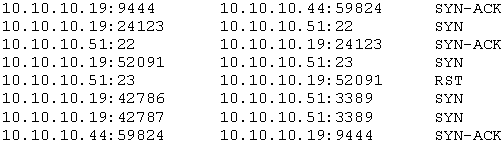
This question tests your ability to map tcpdump outputs to network services, with the trap being to confuse open ports like 22 (SSH) with failed connections like 23 (Telnet).
Learn how to interpret tcpdump port scan results to identify the service used in a network breach. CompTIA N10-008 candidates agree that an SYN-ACK response on port 22 indicates SSH was the connecting protocol.
Common mistake: The most common wrong answer is A (Telnet), likely because Telnet is a common breach target and port 23 appears in the scan, but the SYN-ACK on port 22 shows SSH was the actual open service.
Expert Analysis
Why the Answer Is Correct
The tcpdump output reveals a successful TCP three-way handshake on port 22, indicated by the SYN-ACK response. Port 22 is the default port for SSH, a secure remote administration protocol. Therefore, the attacker established an SSH connection to the device. This aligns with community comment [1], which states "Syn-ack signifies and SSH connection was successful on port 22."
Why the Other Options Are Wrong
Telnet (option A) uses port 23, which the scan shows as failed or without SYN-ACK, meaning no connection was established. VNC (option B) typically uses port 5900, which is not indicated in the output. RDP (option D) uses port 3389, which appears to have sent only SYN packets without a successful handshake, as noted in comment [3]. Thus, only SSH corresponds to an open port with a completed handshake.
Community Comment Notes
The community is largely aligned on answer C, with 83 votes supporting SSH. Comment [2] raises a point about port 23 failing and port 22 succeeding, reinforcing that SSH was the active service. Comment [3] initially confused RDP due to multiple attempts, but the SYN-ACK on port 22 is the definitive indicator. The key takeaway from the comments is to focus on which port returned SYN-ACK rather than the number of attempts.
Official Reference
- https://www.rfc-editor.org/rfc/rfc4251
- https://www.tcpdump.org/manpages/tcpdump.1.html
- https://partners.comptia.org/docs/default-source/resources/comptia-network-n10-008-exam-objectives-(5-0)
These links open the official vendor documentation in a new tab.
Exam Strategy
When analyzing tcpdump output for a port scan, always identify the port number that returns an SYN-ACK packet—it indicates an open port with a completed handshake. Conversely, a SYN packet without a response or an RST means the port is closed or filtered. Memorize common port-to-service mappings, such as 22 for SSH, 23 for Telnet, and 3389 for RDP, to quickly answer such questions.
Community Votes
83% of anonymous learners picked answer C. Votes are pick records left by other test-takers — they are not the verified answer.
Discussion 5 contributions
Compiled from public community threads and reader submissions, lightly edited for clarity. Handles and vote tallies are shown as recorded, and comments reflect the views of individual contributors.
From public community threads 5
-
Cavick 👍 9 Answered CSyn-ack signifies and SSH connection was successful on port 22.
-
laosythai 👍 2 Answered ADid they mean to do “sun-ack” on port 23 and not 22 which would make more sense since 22 is secure shell and port 23 is Telnet and NOT secure meaning a breach is more likely…?
-
b0bby 👍 1I don't know what to look for here. port 23 failed, port 22 syn-ack and port 3389 just syn. Don't know how to come to the conclusion any of these was the breach... I'm just assumming its RDP cause it tried twice??
-
emilia_088 👍 2A I go with Telnet
-
Zach123654 👍 1 Answered CGPTTTT
Reader comments & corrections
No reader corrections yet — spotted an error or have a note? Share it below.