Which DLP Rule Condition Works Across the Policy Locations?
You have a Microsoft 365 E5 subscription. You are creating a data loss prevention (DLP) policy applied to the locations as shown in the following exhibit. Which condition can you use in the DLP rules of the policy? - 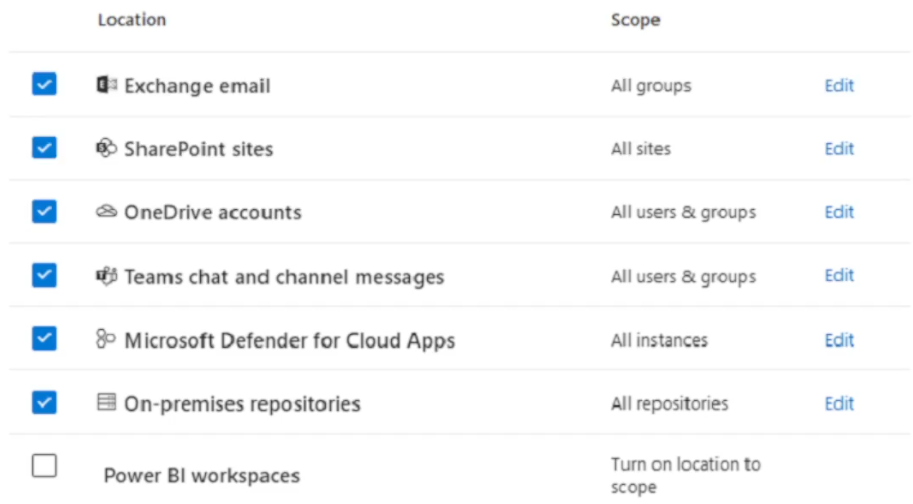
Community Votes
100% of anonymous learners picked answer A. Votes are pick records left by other test-takers — they are not the verified answer.
Community Insight
Tests which DLP rule condition is available across the policy's locations; the trap is assuming keywords or sensitivity labels work in every workload, when only sensitive info types are universal.
In Microsoft 365 E5, DLP policy rule conditions vary by the selected locations. This page establishes that sensitive info types (A) is the condition you can use across the DLP locations shown in the exhibit, while sensitivity labels, keywords, and content search queries are not universally supported.
Many candidates choose keywords or sensitivity labels because they are familiar DLP concepts, but those conditions are not supported for every location shown (e.g., Teams or Devices), whereas sensitive info types are.
Community Discussion (4 comments)
Comments & Corrections
No comments yet — spotted an error or have a note? Share it below.
Expert Analysis
Why the Answer Is Correct
The exhibit configures the DLP policy across multiple Microsoft 365 workloads, likely including Exchange email, SharePoint sites, OneDrive accounts, Teams chat and channel messages, and Devices. Sensitive info types (SITs) are the only condition in the list that Microsoft Purview supports across all those locations. SITs act as pattern-based classifiers for credit card numbers, passport numbers, and other sensitive data, and they are foundational to DLP rules in every workload. Therefore, when you build rules for this policy, sensitive info types can be used without location restrictions.Why the Other Options Are Wrong
Sensitivity labels (B) are supported as a DLP condition in some workloads, such as Exchange, SharePoint, and OneDrive, but they are not available for every location in the exhibit—notably Teams chat and channel messages. Keywords (C) are also workload-specific; endpoint DLP and some Teams scenarios do not offer the keyword condition, so keywords cannot be used universally. Content search queries (D) belong to eDiscovery and Content search, not to DLP rule conditions. DLP rules use SITs, labels, and other workload-specific conditions, but never content search queries.Community Comment Notes
Frank9020 explains that sensitivity labels are primarily for classification and protection, and notes they are not directly used as conditions in DLP rules for the shown locations. Tomtom11 adds that "Sensitive Information Types (SIT) are classifiers" that identify sensitive data by pattern, reinforcing why SITs are the supported choice here. The community vote strongly agrees with option A (100%), and the comments collectively confirm that SITs are the correct condition for this DLP policy.Official Reference
Exam Strategy
For DLP condition questions, first identify every location in the exhibit. Then choose the condition that is supported by all those locations; sensitive info types are the common denominator across Exchange, SharePoint, OneDrive, Teams, and Devices. Eliminate content search queries immediately—they belong to eDiscovery.
Frequently Asked Questions
Why can't I use keywords as a DLP condition for the exhibit's locations?
Keywords are not supported in every DLP workload; endpoint DLP and Teams chat do not offer the keyword condition, while sensitive info types are universal across the locations.
Can sensitivity labels be used as a DLP rule condition?
Sensitivity labels are a condition in some workloads like Exchange and SharePoint, but they are not available for all locations in the exhibit, so they are not the correct universal choice.
Related Analysis
Practice All MS-102 Questions
Access 111 questions with complete answers and detailed explanations.
View Full MS-102 Practice Test →