Which messages are phishing with anti-phishing threshold 3 applied?
You have a Microsoft 365 E5 subscription that contains a user named User1. You create an anti-phishing policy named Policy1 that has the following settings: • Include these users, groups and domains: User1 • Phishing email threshold: 3 - More Aggressive User1 receives the email messages shown in the following table. Which messages are phishing email? - 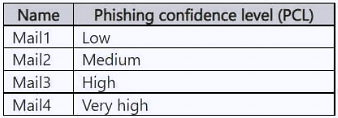
Community Votes
75% of anonymous learners picked answer C. Votes are pick records left by other test-takers — they are not the verified answer.
Community Insight
It tests the advanced phishing threshold behaviour in Defender for Office 365 combined with protected-user impersonation, and the trap is assuming that 3 - More aggressive only catches very-high-confidence phishing rather than lowering the confidence bar for medium-confidence detections too.
This MS-102 question tests how a custom anti-phishing policy (Policy1) with the phishing email threshold set to 3 - More aggressive and User1 added to the impersonation protection list classifies four mail items. The answer established here is that Mail2, Mail3 and Mail4 are phishing, while only Mail1 is legitimate.
Option B (Mail3 and Mail4 only) is the classic wrong pick: candidates assume threshold 3 means only high and very high phishing confidence levels are actioned, so they drop Mail2 even though the more-aggressive setting also promotes medium-confidence detections.
Community Discussion (3 comments)
Comments & Corrections
No comments yet — spotted an error or have a note? Share it below.
Expert Analysis
Why the Answer Is Correct
Policy1 is an anti-phishing policy scoped to User1 as a protected user, so two detection layers apply to her inbound mail: impersonation/spoof detection for User1's identity and the phishing confidence level (PCL) of the message. With the phishing email threshold set to 3 - More aggressive, a medium-confidence phishing detection is treated the same as a very-high-confidence detection, which is exactly why Mail2 (a medium-confidence item in the table) is actioned alongside Mail3 and Mail4. Mail1 shows none of the indicators covered by the policy, so it is delivered as legitimate. That combination of impersonation protection plus a lowered confidence bar makes Mail2, Mail3 and Mail4 the phishing messages, matching option C.Why the Other Options Are Wrong
Option A (Mail4 only) ignores both the protected-user setting and the effect of the threshold, treating only the most obvious message as malicious. Option B (Mail3 and Mail4 only) is the popular near-miss: it is based on a reading where 3 - More aggressive requires high or very high PCL, which wrongly excludes the medium-confidence Mail2 that the more-aggressive threshold does promote. Option D over-corrects in the other direction by including Mail1, a message that carries no spoof of User1 and no phishing-confidence signal from the policy, so there is no policy reason to classify it as phishing.Community Comment Notes
Most learners converge on C: makonmakon, the highest-voted comment, quotes the Microsoft Learn text stating that at the more-aggressive level "Messages that are identified as phishing with a medium or high degree of confidence" are treated as very high confidence, and both makonmakon and SeijuroSGD link the same anti-phishing policy page as proof. JoskeVr argues for B by reasoning that threshold 3 should flag only "High or Very High" PCL messages, which is the same misconception that produces the B distractor on the real exam. The vote split (75 to 25 in favour of C) reflects that doc wording, but the deciding factor is the Defender for Office 365 threshold definition itself rather than the poll.Official Reference
Exam Strategy
When an anti-phishing question names a threshold other than the default 1 - Standard, first write down which confidence bands that level promotes, then test each mail item against that band plus the protected-user list before looking at the options. Never let a mail item's name or order tempt you into guessing - MS-102 always expects the threshold semantics to drive the count of phishing messages.
Frequently Asked Questions
Why does 3 - More aggressive flag Mail2 and not only Mail3 and Mail4?
The more-aggressive level lowers the bar: medium-confidence phishing detections are treated as very high confidence, so a medium-PCL message such as Mail2 is actioned by Policy1 as well.
Does adding User1 under 'Include these users, groups and domains' affect the result?
Yes. That setting enables impersonation protection for User1, so messages that spoof her identity are classified as phishing on top of the PCL-based detections.
Related Analysis
Practice All MS-102 Questions
Access 111 questions with complete answers and detailed explanations.
View Full MS-102 Practice Test →