Which devices support the Defender Update controls endpoint security template?
You have a Microsoft 365 E5 subscription that contains the devices shown in the following table. You plan to create an Endpoint security policy by using the Defender Update controls template. To which devices can you apply the policy? - 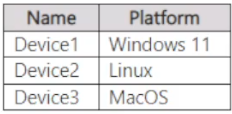
Community Votes
100% of anonymous learners picked answer A. Votes are pick records left by other test-takers — they are not the verified answer.
Community Insight
The question tests platform support for the Defender Update controls endpoint security template — the trap is assuming every device listed in a Microsoft 365 E5 tenant can receive an antivirus update policy.
The Defender Update controls template is an Intune endpoint security policy that manages Microsoft Defender Antivirus protection update settings, and it can only be applied to supported Windows client devices. This page confirms that in the shown device table only Device1 qualifies, making option A the correct scope for the policy.
Many candidates pick C or D because they assume any managed device in the tenant — including the non-Windows entries in the table — can receive a Defender Antivirus update policy, but the template only delivers settings to supported Windows devices.
Community Discussion (3 comments)
Comments & Corrections
No comments yet — spotted an error or have a note? Share it below.
Expert Analysis
Why the Answer Is Correct
The Defender Update controls template lives in the Intune endpoint security Antivirus workload and exists specifically to manage how Microsoft Defender Antivirus protection updates (security intelligence) are downloaded and applied. Those settings exist only in the Windows client agent, so the policy can be assigned only to a Windows device — the table's Device1. Community consensus agrees: as Khattak3143 wrote, the template is "designed for managing update settings specifically for Windows devices." Nothing in the scenario adds a second Windows client, so assigning the policy to Device1 only is the accurate, defensible answer. Option A is therefore the answer the exam expects.Why the Other Options Are Wrong
Options B, C and D each push the policy beyond Device1 to at least one additional device that the Defender Update controls template does not target, which is exactly the overreach the question is testing. Because the profile only exposes Defender Antivirus update settings, an assignment to a non-Windows platform has no corresponding settings to deliver and cannot be a valid scope. abill's comment "is it C?" captures the natural temptation to widen the assignment, but C fails for the same reason B and D fail: the extra device is not supported by this template. Widening the target also contradicts the community's uniform A votes.Community Comment Notes
Commenters converged on one idea — template support is Windows-bound. Khattak3143 explained that the template is "designed for managing update settings specifically for Windows devices," which directly supports limiting the policy to Device1. BJS78 pointed readers to Microsoft Learn's guidance on managing Microsoft Defender Antivirus protection updates and observed that "Updates come via MS Update anyway," reinforcing that the policy governs update delivery rather than device onboarding. abill's "is it C?" shows the most common hesitation, and the reply thread resolved it in favor of the single supported Windows device.Official Reference
Exam Strategy
When a question asks which devices can receive an endpoint security policy, first identify the policy family and its supported platforms before reading the device table — the table is designed to include decoys. For Defender Antivirus profiles such as Defender Update controls, expect only Windows client devices to be valid targets.
Frequently Asked Questions
Why can't the Defender Update controls policy be applied to the other devices in the table?
The template configures Microsoft Defender Antivirus protection update behavior, which is delivered only to supported Windows clients, so any non-Windows entry has no settings to receive.
What does the Defender Update controls template actually configure?
It controls how Defender Antivirus protection updates (security intelligence) are obtained and applied, such as update source, frequency and channels, on managed Windows devices.
Related Analysis
Practice All MS-102 Questions
Access 111 questions with complete answers and detailed explanations.
View Full MS-102 Practice Test →