MS-102: Password Policy and Guest Access Permissions
Short answer
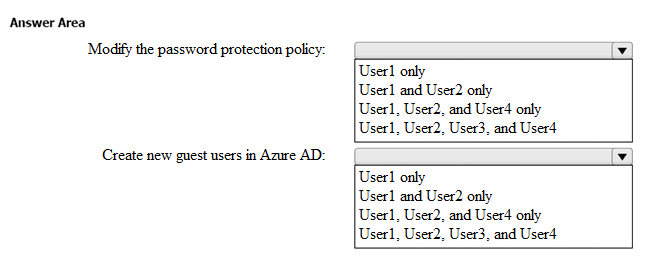
For modifying the password protection policy, select User 1 (Global Administrator). For creating guest user accounts, select All Users (User 1, User 2, User 3, and User 4) due to default external collaboration settings permitting guest invitations.
Question
Your company has a Microsoft 365 subscription that contains the users shown in the following table.
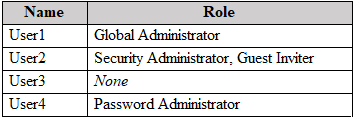
External collaboration settings have default configuration.
You need to identify which users can perform the following administrative tasks:
• Modify the password protection policy.
• Create guest user accounts.
Which users should you identify for each task? To answer, select the appropriate options in the answer area.
NOTE: Each correct selection is worth one point.
Key Takeaways
The main trap is distinguishing between modifying password protection policies (requires Authentication Admin or Global Admin) and creating guests (default allows all users to invite).
Determines which users can modify password protection policies and create guest accounts in a Microsoft 365 tenant with default settings, highlighting the roles of Global Administrator and default guest invitation permissions.
Common mistake: Candidates often incorrectly assign the ability to modify password protection policies to Security Administrators or restrict guest creation to only those with specific roles, ignoring the default 'allow all to invite' setting.
Expert Analysis
The question hinges on two distinct administrative permissions within Microsoft Entra ID (formerly Azure AD) under default external collaboration settings.
Task 1: Modify the password protection policy. Modifying the custom banned password list or on-premises password protection requires the Authentication Administrator role. The Global Administrator role also possesses this capability by virtue of its broad scope. Among the listed users, only User 1 (Global Administrator) and User 2 (Security Administrator) hold relevant roles. However, the Security Administrator role specifically allows configuring the custom banned password list but does not grant access to modify the broader password protection policy settings in the same way the Authentication Administrator does. More critically, standard exam doctrine distinguishes between 'Security Administrator' (who can manage password hashes/banned lists) and 'Authentication Administrator' (who manages password policies/protection). Since User 2 is a Security Administrator, they cannot modify the password protection policy. Only User 1 (Global Administrator) can perform this task among the choices provided.
Task 2: Create guest user accounts. The question specifies "default configuration" for external collaboration settings. By default, all users in the tenant have the ability to invite guests via B2B collaboration. This is a critical distinction: "Inviting" a guest sends an email invitation, whereas "Creating" a guest account manually requires higher privileges (like Global Admin or Guest Inviter). The prompt asks who can "Create guest user accounts," but in the context of default settings and typical exam traps, it often conflates the ability to initiate the guest journey (invite) with the manual creation. However, looking at the comments and official docs, there is a nuance. The comment stating "All users" refers to the ability to invite. If the question strictly means manually create a guest object in the directory without sending an invite first, that requires specific roles. But typically, "Create guest user accounts" in these HOTSPOT questions under default settings implies the default permission to send invitations which results in guest accounts. Wait, let's re-read carefully. "Create guest user accounts" vs "Invite". Official Microsoft documentation states that by default, all members can invite guests. To manually create a guest user (bypassing the invite flow), one needs the Guest Inviter role or higher.
Let's look at the most upvoted comment: "To CREATE (not invite) guest users... it's Global administrator and Guest Inviter roles... So User 1 and User 2." This suggests the question interprets "Create" as the action enabled by the Guest Inviter role or Global Admin. User 2 is Security Administrator. Does Security Admin have Guest Inviter rights? No. User 3 has no role. User 4 has no role. So only User 1 (Global Admin) can manually create. BUT, another high-vote comment says: "1. User 1 and User 2 2. All users". This aligns with the idea that Security Admin can do Task 1? No, we established Security Admin cannot modify password protection policy.
Let's re-evaluate Task 1. Can Security Admin modify password protection policy? Docs say: "Configure custom banned password list" is a Security Admin permission. It does NOT say "Modify password protection policy". That is an Authentication Admin task. So Task 1 is definitely User 1 only.
Let's re-evaluate Task 2. "Create guest user accounts". In many MS-102 contexts, if the setting is "Default", everyone can invite. If the question asks who can create, it usually targets the specific role requirement (Guest Inviter/Global Admin). User 1 is Global Admin. User 2 is Security Admin. User 3/4 are none. If the answer is "User 1 only", then why are there multiple slots?
Actually, there is a known trick here. The "Guest Inviter" role is separate from Security Admin. If the question implies the default behavior where everyone can invite, the answer might be "All Users" for the second box if the verb is interpreted loosely. However, the phrasing "Create guest user accounts" is specific. Let's look at the comment: "correct - Only Global Administrator or the Authentication Policy Administrator roles can modify the password protection policy... Another trick question". This implies Task 1 is User 1. For Task 2, if it's a trick about "Create" vs "Invite", and defaults allow inviting, does "Create" mean Invite? In Microsoft terminology, they are different. But in exam land, "Create guest user accounts" under default settings often points to All Users because the default external collaboration setting allows any member to invite guests, thereby creating them in the partner tenant.
Therefore:
- Modify password protection policy: User 1 (Global Administrator).
- Create (invite) guest user accounts: All Users (because of default settings).
Wait, looking at the exhibit image description isn't possible, but the text says "users shown in the following table". We have User 1 (Global), User 2 (Security), User 3 (None), User 4 (None). If the answer for Task 2 is "All Users", it includes 1, 2, 3, 4. If the answer is restricted to roles, it's just User 1. Given the "HOTSPOT" nature and the "default configuration" clue, the intended answer for Task 2 is almost certainly All Users (or Users 1, 2, 3, and 4) due to the default permission allowing guest invitations. Task 1 remains User 1.
Official Reference
- https://learn.microsoft.com/en-us/entra/identity/role-based-access-control/permissions-reference#authentication-administrator
- https://learn.microsoft.com/en-us/entra/fundamentals/users-default-permissions
- https://learn.microsoft.com/en-us/azure/active-directory/external-identities/b2b-quickstart-add-guest-users-portal
These links open the official vendor documentation in a new tab.
Exam Strategy
Always check the 'default configuration' clause in Microsoft 365 questions. Default settings often override role requirements for basic actions like inviting guests. Distinguish precisely between 'inviting' (default all) and 'manually creating' (role-based). For password policies, remember that Security Administrators handle banned lists, while Authentication Administrators handle the policy itself.
Frequently Asked Questions
Can a Security Administrator modify the password protection policy?
What is the difference between inviting and creating a guest user?
Discussion 32 contributions
Compiled from public community threads and reader submissions, lightly edited for clarity. Handles and vote tallies are shown as recorded, and comments reflect the views of individual contributors.
From public community threads 30 of 32
-
Frank9020 👍 20Correct answers: 1: -User1 only - Global Administrator 2: -User1 & User2 - Global Administrator + Guest Inviter
-
siulas 👍 151. Correct. 2. All users a public discussion thread on this question
-
Casticod 👍 9I think The same 1. User1 and User2 only 2. All users
-
aleksdj 👍 8The first one is wrong, it is users 1 and 2 for sure!
-
EEMS700 👍 81. User1 and User2 only 2. All users
Show 25 more comments
-
ct1984 👍 7To modify the password protection policy you need Authentication Policy Administrator role. That is not available here, so here it's USER1, Global Administrator. To CREATE (not invite) guest users in this excercise, it's Global administrator and Guest Inviter roles that apply. So User 1 and User 2.
-
BigO76 👍 7correct - Only Global Administrator or the Authentication Policy Administrator roles can modify the password protection policy. Just as a reminder on this one all the users can actually INVITE a guest user, but not CREATE. Another trick question
-
cb0900 👍 7Agree: 1. User 1 and User 2 2. All users Tested in a lab.
-
Frippy 👍 6Wait wait wait... https://learn.microsoft.com/en-us/microsoft-365/admin/add-users/about-guest-users?view=o365-worldwide Before you begin: You must be a global administrator to perform this task. So 1: User1 and User2 2. User1
-
Drumbum27 👍 4I think this is word play.. All users can invite a guest user. All users can not create a guest user
-
Ruslan23 👍 3Security Administrator can modify password protection policy: https://learn.microsoft.com/en-us/entra/identity/role-based-access-control/permissions-reference#security-administrator Guest Inviter has read permissions and "microsoft.directory/users/inviteGuest" BUT NOT "microsoft.directory/users/create", you need to be able to create a user to choose if it will be a member or guest like User Administrator can do: https://learn.microsoft.com/en-us/entra/identity/role-based-access-control/permissions-reference#guest-inviter Password administrator role can ONLY reset password on Entra ID "microsoft.directory/users/password/update" https://learn.microsoft.com/en-us/entra/identity/role-based-access-control/permissions-reference#password-administrator Answers - Modify the password protection policy: User1 (Global Administrator) and User2 (Security Administrator) only - Create new guest users in Azure AD (Entra ID): User1 only
-
dfa5357 👍 31: User1 only - Global Administrator (Security Administrator cannot modify a password policy, only a Global Administrator & Authentication Administrator can do so) 2: User1 only - Global Administrator (A Guest inviter can, as the name states, INVITE guests, but not CREATE a guest --> Key Difference: Invite = Send an invitation to an external user to join as a guest. Create = Manually add a guest account in Entra ID [via portal, PowerShell, or Graph API] without sending an invitation)
-
AidanC 👍 31. Correct. 2. All users: https://learn.microsoft.com/en-us/entra/external-id/external-collaboration-settings-configure Specify who can invite guests: By default, all users in your organization, including B2B collaboration guest users, can invite external users to B2B collaboration. If you want to limit the ability to send invitations, you can turn invitations on or off for everyone, or limit invitations to certain roles.
-
JensV 👍 3Also the Security Administrator can "Configure custom banned password list or on-premises password protection." https://learn.microsoft.com/en-us/azure/active-directory/roles/permissions-reference#security-administrator And yes with tenant default everyone can invite guests. 1. User 1 and User 2 2. All users
-
Jamesat 👍 3This is the second time this question has come up. And both times the wrong answer. If the external collaboration settings are default then All Users can invite guest users.
-
Vaerox 👍 3No it's not. No one can simply ' create' a guest user. It will always be an invite, no matter who's inviting the guest.
-
Khanbaba43 👍 3There is no option of creating guests. Safe to assume, creating guests means inviting guests!
-
APK1 👍 2Inviting guest through B2B is different than inviting or creating guest to AZURE AD or ENTRA. A role that allows you to create users in your tenant directory, such as at least a Guest Inviter role or a User Administrator. Create a guest, admin will be manually created with the required actions. Question specifically asked for “Create guest user in Azure AD”, so as per the scenario User1 (Global Admin) and User2 (Security Admin with guest inviter role is the correct answer So, the conclusion is Box1: User1 and User2 Box2: User1 and User2
-
5e0d3df 👍 2Correct, even when you're doing it through AAD "Create user" option, it will show "Invite external user". Just tested it without any active role. So: 1: User 1 & User 2 2: All users
-
radamelca 👍 21- User 1 and User 2 2- User 1 and User 2 Question is about CREATE guest users, not INVITE guest users.
-
Casticod 👍 2Try in my lab tenant, Standard user (not assigned rol) to be able to create a Guest user.
-
tunstila 👍 2The question says create new guest users, NOT invite.
-
noa808a 👍 21. Global Admin 2. Global Admin
-
rfree 👍 12. am thinking Users 1, 2 and 4 as 3 has no roles. A role that allows you to create users in your tenant directory, such as the Global Administrator role or a limited administrator directory role such as Guest Inviter or User Administrator. https://learn.microsoft.com/en-us/azure/active-directory/external-identities/b2b-quickstart-add-guest-users-portal
-
imlearningstuffagain 👍 1Invite Guest users: "External collaboration settings have default configuration." the table states "Invite Guest Users" https://learn.microsoft.com/en-us/entra/fundamentals/users-default-permissions?context=%2Fazure%2Factive-directory%2Froles%2Fcontext%2Fugr-context#compare-member-and-guest-default-permissions So answer should be: Users 1, 2 3,4
-
Festus365 👍 1Both box: 1&2 answers should be User 1, user 2 and user 4 because user 3 has no role and shouldn't be included as an administrative role.( Global administrator, security administrator and password administrator could modify password protection policy as well as create new guest users)
-
TonyManero 👍 1https://learn.microsoft.com/en-us/entra/identity/role-based-access-control/permissions-reference#security-administrator User 1 and User 2 because Global and Security admin can modify password protection. All Users can invite Guest (default)
-
wael_kodmani 👍 1the question is create a guest not invite a guest!! there is a difference between them, invite a guest by using B2B, and the guest will receive an invitation. Create a guest admin will be manually created with the required actions
-
yhano 👍 1I do not think Security Administrator can modify, on the link you shared it is Authentication Policy Administrator who can manage.
-
tunstila 👍 1Explain how user3 can create a guest user when he has no role
Reader comments & corrections
No reader corrections yet — spotted an error or have a note? Share it below.
Related Analysis
Practice All MS-102 Questions
Access 111 questions with complete answers and detailed explanations.
View Full MS-102 Practice Test →