Microsoft Graph PowerShell Cmdlets for User Updates and Group Creation
Short answer
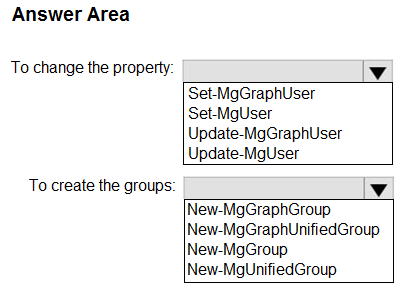
To change the Company name property for all users, run Update-MgUser. To create new Microsoft 365 groups, run New-MgGroup.
Question
You have a Microsoft 365 E5 subscription.
You plan to use Microsoft Graph PowerShell to perform the following tasks:
• Change the Company name property for all users.
• Create new Microsoft 365 groups.
Which PowerShell cmdlet should you run? To answer, select the appropriate options in the answer area.
NOTE: Each correct selection is worth one point.
Key Takeaways
The core concept tested is matching the action verb in the task description ('Change', 'Create') to the corresponding verb prefix in the Microsoft Graph PowerShell cmdlet names.
This page explains how to use Update-MgUser for modifying user properties and New-MgGroup for creating Microsoft 365 groups via Microsoft Graph PowerShell.
Common mistake: Learners often select 'Get-MgUser' or 'Get-MgGroup' because they focus on identifying resources rather than performing the requested modification or creation action.
Expert Analysis
The scenario requires two distinct actions using Microsoft Graph PowerShell within an E5 subscription. First, modifying the 'Company name' property for existing users necessitates a cmdlet capable of updating user attributes. The correct choice is Update-MgUser (or Set-MgUser in older syntax, but modern Graph modules standardize on Update-MgUser). This cmdlet targets specific user identities to apply property changes.
Second, creating new Microsoft 365 groups requires a cmdlet designed for resource creation. The correct choice is New-MgGroup. This cmdlet initializes new group objects with properties like display name and type.
A common trap is confusing these with cmdlets for listing (Get-MgUser, Get-MgGroup) or deleting (Remove-MgUser, Remove-MgGroup). The question explicitly asks for 'Change' (update) and 'Create' (new), making the action verbs critical for selecting the correct verb prefix in the cmdlet names.
Official Reference
- https://learn.microsoft.com/en-us/powershell/module/microsoft.graph.users/update-mguser?view=graph-powershell-1.0
- https://learn.microsoft.com/en-us/powershell/module/microsoft.graph.groups/new-mggroup?view=graph-powershell-1.0
These links open the official vendor documentation in a new tab.
Exam Strategy
When facing Graph PowerShell questions, always identify the primary action verb (e.g., Create, Update, Remove, Get). Map 'Create' to 'New-', 'Update/Modify' to 'Update-' or 'Set-', and 'Read/View' to 'Get-'. Ignore the noun until you have secured the correct verb prefix, as this eliminates incorrect functional options immediately.
Frequently Asked Questions
What is the difference between Update-MgUser and Set-MgUser?
Can I create a Microsoft 365 group without MailEnabled?
Discussion 4 contributions
Compiled from public community threads and reader submissions, lightly edited for clarity. Handles and vote tallies are shown as recorded, and comments reflect the views of individual contributors.
From public community threads 4
Reader comments & corrections
No reader corrections yet — spotted an error or have a note? Share it below.
Related Analysis
Practice All MS-102 Questions
Access 111 questions with complete answers and detailed explanations.
View Full MS-102 Practice Test →
Update-MgUser(oppureUpdate-MgGraphUsera seconda della versione del modulo, ma la sintassi standard del modulo Microsoft.Graph per aggiornare gli utenti èUpdate-MgUser). To create the groups (per creare nuovi gruppi Microsoft 365):New-MgGroup(utilizzato per creare gruppi in Microsoft Graph, inclusi i gruppi Microsoft 365 impostando i parametri appropriati come i tipi di gruppo).