Entra Cloud Sync Least-Privilege Groups and Roles
HOTSPOT
Your network contains an on-premises Active Directory Domain Services (AD DS) domain. The domain contains a user named User1.
You have a Microsoft Entra tenant that contains a user named User2.
You plan to use Microsoft Entra Cloud Sync to sync the AD DS domain and the Microsoft Entra tenant.
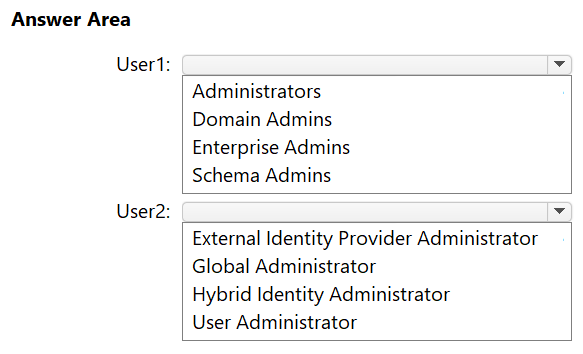
You need to ensure that User1 can install Microsoft Entra Cloud Sync in the domain, and User2 can configure Microsoft Entra Cloud Sync in the tenant. The solution must follow the principle of least privilege.
To which group should you add User1, and which role should you assign to User2? To answer, select the appropriate options in the answer area.
NOTE: Each correct selection is worth one point.
Community Insight
The item tests the exact prerequisites for installing and configuring Cloud Sync: local administrator rights on the agent server plus the Hybrid Identity Administrator Entra role, with Domain Admins being the tempting over-privileged wrong pick.
For Microsoft Entra Cloud Sync, the on-premises installer account only needs membership in the local Administrators group on the server running the provisioning agent, while the tenant-side configuration account needs the Hybrid Identity Administrator Entra role. This hotspot establishes that least privilege rules out Domain Admins on-premises and any broader cloud role.
Choosing Domain Admins for User1. Installing the Cloud Sync provisioning agent only requires local administrator rights on the target server, so granting Domain Admins violates the principle of least privilege the question explicitly demands.
Community Discussion (5 comments)
Comments & Corrections
No comments yet — spotted an error or have a note? Share it below.
Expert Analysis
Why the Answer Is Correct
The Microsoft Entra Cloud Sync prerequisites documentation states that the account running the provisioning agent installer must be a member of the local Administrators group on the server, and that the Microsoft Entra account used to register the agent must hold at least the Hybrid Identity Administrator role. Adding User1 to the local Administrators group satisfies the agent installation requirement without granting domain-wide authority, which is exactly what least privilege requires. Assigning User2 the Hybrid Identity Administrator role gives enough permission to configure Cloud Sync in the tenant, including creating the configuration and the agent, without handing over Global Administrator. This pair therefore fulfills both halves of the requirement with the narrowest permissions that work.Why Other Candidate Answers Are Wrong
Domain Admins grants full control of the AD DS domain—password resets, GPO creation, schema changes—far beyond installing an agent on a single server, so it is not least-privileged even though it would technically succeed. Similarly, assigning User2 Global Administrator or a Entra role such as User Administrator or Security Administrator either exceeds what Cloud Sync configuration needs or lacks the specific Cloud Sync permissions the Hybrid Identity Administrator role provides. The on-premises requirement is scoped to the local machine, not the domain, which is why the built-in local Administrators group is the correct target rather than any domain-level group.Community Comment Notes
Commenters converged on Hybrid Identity Administrator for User2, with n_mehr69 citing the Microsoft accounts-and-permissions pages. For User1 the thread shows a self-correction: after initially answering Domain Admins, 61ca611 wrote "Pardon, it's Administrators" and 3661de6 noted the cloud side requires "at least a Hybrid Identity Administrator role." Swartszi instead suggested "Enterprise admin to add the domains," but Enterprise Admin is the most powerful on-premises role available and is clearly incompatible with the least-privilege constraint stated in the question.Official Reference
Exam Strategy
Whenever a Microsoft 365 question adds 'the solution must follow the principle of least privilege,' immediately reject any answer that grants a domain-wide or tenant-wide administrative tier when a scoped group or specialized Entra role exists. For hybrid sync tasks, memorize the pairing: local Administrators on the server, Hybrid Identity Administrator (or Directory Synchronization Accounts for Connect) in the tenant.
Frequently Asked Questions
Why isn't Domain Admins required to install the Microsoft Entra Cloud Sync agent?
The provisioning agent only needs local administrator rights on the server where it is installed, so Domain Admins is unnecessary and violates least privilege by granting full domain control.
What is the least-privilege Microsoft Entra role for configuring Cloud Sync?
Hybrid Identity Administrator. Microsoft documents that the account used for Cloud Sync configuration needs at least this role; Global Administrator is not required.
Related Analysis
Practice All MS-102 Questions
Access 111 questions with complete answers and detailed explanations.
View Full MS-102 Practice Test →