Which Office Versions and File Types Support Sensitivity Labels?
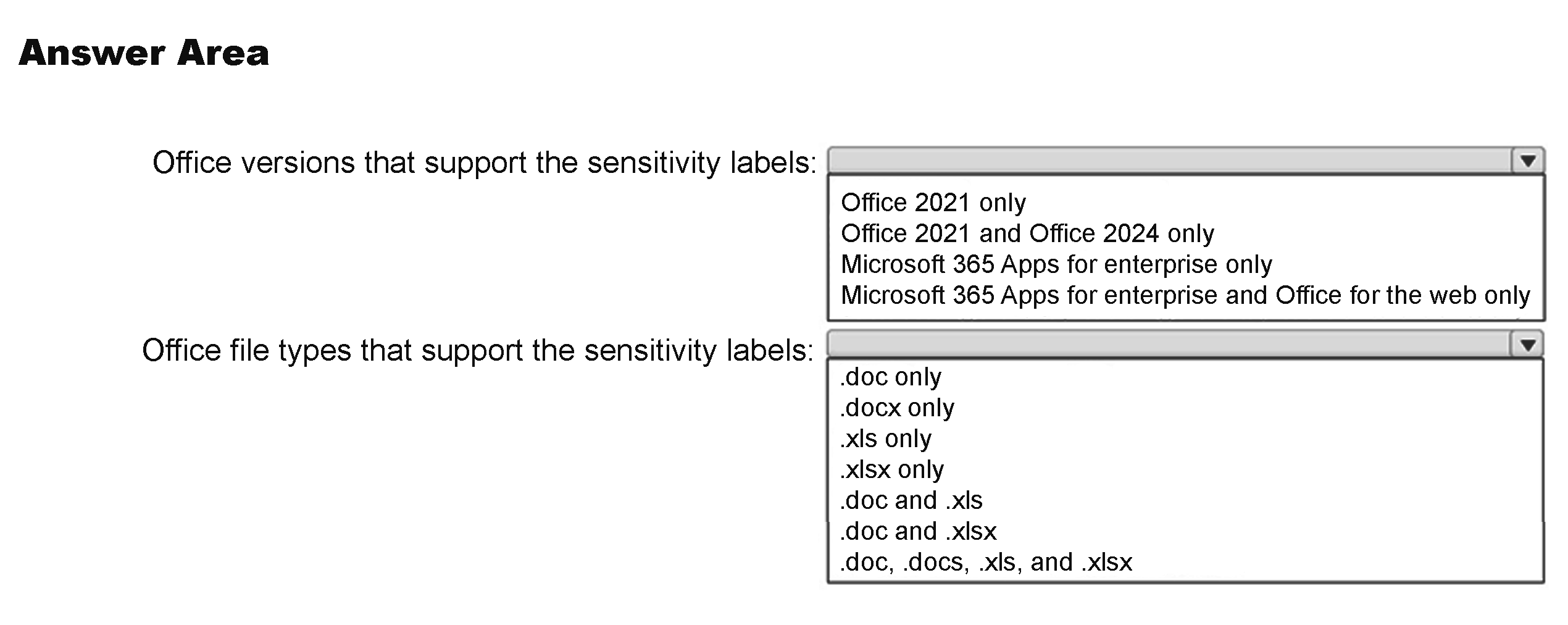
HOTSPOT
Your company has a Microsoft 365 E5 tenant.
Users at the company use the following versions of Microsoft Office:
• Microsoft 365 Apps for enterprise
• Office for the web
• Office 2021
• Office 2024
The company currently uses the following Office file types:
• .docx
• .xlsx
• .doc
• .xls
You plan to use sensitivity labels.
You need to identify the following:
• Which versions of Office support the sensitivity labels.
• Which file types support the sensitivity labels.
What should you identify? To answer, select the appropriate options in the answer area.
NOTE: Each correct selection is worth one point.
Community Insight
The support-matrix question tests whether you know that current Office builds honor sensitivity labels but legacy binary .doc/.xls formats are excluded.
This MS-102 hotspot asks which Office versions and file types support Microsoft Purview sensitivity labels in a Microsoft 365 E5 tenant. The page establishes that all four listed Office versions support labels, while only the .docx and .xlsx file types do.
A frequent mistake is selecting every file type the Office apps can open, including .doc and .xls, instead of limiting support to the Open XML .docx and .xlsx formats.
Community Discussion (2 comments)
Comments & Corrections
No comments yet — spotted an error or have a note? Share it below.
Expert Analysis
Why the Answer Is Correct
Sensitivity labels are surfaced in Microsoft 365 Apps for enterprise, Office for the web, Office 2021, and Office 2024, so the version-side selection should include all four. For file types in scope, Purview label support in Office is built around Open XML files, so among the listed extensions only.docx and.xlsx qualify. The legacy.doc and.xls formats are not part of this supported label matrix. This matches the question's pairing of version support with file-format support.Why Other Candidate Answers Are Wrong
Excluding Office 2021 or Office 2024 is wrong because perpetual Office releases still expose built-in sensitivity labeling for supported files. Selecting.doc or.xls is the bigger trap: the desktop apps may open those legacy files, but that does not make them label-supported file types in this scenario. Any mixed set such as.doc &.xlsx is internally inconsistent and should be rejected. The correct file-type choice must pair.docx with.xlsx, not a legacy extension.Community Comment Notes
As MarcoHurry noted, ".doc &.xlsx is a nonsense answer" because it mixes a legacy binary format with a modern Open XML format. Commenter 3661de6 flagged a likely typo in the file-type answer list and pointed toward ".docx and.xlsx" as the sensible pair. That community concern aligns with the official support boundary: modern Office versions use labels, but the legacy.doc/.xls extensions remain unsupported.Official Reference
Exam Strategy
Treat the MS-102 hotspot as two independent checks: app version support and file extension support. Do not let the fact that Word or Excel opens .doc/.xls pull you into selecting those legacy formats.
Frequently Asked Questions
Do Office 2021 and Office 2024 support sensitivity labels?
Yes. Both perpetual Office versions support built-in sensitivity labels for supported Open XML files; they are not limited to Microsoft 365 Apps.
Why are .doc and .xls not supported for sensitivity labels?
Purview sensitivity labels in Office are applied to Open XML formats; legacy binary .doc and .xls files are not in the supported file-type list, so convert them to .docx or .xlsx.
Related Analysis
Practice All MS-102 Questions
Access 111 questions with complete answers and detailed explanations.
View Full MS-102 Practice Test →