Who Can View Sign-Ins in Microsoft Entra Sign-ins Blade?
HOTSPOT
You have a Microsoft 365 subscription that uses an Azure AD tenant named contoso.com. The tenant contains the users shown in the following table.
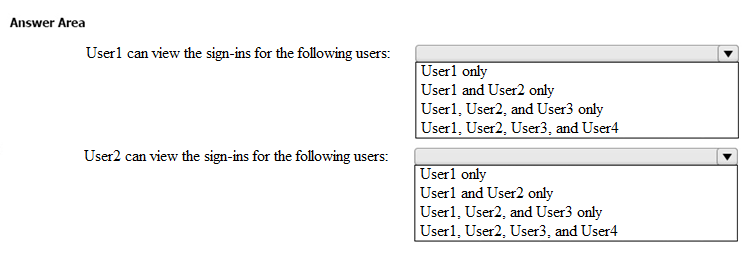
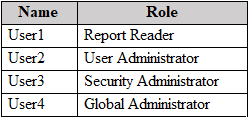 From the Sign-ins blade of the Microsoft Entra admin center, for which users can User1 and User2 view the sign-ins? To answer, select the appropriate options in the answer area.
NOTE: Each correct selection is worth one point.
From the Sign-ins blade of the Microsoft Entra admin center, for which users can User1 and User2 view the sign-ins? To answer, select the appropriate options in the answer area.
NOTE: Each correct selection is worth one point.
Community Insight
The question tests role-based access to Microsoft Entra sign-in logs, and the trap is assuming that any administrator role automatically unlocks tenant-wide sign-in reporting.
This MS-102 hotspot tests which directory roles grant read access to the Sign-ins blade in the Microsoft Entra admin center for a contoso.com tenant. It establishes that User1, holding the Reports Reader role, can view sign-ins for all four users, while User2, holding only the User Administrator role, can view sign-ins for himself alone.
Learners assume that because User2 is a User Administrator he can read the sign-ins of other administrators such as the Security Administrator and Global Administrator. User Administrator is a scoped directory management role that grants no Microsoft Entra ID log-read permission, so it only ever exposes the admin's own sign-in activity.
Community Discussion (12 comments)
Comments & Corrections
No comments yet — spotted an error or have a note? Share it below.
Expert Analysis
Why the Answer Is Correct
The Reports Reader role is one of the built-in roles explicitly permitted to read Microsoft Entra activity and sign-in logs across the directory, so User1 can open the Sign-ins blade and see records for User1, User2, User3 and User4. User2 holds only User Administrator, which is scoped to user and group management tasks and carries no permission to read other users' sign-in records. Because Microsoft Entra always lets a user see their own sign-in activity, User2's selection is limited to User2. This matches the widest-supported community reading of the hotspot, including cb0900's note that "User 1 - can view sign-in logs for user 1, user 2, user3, and user4."Why Other Candidate Answers Are Wrong
The competing claim that User1 sees only his own sign-ins, or that he is blocked from administrator accounts, contradicts Microsoft's documented role matrix for activity logs: Reports Reader, Security Reader, Security Administrator, Global Reader and Global Administrator can all read tenant sign-in data. The argument that User2 can also see User1 or other standard users relies on User Administrator granting report access, which it does not — report reading requires a reports-capable role or a custom role with the sign-in log read permission. Similarly, treating Security Administrator (User3) and Global Administrator (User4) as hidden from Reports Reader reverses the actual privilege direction, since those accounts are themselves sign-in log readers rather than protected subjects. Frank9020's later revision that "User2 - can see sign in for User1 and User2" is inconsistent with the same correction he posted earlier.Community Comment Notes
Commenters quickly flagged that the visible answer area seemed incomplete, with Khattak3143 writing "Not sure why there isn't a 5th option" and NrdAlrt arguing the User Administrator "doesn't give them access to the sign-in reports." koopb reported hands-on validation, stating "with the Reports Reade role you can see ALL sign-in logs. Also from the Global Administrators." APK1 summarized the same split by listing Global administrator, Security administrator, Security reader, Global reader and Report reader for the first selection and "Only User Admin" for the second. SemtechIT's narrower claim that Reports Reader sees only his own logs is the outlier position and should not be followed.Official Reference
Exam Strategy
Before choosing, map each user to their role and ask whether that role carries Microsoft Entra ID log-read permission, not merely administrative power. Remember the baseline rule: every user can read their own sign-ins, but only reports-capable roles (Reports Reader, Security Reader, Global Reader, Security Administrator, Global Administrator) reach across the tenant.
Frequently Asked Questions
Which Microsoft Entra roles can read sign-in logs for every user in the tenant?
Reports Reader, Security Reader, Security Administrator, Global Reader and Global Administrator can read sign-in logs tenant-wide. All other users can read only their own sign-in activity.
Does the User Administrator role allow viewing other users' sign-ins?
No. User Administrator covers user and group management only and grants no sign-in log read permission, so that admin sees just their own sign-ins unless given a reports-capable or custom role.
Related Analysis
Practice All MS-102 Questions
Access 111 questions with complete answers and detailed explanations.
View Full MS-102 Practice Test →