Which Portals Create Shared Mailbox and Grant Send As?
HOTSPOT
You have a Microsoft 365 E5 subscription that contains a user named User1.
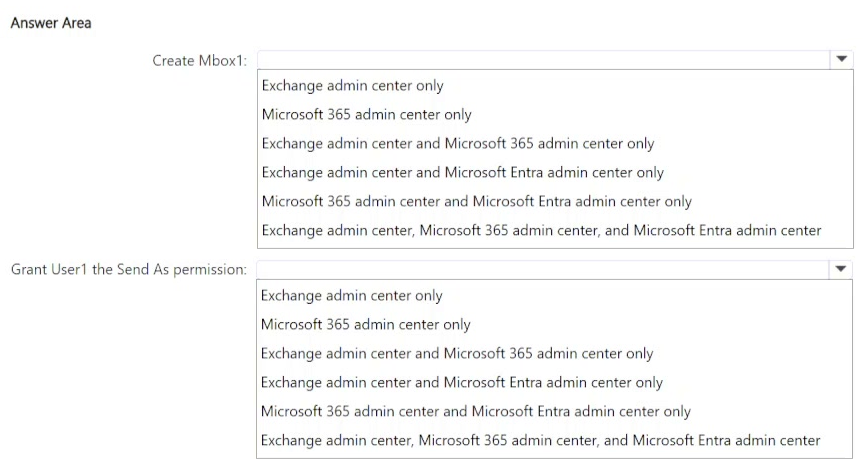
You need to perform the following actions:
• Create a shared mailbox named Mbox1 in the subscription.
• Grant User1 the Send As permission for Mbox1.
Which Microsoft 365 portals can you use to perform each task? To answer, select the appropriate options in the answer area.
NOTE: Each correct selection is worth one point.
Community Insight
The question tests knowledge of admin-center overlap for shared mailbox lifecycle tasks, and the trap is assuming mailbox creation is exclusive to one portal while delegation lives only in the other.
This MS-102 hotspot asks which Microsoft 365 portals can create shared mailbox Mbox1 and grant User1 Send As permission on it. Both the Microsoft 365 admin center and the Exchange admin center can perform both tasks.
The common error is pairing shared mailbox creation with only the Microsoft 365 admin center and Send As with only the Exchange admin center; in reality both portals expose shared mailbox creation and the Send As/delegation controls.
Community Discussion (1 comments)
Comments & Corrections
No comments yet — spotted an error or have a note? Share it below.
Expert Analysis
Why the Answer Is Correct
Both required actions can be completed in either portal, so both selections apply to each task. The Microsoft 365 admin center creates Mbox1 under Teams & groups > Shared mailboxes > Add a shared mailbox, and the same blade's delegation settings let you add User1 with Send As rights. The Exchange admin center accomplishes both under Recipients > Mailboxes, using Add a shared mailbox for creation and the mailbox's Delegation settings for Send As. This dual capability is exactly what makes the hotspot answer both portals for both rows.Why Other Candidate Answers Are Wrong
Selecting only the Microsoft 365 admin center for creation but only the Exchange admin center for Send As implies an artificial split that the product does not enforce, and choosing a single portal for both tasks undercounts the available options. Portals such as the Microsoft Entra admin center or the Teams admin center do not host shared mailbox creation or Send As delegation at all, so any selection naming them is invalid. Because each correct selection earns a point, omitting a valid portal loses credit even if the other choice is right.Community Comment Notes
MarcoHurry agreed with the shared approach, laying out both paths: "Microsoft 365 Admin Center → Teams & Groups → Shared mailboxes" and "Exchange Admin Center (EAC) → Recipients → Mailboxes → Add a shared mailbox." He then summarized the reasoning with the fragment "you can set the delegated send-as permissions too," meaning creation and Send As stay available together in either place. No other comments disputed this overlap.Official Reference
Exam Strategy
For hotspot items, evaluate each task independently instead of assuming portals are mutually exclusive; shared mailbox duties in Microsoft 365 are deliberately duplicated between the Microsoft 365 and Exchange admin centers. Only exclude a portal when the feature genuinely does not exist there, such as Entra or Teams admin centers.
Frequently Asked Questions
Can I create shared mailbox Mbox1 in the Microsoft 365 admin center?
Yes. Use Teams & groups > Shared mailboxes > Add a shared mailbox, then add User1 with Send As from the same delegation settings.
Where do I grant Send As permission for a shared mailbox?
In the Exchange admin center, open the mailbox under Recipients > Mailboxes and configure Send As on the Delegation tab; the Microsoft 365 admin center also offers it.
Related Analysis
Practice All MS-102 Questions
Access 111 questions with complete answers and detailed explanations.
View Full MS-102 Practice Test →