Defender XDR Settings for Malicious Organizations and Weekly OSINT
Short answer
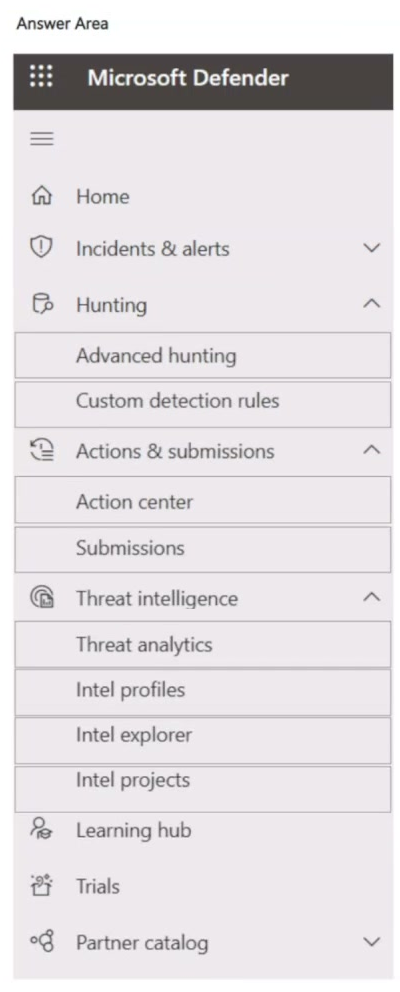
In the Microsoft Defender portal, select Intel profiles for details about known malicious organizations and Threat analytics for the weekly open-source intelligence (OSINT) highlights.
Question
You have a Microsoft 365 E5 subscription.
You need to use Microsoft Defender XDR to identify the following:
• Information-about known malicious organizations.
• Weekly open-source intelligence (OSINT) highlights.
Which two settings should you use in the Microsoft Defender portal? To answer, select the appropriate settings in the answer area.
NOTE: Each correct selection is worth one point.
Key Takeaways
It tests whether you can distinguish an entity profile from a curated report feed in the Defender portal; the main trap is choosing Intel explorer because it also contains intelligence articles.
This MS-102 item tests Microsoft Defender XDR threat-intelligence surfaces. The required settings are Intel profiles for known malicious organizations and Threat analytics for weekly OSINT highlights.
Common mistake: A common error is selecting Intel explorer for the weekly OSINT highlights. Intel explorer is a search and article library, not the Defender XDR report surface that presents the recurring weekly OSINT highlight reports.
Expert Analysis
Map the requirement to the Defender XDR surface The question tests Microsoft Defender portal threat-intelligence navigation, not generic hunting. The first requirement is a profile of a known malicious organization: infrastructure, aliases, campaigns, tools, and related activity. In Defender XDR, that entity-centric view is Intel profiles, which is built for known threat actors and malicious organizations.
Weekly OSINT is a report feed The second requirement is not a search for an indicator; it is a recurring curated digest. Microsoft's threat-intelligence reporting surfaces weekly open-source intelligence highlights through Threat analytics, the curated report dashboard in Microsoft Defender XDR. Threat analytics brings together Microsoft security research and MDTI content, including the weekly OSINT highlight reports, so the analyst can review a recurring report rather than query Intel explorer manually.
Why Intel explorer is a trap Learner comments on this scenario show the confusion: one recurring comment pairs Intel profiles with Threat analytics, while another points at Intel explorer's featured-articles content. Intel explorer is the searchable article and indicator library in Microsoft Defender Threat Intelligence, and it does contain articles, but the exam requirement asks for the portal setting that provides the weekly OSINT highlights as part of Defender XDR reporting. The distinguishing test is known malicious organization versus weekly report feed: select Intel profiles and Threat analytics.
Exam-safe mapping Use Intel profiles when the noun is a malicious organization, threat actor, or campaign profile. Use Threat analytics when the noun is a report, weekly digest, OSINT highlight, or emerging threat summary. Do not substitute Secure Score, Advanced hunting, or Intel explorer just because the words intelligence or articles appear.
Official Reference
- https://learn.microsoft.com/en-us/defender-xdr/threat-analytics
- https://learn.microsoft.com/en-us/defender/threat-intelligence/what-is-microsoft-defender-threat-intelligence-defender-ti
- https://techcommunity.microsoft.com/blog/defenderthreatintelligence/more-threat-intelligence-content-in-mdti-ta-enables-better-security-outcomes/4177542
These links open the official vendor documentation in a new tab.
Exam Strategy
When a Defender XDR question names a type of intelligence output, map it to the portal surface that displays it, not the one that sounds like a search engine. Intel profiles are for entity and threat-actor context; Threat analytics is for curated reports such as weekly OSINT. Before answering, ask whether the requirement is a profile lookup or a report feed, then verify the exact portal navigation label.
Frequently Asked Questions
Which Defender portal setting provides information about known malicious organizations?
Where do weekly open-source intelligence (OSINT) highlights appear in Microsoft Defender XDR?
Is Intel explorer the correct choice for weekly OSINT highlights?
Discussion 9 contributions
Compiled from public community threads and reader submissions, lightly edited for clarity. Handles and vote tallies are shown as recorded, and comments reflect the views of individual contributors.
From public community threads 9
-
koopb 👍 92. is Intel Explorer
-
Mirana 👍 5Intel profiles et Threat analytics https://learn.microsoft.com/en-us/defender-xdr/threat-analytics https://techcommunity.microsoft.com/blog/defenderthreatintelligence/more-threat-intelligence-content-in-mdti-ta-enables-better-security-outcomes/4177542
-
b95b674 👍 5Threat Analytics: https://learn.microsoft.com/en-us/defender-xdr/threat-analytics Intel Explorer: https://learn.microsoft.com/en-us/defender/threat-intelligence/what-is-microsoft-defender-threat-intelligence-defender-ti#featured-articles
-
MoneyStacking 👍 4Tested in own tenant, fully agree
-
koopb 👍 21. Intel profiles – shows information about known malicious organizations, including infrastructure, activity, and related threats. 2. Intel projects – includes curated weekly OSINT highlights and ongoing tracked threat activity.
Show 4 more comments
-
61ca611 👍 2Intel profiles et Threat analytics
-
YomboYombo 👍 1Intel profiles & threat intelligence.
-
Nick_UNO 👍 1Intel Explorer and Intel Profiles
-
Thorgal_Aegirsson 👍 1Agree with Koopb
Reader comments & corrections
No reader corrections yet — spotted an error or have a note? Share it below.
Related Analysis
Practice All MS-102 Questions
Access 111 questions with complete answers and detailed explanations.
View Full MS-102 Practice Test →