Configuring Malware Email Alerts with Least Privilege in Microsoft 365
Short answer
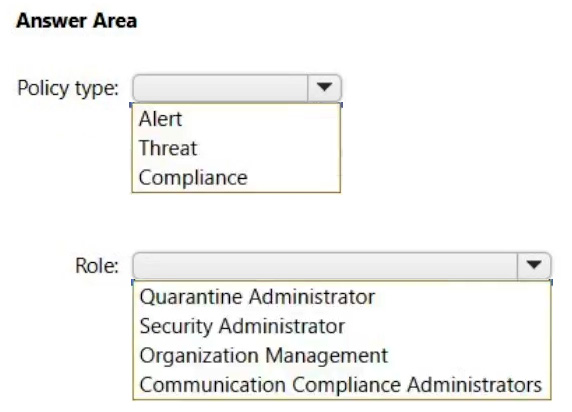
Policy type: Alert; Role: Security Administrator
Question
You have a Microsoft 365 E5 tenant.
You need to ensure that administrators are notified when a user receives an email message that contains malware. The solution must use the principle of least privilege.
Which type of policy should you create, and which Microsoft Purview solutions role is required to create the policy? To answer, select the appropriate options in the answer area.
NOTE: Each correct selection is worth one point.
Key Takeaways
The question tests knowledge of Alert policies for threat notifications and the Security Administrator role for least-privilege access control.
Learn how to configure Microsoft 365 alerts for malware emails using the Security Administrator role to adhere to the principle of least privilege.
Common mistake: Selecting Threat Policy instead of Alert Policy, or choosing Organization Management over Security Administrator, failing to recognize the specific use case for alerts and the granularity of the Security Administrator role.
Expert Analysis
To ensure administrators are notified when a user receives an email message that contains malware, the correct mechanism is to create an Alert policy within Microsoft Purview (specifically in the Defender portal or Security & Compliance Center). Alert policies allow you to define specific conditions—such as "Detected Malware in an email message"—and trigger notifications via email or other channels when those events occur. This directly addresses the requirement for notification upon malware detection.
Regarding the principle of least privilege, the Security Administrator role is the appropriate choice. While the Organization Management role has broader permissions, it is often considered a global administrative role rather than a specialized security role. The Security Administrator role includes the Manage Alerts role permission, which is sufficient to create and manage alert policies. This aligns with the principle of least privilege by granting only the necessary permissions for security-related tasks without providing full organizational management rights. Comments discussing the distinction between Security Administrator and Organization Management highlight this nuance, with many confirming that Security Administrator is the preferred answer for least-privilege compliance in this context.
Official Reference
This link opens the official vendor documentation in a new tab.
Exam Strategy
When faced with questions about notifications for specific security events like malware, always consider 'Alert' policies as the primary mechanism. For role selection, prioritize specialized roles like Security Administrator over broad administrative roles to satisfy the principle of least privilege, unless the task requires global tenant configuration.
Frequently Asked Questions
What is the difference between Alert and Threat policies in Microsoft 365?
Why is Security Administrator preferred over Organization Management?
Discussion 33 contributions
Compiled from public community threads and reader submissions, lightly edited for clarity. Handles and vote tallies are shown as recorded, and comments reflect the views of individual contributors.
From public community threads 30 of 33
-
osxzvkwpfcfxobqjby 👍 71- Alert - Security administrator (principle of least privilege) https://learn.microsoft.com/en-us/microsoft-365/security/office-365-security/scc-permissions?view=o365-worldwide
-
sigvast 👍 27My bad, Security Administrator is the correct answer because Organization Management give more permissions ...
-
letters1234 👍 12Security Administrator or Global Administrator are required to setup the alert notifications. Least privilege means SA instead of GA. https://learn.microsoft.com/en-us/microsoft-365/security/defender/configure-email-notifications?view=o365-worldwide#create-rules-for-alert-notifications
-
TonyManero 👍 7Alert and Security Admin. Please update the answers.
-
sigvast 👍 6The correct answer is : - Alert - Organization Management "To create alert policies, you have to be assigned the Manage Alerts role or the Organization Configuration role in the compliance portal or the Defender portal." https://learn.microsoft.com/en-us/purview/alert-policies?redirectSourcePath=%252farticle%252f8927b8b9-c5bc-45a8-a9f9-96c732e58264#how-alert-policies-work Manage Alerts role is in included in the following role groups : - Compliance Administrator - Compliance Data Administrator - Organization Management - Security Administrator - Security Operator Organization Configuration role is included in the following role groups : - Compliance Administrator - Compliance Data Administrator - Organization Management https://learn.microsoft.com/en-us/microsoft-365/security/office-365-security/scc-permissions?view=o365-worldwide Security Administrator and Organization Management are correct answers but following the principle of least privilege, the correct role group is Organization Management.
Show 25 more comments
-
Greatone1 👍 5Should be Alert and Security Administrator
-
Nilz76 👍 4Policy type: Threat Role: Security Administrator Explanation: You would want to create a Threat Policy to ensure that administrators are notified when a user receives an email message containing malware. Specifically, you might want to configure a Threat Policy within the Microsoft 365 Security & Compliance Center or Microsoft 365 Defender. The Security Administrator role is suited for this task as it has the necessary permissions to manage security configurations across the tenant, adhering to the principle of least privilege. This role can create and manage threat policies to ensure that alerts are generated and sent to administrators when malware is detected in email messages.
-
Jonnaz 👍 3I think it should be Threat instead of Alert and here's why: An Alert policy in Microsoft 365 is typically used to track and respond to activity alerts, such as user and admin activities, malware threats, or data loss incidents. While you can create an alert policy to notify administrators when certain activities occur, it’s not specifically designed to handle malware detections in email messages1. On the other hand, a Threat policy (specifically, an anti-malware policy) in Microsoft 365 is designed to configure the settings that determine how malware detections are handled, including settings for notifications when a user receives an email that contains malware. Therefore, while an Alert policy could potentially be used to achieve similar results, a Threat policy is the more appropriate and direct solution for this specific requirement.
-
MarkusSan 👍 3not correct, by link provided ;)
-
Clinson 👍 2Yep, but per your same link communication compliance administrator can create policies, and has less privileges that Org Management
-
Feras_MOH 👍 2Answer: ALert and security administrator with concept of least privilege access
-
vercracked_007 👍 2Alert and Security Admin Organisation Management is not a Purview role indeed.
-
gomezmax 👍 2Correct, Alert and Organization Management.
-
M4rcintheD4rk 👍 1Organization Management is broader then Security Administrator according to ChatGPT so Security Administrator has the least privilege: Security Administrator Role Scope: This is a powerful built-in role in Microsoft Entra ID (formerly Azure AD) or Microsoft 365. Privileges: Manage security-related features across Microsoft 365. Can manage Microsoft Defender, compliance alerts, DLP (Data Loss Prevention), policies, and more. Organization Management Role Scope: This is the highest-level role group in Microsoft Purview Compliance Portal (formerly SCC). Privileges: Full access to all compliance features: DLP, audit logs, eDiscovery, retention, insider risk, information governance, etc. Can assign permissions to other role groups and configure organization-wide compliance settings. Implications: Even broader than Security Administrator, often used by tenant admins or super users. Grants access to everything in the compliance portal, which violates least privilege for most users.
-
MR_Eliot 👍 1Second one is Security Administrator: Role group name Security Administrator Role group description - Roles in the role group Audit Logs Compliance Manager Administration Device Management DLP Compliance Management IB Compliance Management Manage Alerts Quarantine Security Administrator Sensitivity Label Administrator Tag Contributor Tag Manager Tag Reader View-Only Audit Logs View-Only Device Management View-Only DLP Compliance Management View-Only IB Compliance Management View-Only Manage Alerts
-
lolern123 👍 1Correct me if im wrong, but people here saying that the Organization Management is not a role in purview and only exchange. Look at this bit. https://learn.microsoft.com/en-us/microsoft-365/security/office-365-security/scc-permissions?view=o365-worldwide Can someone break this down? To me it looks like that Organization Management is enough and that security administrator will give a lot of unnecessary access in this case. For now sticking with the answer provided - Alert - Organization Management
-
EubertT 👍 1✅ Answer Area: Policy type: Alert Role: Security Administrator 🧠 Explanation: Alert policies in the Microsoft 365 Defender or Purview compliance center can be configured to notify admins when suspicious or malicious activities occur, such as malware in email. The Security Administrator role has the necessary permissions to create and manage alert policies related to threats and incidents, without granting broader organizational permissions like Organization Management.
-
Alecks 👍 1- Alert - Communication Compliance Administrators Because "Communication Compliance Administrators" is the principle of least privilege https://learn.microsoft.com/en-us/microsoft-365/security/office-365-security/scc-permissions?view=o365-worldwide#:~:text=Administrators%20of%20communication%20compliance%20that%20can%20create/edit%20policies%20and%20define%20global%20settings.
-
MondherBB 👍 1https://learn.microsoft.com/en-us/microsoft-365/security/office-365-security/scc-permissions?view=o365-worldwide&toc=%2Fmicrosoft-365%2Fcompliance%2Ftoc.json&bc=%2Fmicrosoft-365%2Fbreadcrumb%2Ftoc.json Communication Compliance Administrators Administrators of communication compliance that can create/edit policies and define global settings.
-
sergioandreslq 👍 1In the Alert policies, you can create an alert with to send a notification when: "Detected Malware in an email message", you set up an alert and add as information the category for this alert which is "threat management" https://security.microsoft.com/alertpoliciesv2 My selection for the role will be "security administrator"
-
004b54b 👍 1Second is "Security Administrator": first row of the table: https://learn.microsoft.com/en-us/entra/identity/role-based-access-control/delegate-by-task#microsoft-entra-id-protection-least-privileged-roles Task Least privileged role Configure alert notifications Security Administrator
-
araujoarai 👍 1A necessidade "notificar administradores quando um usuário recebe um e-mail com malware" Alert policy / Política de alerta & Organization Management Least privilege Para criar política de alerta, a role esperada no Microsoft Purview/Defender é Organization Management.
-
Blixa 👍 1But it is: https://learn.microsoft.com/en-us/microsoft-365/security/office-365-security/scc-permissions?view=o365-worldwide Still think Security Administrator (the purview role - not Entra Id role) is the right answer
-
RahulX 👍 1Create alert policy for malware detection in email. we can use Security Administrator role which will be the least privilege in these option.
-
Casticod 👍 1I think security administrator. Organization management, not Purview role, its a Echange Role. In the question need a Pureview role
-
9326359 👍 1-Alert -Security administrator https://learn.microsoft.com/en-us/entra/identity/role-based-access-control/delegate-by-task
-
neken123 👍 1we just need the role to create the policy, so organization management role would be least priviledged role
-
Clinson 👍 1Nevermind, the communcation compliance administrator doesn't have permission to create alert policies.
-
xmattay 👍 1Organization management has more broad permissions than security administrator.
-
LakesWizard 👍 1Using least privileaged won't be organization management.
Reader comments & corrections
No reader corrections yet — spotted an error or have a note? Share it below.
Related Analysis
Practice All MS-102 Questions
Access 111 questions with complete answers and detailed explanations.
View Full MS-102 Practice Test →