AWS Glue Crawlers and DataBrew for CSV Schema Inference
HOTSPOT
A company stores historical data in .csv files in Amazon S3. Only some of the rows and columns in the .csv files are populated. The columns are not labeled. An ML
engineer needs to prepare and store the data so that the company can use the data to train ML models.
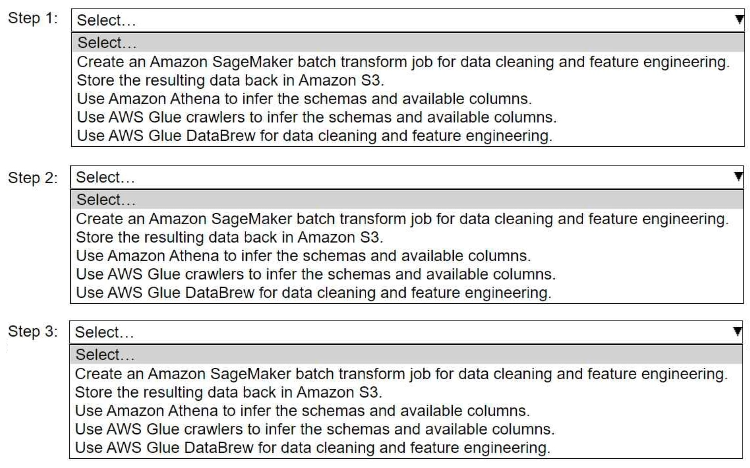
Select and order the correct steps from the following list to perform this task. Each step should be selected one time or not at all. (Select and order three.)
• Create an Amazon SageMaker batch transform job for data cleaning and feature engineering.
• Store the resulting data back in Amazon S3.
• Use Amazon Athena to infer the schemas and available columns.
• Use AWS Glue crawlers to infer the schemas and available columns.
• Use AWS Glue DataBrew for data cleaning and feature engineering.
Community Insight
The key trap is confusing Athena with Glue for schema inference; Glue Crawlers are required to build the Data Catalog first, enabling DataBrew to clean and engineer features effectively.
This scenario tests the correct AWS service workflow for inferring schemas from unlabeled CSVs and performing feature engineering using AWS Glue and DataBrew.
Learners often select Athena or attempt to use SageMaker Batch Transform prematurely. Athena requires a pre-existing table definition (schema) which does not exist yet, making it unable to infer schemas from raw unlabeled files without prior cataloging by Glue Crawlers.
Community Discussion (4 comments)
Comments & Corrections
No comments yet — spotted an error or have a note? Share it below.
Expert Analysis
Why the Answer Is Correct
The logical sequence begins with Use AWS Glue crawlers to infer the schemas and available columns. Since the.csv files are unlabeled and only partially populated, the Data Catalog must be built first so that downstream tools can understand the data structure. Once the schema is inferred and stored in the Glue Data Catalog, the next step is Use AWS Glue DataBrew for data cleaning and feature engineering. DataBrew integrates directly with the Glue Data Catalog, allowing analysts to visually clean, transform, and prepare data without writing code. Finally, the processed data must be persisted, so the last step is Store the resulting data back in Amazon S3. This leverages the native integration between Glue services and S3 storage.Why Other Candidate Answers Are Wrong
Create an Amazon SageMaker batch transform job is incorrect because Batch Transform is typically used for model inference on already prepared datasets, not for initial ETL/schema inference of raw source files. Use Amazon Athena to infer the schemas is incorrect because Athena queries existing tables in the Glue Data Catalog; it cannot independently scan raw, unlabeled CSVs to generate a schema and catalog entry automatically like a Glue Crawler can. The alternative order suggested by some users (DataBrew -> S3 -> Glue Crawler) is flawed because DataBrew benefits significantly from having the schema defined by the crawler beforehand to correctly map columns and types during the visual editing process.Community Comment Notes
Community consensus strongly favors the Glue Crawler -> DataBrew -> S3 sequence. User AzureDP900 highlighted the exact order: "Use AWS Glue crawlers... Use AWS Glue DataBrew... Store the resulting data back in Amazon S3." User Naril reinforced this by noting you must "Infer the current schema and create data catalog using Glue crawlers" before processing. While user drowett suggested DataBrew precedes Glue Crawlers, this ignores the standard architectural pattern where the Data Catalog serves as the metadata foundation for DataBrew jobs.Exam Strategy
When dealing with raw, unstructured data in S3, always look for AWS Glue Crawlers as the first step to build the Data Catalog. If data preparation/cleaning is required after cataloging, AWS Glue DataBrew is the primary managed service for visual ETL tasks.
Frequently Asked Questions
Why can't I use Amazon Athena to infer the schema?
Athena queries tables that already exist in the Glue Data Catalog. It cannot automatically scan raw, unlabeled files to create the schema and catalog entries; that is the specific function of AWS Glue Crawlers.
Is SageMaker Batch Transform used for data cleaning?
No. SageMaker Batch Transform is primarily used for running inference on trained models against large datasets. For data cleaning and feature engineering of raw source data, AWS Glue DataBrew is the appropriate managed tool.
Related Analysis
Practice All MLA-C01 Questions
Access 115 questions with complete answers and detailed explanations.
View Full MLA-C01 Practice Test →