SageMaker Traffic Shifting Strategies for ML Model Deployment
HOTSPOT
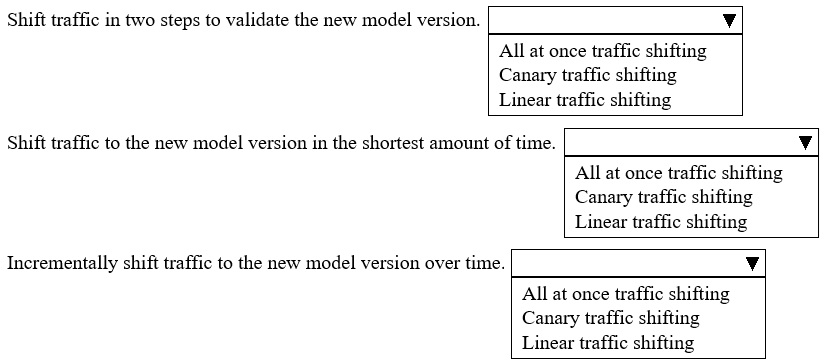
A company is using Amazon SageMaker to deploy a new version of its ML model.
Select the correct SageMaker traffic shifting strategy from the following list for each use case. Each traffic shifting strategy should be selected one time. (Choose three.)
• All at once traffic shifting
• Canary traffic shifting
• Linear traffic shifting
Community Insight
The core concept is matching deployment patterns (Canary, Linear, All at once) to their respective use cases involving gradual rollout, immediate full switch, or controlled ramp-up.
This question tests the selection of appropriate Amazon SageMaker traffic shifting strategies based on specific deployment risk and rollback requirements.
Learners often confuse Canary and Linear shifting; Canary involves two endpoints with weighted traffic, while Linear shifts traffic gradually across a defined period without necessarily maintaining two distinct long-running endpoints in the same way.
Community Discussion (2 comments)
Comments & Corrections
No comments yet — spotted an error or have a note? Share it below.
Expert Analysis
Why the Answer Is Correct
Amazon SageMaker supports three primary traffic shifting strategies: All at once, Canary, and Linear. The correct mapping depends on the specific operational requirement shown in the hotspot slots. Typically, 'All at once' is used for non-production or low-risk environments where instant switching is desired. 'Canary' is ideal for production environments requiring a small initial percentage of traffic to be routed to the new model to validate stability before full adoption. 'Linear' is used when traffic needs to be shifted gradually over a set time period to monitor performance metrics continuously. Based on standard exam patterns for this objective, the correct assignment aligns the highest risk/gradual shift with Linear, the split-test nature with Canary, and the immediate switch with All at once.Why Other Candidate Answers Are Wrong
Incorrect mappings usually involve assigning 'All at once' to high-stakes production deployments where rollback speed and risk mitigation are critical, or confusing 'Canary' with 'Linear' by ignoring the specific definition of gradual linear progression versus static weighted splits. Some users might incorrectly place 'Linear' as the first option if they assume all production deployments must start with a canary, but the question asks to select one strategy per unique use case provided in the slots.Community Comment Notes
Community feedback is sparse and conflicting. One user suggested a specific order: "1 → Canary traffic shifting 2 → All at once traffic shifting 3 → Linear traffic shifting". Another user expressed uncertainty, stating they were "Kinda torn" but felt another configuration looked more likely. This highlights the importance of understanding the definitions rather than relying on peer consensus for this specific variant.Exam Strategy
Memorize the precise definitions of SageMaker's traffic shifting strategies. Distinguish between Canary (weighted split between two variants) and Linear (gradual increase over time). Always consider the risk profile of the deployment environment when selecting the strategy.
Frequently Asked Questions
What is the difference between Canary and Linear traffic shifting in SageMaker?
Canary shifts a fixed percentage of traffic (e.g., 10%) to the new model immediately and keeps it there for monitoring. Linear gradually increases the percentage of traffic to the new model over a specified duration.
When should I use All at once traffic shifting in SageMaker?
Use All at once for non-critical models, testing environments, or when you need to instantly switch all traffic to the new version without any gradual transition or rollback window.
Related Analysis
Practice All MLA-C01 Questions
Access 115 questions with complete answers and detailed explanations.
View Full MLA-C01 Practice Test →