Amazon SageMaker AI Model Deployment Strategies
HOTSPOT
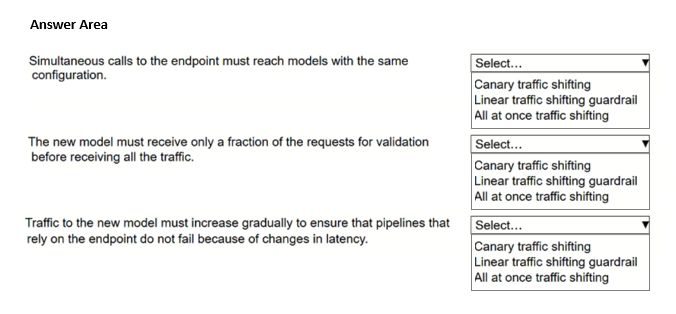
A company has multiple models that are hosted on Amazon SageMaker AI. The models need to be re-trained. The requirements for each model are different, so the company needs to choose different deployment strategies to transfer all requests to a new model.
Select the correct strategy from the following list for each requirement. Select each strategy one time.
• Canary traffic shifting
• Linear traffic shifting guardrail
• All at once traffic shifting
Community Insight
The question tests the ability to map deployment characteristics—such as risk tolerance and validation needs—to the appropriate SageMaker traffic shifting method.
This page explains how to select the correct Amazon SageMaker AI deployment strategy (Canary, Linear, or All at once) based on specific business requirements for model retraining and traffic shifting.
Learners often confuse Canary and Linear shifting by focusing only on speed rather than the mechanism of traffic transfer; Canary uses a small percentage for validation while Linear shifts gradually over time.
Community Discussion (1 comments)
Comments & Corrections
No comments yet — spotted an error or have a note? Share it below.
Expert Analysis
Why the Answer Is Correct
SageMaker offers three primary deployment strategies for production endpoints: All at once, Canary, and Linear. The selection depends entirely on the stated requirements. All at once is used when there is no need for gradual transition or validation, transferring 100% of traffic immediately. Canary shifts a small percentage of traffic to the new model to validate performance before moving the rest, ideal for high-risk scenarios. Linear shifts traffic in increments over a set period, allowing for gradual monitoring.Why Other Candidate Answers Are Wrong
Incorrect mappings usually arise from misunderstanding the 'guardrail' aspect or the immediacy of the shift. For instance, choosing 'All at once' for a requirement involving validation is wrong because it skips the safety check. Choosing 'Linear' for a scenario requiring immediate full validation is incorrect as it is too slow and rigid for quick verification.Community Comment Notes
As ChiggaBoy noted in the comments, remembering the emojis helps: 'All at once → 🚀 100% immediately', 'Canary → 🐤 small percentage → validate → 100%', and 'Linear guardrail → 📈 gradual increments'. This aligns with AWS documentation where Canary is defined as shifting a small portion to test, while Linear shifts gradually.Official Reference
Exam Strategy
Focus on the keywords in the requirement: 'validate' implies Canary, 'gradual' implies Linear, and 'immediate/100%' implies All at once. Do not assume 'safest' always means Linear; if validation is the key, Canary is often the intended answer for quick checks.
Frequently Asked Questions
What is the difference between Canary and Linear traffic shifting in SageMaker?
Canary shifts a small percentage initially to validate the new model before moving all traffic, whereas Linear shifts traffic gradually in increments over a specified time period.
When should I use All at once deployment in SageMaker?
Use All at once when you need to switch 100% of traffic to the new model immediately without any gradual transition or validation phase.
Related Analysis
Practice All MLA-C01 Questions
Access 115 questions with complete answers and detailed explanations.
View Full MLA-C01 Practice Test →