Azure Network Connection for Entra Hybrid Join
Your on-premises network contains an Active Directory Domain Services (AD DS) domain named contoso.com. The domain contains a domain controller named dc1.contoso.com. You have a Microsoft 365 E5 subscription that uses Microsoft Intune Suite. You have an Azure subscription that contains the resources shown in the following table. The subscription contains the virtual networks shown in the following table. You plan to deploy Windows 365 Enterprise Cloud PC. You need to create an Azure network connection (ANC) that will use Microsoft Entra hybrid join. Which virtual network can you use for the ANC? - 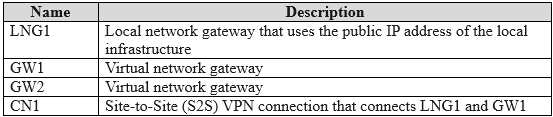 -
- 
Community Votes
100% of anonymous learners picked answer A. Votes are pick records left by other test-takers — they are not the verified answer.
Community Insight
Windows 365 ANC for Entra hybrid join requires the virtual network to have network access to the domain controller and custom DNS configured to resolve the AD DS domain.
Creating an Azure network connection (ANC) for Windows 365 Enterprise Cloud PCs with Microsoft Entra hybrid join requires specific network and DNS configurations. This guide establishes that only the virtual network containing the domain controller with proper custom DNS meets all prerequisites.
Assuming a peered virtual network (VNet2) can be used if it lacks custom DNS pointing to the domain controller, or selecting a vNet in a different region (VNet3).
Community Discussion (5 comments)
Comments & Corrections
No comments yet — spotted an error or have a note? Share it below.
Expert Analysis
Why the Answer Is Correct
VNet1 is the only virtual network that satisfies all requirements for an Azure network connection (ANC) using Microsoft Entra hybrid join. The ANC requires the virtual network to be in the same region as the Cloud PC, have network access to the domain controller, and be configured with custom DNS servers that can resolve the Active Directory Domain Services (AD DS) environment. Since the domain controller dc1.contoso.com resides in VNet1, VNet1 inherently has network access and can be configured with the correct custom DNS.Why the Other Options Are Wrong
VNet2 and VNet3 fail to meet one or more of the strict ANC requirements. VNet2, even if peered with VNet1, typically uses Azure-provided DNS or a private link IP in these scenarios, which cannot resolve the on-premises or AD DS domain names. VNet3 is often located in a different region, violating the requirement that the ANC virtual network must be in the same region as where the Cloud PCs are provisioned. Even if VNet3 has the correct DNS, the region mismatch disqualifies it.Community Comment Notes
Commenters correctly emphasize that the chosen virtual network must be able to resolve DNS entries for the AD DS environment by defining the AD DS DNS servers as the custom DNS for the vNet, as skitic pointed out. Arsh807 also highlighted the regional requirement, noting "You must have a vNET in the same region as where the Cloud PC desktops are created." These constraints logically eliminate any vNet lacking direct DNS resolution or regional proximity to the domain controller.Official Reference
Exam Strategy
When evaluating Azure network connections for Windows 365, always check three things: region match, network access to the domain controller, and custom DNS configuration pointing to the AD DS DNS servers. Eliminate any virtual network missing even one of these prerequisites.
Related Analysis
Practice All MD-102 Questions
Access 92 questions with complete answers and detailed explanations.
View Full MD-102 Practice Test →