SQL Server REGEXP_REPLACE for Email Normalization
You have a SQL database in Microsoft Fabric that contains a column named Payload. Payload stores customer data in JSON documents that have the following format.
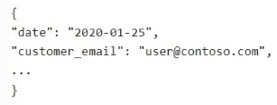 Data analysis shows that some customers have subaddressing in their email address, for example, [email protected] .
You need to return a normalized email value that removes the subaddressing, for example, user1 [email protected] must be normalized to [email protected] .
Which Transact-SQL expression should you use?
Data analysis shows that some customers have subaddressing in their email address, for example, [email protected] .
You need to return a normalized email value that removes the subaddressing, for example, user1 [email protected] must be normalized to [email protected] .
Which Transact-SQL expression should you use?
Community Insight
The key is understanding how regex replacement works: you must match the unwanted portion (from the plus sign up to the @ symbol) and replace it with just the @ symbol, preserving the domain.
This question tests the ability to use regular expressions in T-SQL to normalize email addresses by removing subaddressing (the plus sign and everything following it). The correct expression uses a regex pattern that matches the plus sign up to the domain separator.
Learners often choose option A, which replaces everything from the plus sign to the end of the string. This incorrectly removes the domain name (e.g., 'example.com'), leaving only the local part without a valid email format.
Community Discussion (2 comments)
Comments & Corrections
No comments yet — spotted an error or have a note? Share it below.
Expert Analysis
Why the Answer Is Correct
Option C is the correct choice because the regex pattern '\+.*@' specifically targets the plus sign, any characters following it (non-greedy or greedy until the next specific delimiter), and stops at the '@' symbol. By replacing this matched sequence with just '@', the subaddressing is removed while retaining the full domain. For example, '[email protected]' becomes '[email protected]'.Why the Other Options Are Wrong
Option A replaces '\+.$' (plus sign to end of string) with an empty string, resulting in 'user1' without the domain. Option B uses REGEXP_SUBSTR (which extracts rather than replaces) and has a syntax error with '=)' at the end. Option D replaces '\+.' (plus sign to end of string) with an empty string, also dropping the domain.Community Comment Notes
One commenter noted that '$' means until the end of the string, correctly identifying why Option A fails to preserve the domain. Another user questioned if removing the plus and everything after leaves just the username, highlighting the common confusion between stripping the suffix versus stripping the entire rest of the string.Exam Strategy
When using regex replacement, always verify what remains after the substitution. If you are removing text, ensure you aren't accidentally deleting necessary parts like the domain in an email address. Use '@' as a boundary marker when dealing with emails.
Frequently Asked Questions
Why does Option A fail to normalize the email?
Option A replaces everything from the '+' to the end of the string with nothing, deleting the domain name entirely.
What does the regex \+.*@ actually match?
It matches the literal plus sign, followed by any characters, stopping right before the '@' symbol.