Optimizing JSON Queries with Computed Columns and Covering Indexes
Short answer
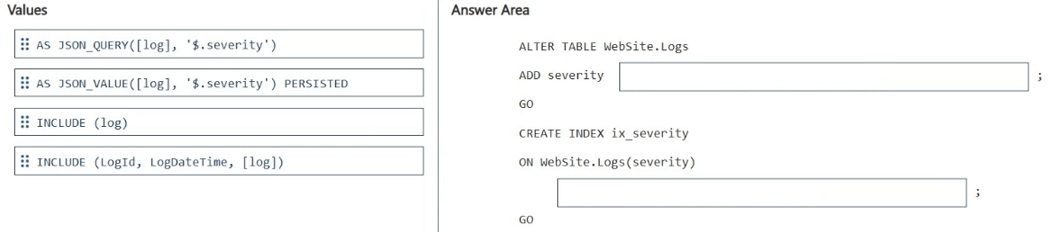
ALTER TABLE WebSite.Logs ADD Severity AS JSON_VALUE(log, '$.severity'); CREATE INDEX IX_Logs_Severity ON WebSite.Logs (Severity) INCLUDE (LogId, LogDateTime, log);
Question
You have a SQL database in Microsoft Fabric that contains a table named WebSite.Logs. WebSite.Logs stores application telemetry data. WebSite.Logs contains a nvarchar (max) column named log that stores JSON documents.
You have a daily report that filters by the $.severity JSON property and returns LogId, LogDateTime, and log. The report frequently causes full table scans.
You need to modify WebSite.Logs to support efficient filtering by $.severity and avoid key lookups for the columns returned by the report.
How should you complete the Transact-SQL code to avoid full table scans? To answer, drag the appropriate values to the correct targets. Each value may be used once, more than once, or not at all. You may need to drag the split bar between panes or scroll to view content.
NOTE: Each correct selection is worth one point.
Key Takeaways
The trap is trying to index the raw JSON column directly; the solution requires extracting the scalar value via a computed column first to enable indexing and coverage.
Learn how to optimize SQL queries filtering JSON properties in Microsoft Fabric by creating persisted computed columns and covering indexes to eliminate full table scans.
Common mistake: Attempting to create an index directly on the `log` column or using non-persisted computed columns without understanding that the index must cover all selected columns to avoid key lookups.
Expert Analysis
The core challenge is optimizing a query that filters on a JSON property within an nvarchar(max) column. Standard indexes cannot efficiently scan or seek into the internal structure of a text blob, leading to the full table scans mentioned in the scenario.
To resolve this, you must use Computed Columns combined with Indexing. The process involves two distinct steps:
- Create a Computed Column: You need to extract the specific JSON value (
$.severity) from thelogcolumn and store it as a persistent computed column. This allows SQL Server to materialize the data physically rather than parsing it on every query execution. The syntax usesJSON_VALUE(log, '$.severity'). - Create an Index on the Computed Column: Once the computed column exists, you create a standard index on it. Crucially, because the report returns
LogId,LogDateTime, andlogin addition to filtering by severity, you must include these columns in the index definition using theINCLUDEclause. This creates a Covering Index, ensuring the database engine can satisfy the entire query (filter + select) directly from the index leaf nodes without performing key lookups back to the base table.
This approach transforms the bottleneck from a full table scan of large JSON blobs into an efficient index seek, significantly reducing I/O and latency.
Official Reference
- https://learn.microsoft.com/en-us/sql/relational-databases/indexes/create-indexes-on-json-data?view=sql-server-ver16
- https://learn.microsoft.com/en-us/sql/t-sql/functions/json-value-transact-sql?view=sql-server-ver16
These links open the official vendor documentation in a new tab.
Exam Strategy
When faced with JSON performance issues in DP-800, always check if the queried fields can be extracted into a computed column. If so, index that column. Always verify if the index 'covers' the SELECT list using INCLUDE to prevent expensive key lookups.
Frequently Asked Questions
Why can't I just create an index directly on the JSON column?
nvarchar(max) JSON data. You must extract the scalar value into a computed column first to make it indexable.What is the purpose of the INCLUDE clause in the index?
Discussion 1 contributions
Compiled from public community threads and reader submissions, lightly edited for clarity. Handles and vote tallies are shown as recorded, and comments reflect the views of individual contributors.
From public community threads 1
-
authemany2k 👍 1ALTER TABLE WebSite.Logs ADD Severity AS JSON_VALUE(log, '$.severity'); CREATE INDEX IX_Logs_Severity ON WebSite.Logs (Severity) INCLUDE (LogId, LogDateTime, log);
Reader comments & corrections
No reader corrections yet — spotted an error or have a note? Share it below.