Optimizing Azure SQL Reporting with Columnstore and Rowstore Indexes
Short answer
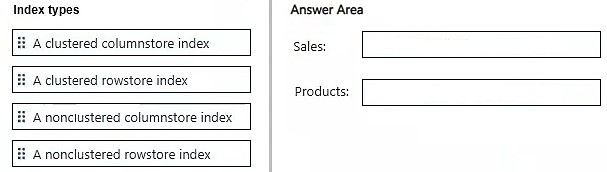
Sales should use a Clustered Columnstore Index, and Products should use a Clustered Rowstore Index.
Question
You have an Azure SQL database that stores sales data and contains tables named Sales and Products. Sales contains three columns named SalesDate, ProductKey, and TotalSale,
Sales is 10 TB and is loaded nightly by using a batch process. Most reporting queries scan large portions of Sales, filter on SalesDate or ProductKey, and use SUM() to aggregate TotalSale.
Products is relatively small and is used primarily for point lookups and joins to Sales.
You need to recommend which indexes to create to optimize the reporting queries. The solution must minimize storage requirements.
Which type of index should you recommend for each table? To answer, drag the appropriate index types to the correct tables. Each index type may be used once, more than once, or not at all. You may need to drag the split bar between panes or scroll to view content.
NOTE: Each correct selection is worth one point.
Key Takeaways
The main trap is applying rowstore indexes to large analytical tables; columnstore is required for storage efficiency and aggregation speed on large datasets.
Learn how to optimize Azure SQL database performance by selecting Clustered Columnstore Indexes for large analytical tables and Clustered Rowstore Indexes for small transactional tables.
Common mistake: Choosing clustered rowstore indexes for the Sales table fails because it does not provide the necessary compression or batch-mode processing acceleration for large-scale aggregation queries.
Expert Analysis
Sales Table: Clustered Columnstore Index The Sales table is large (10 TB) and used for analytical reporting. The workload involves scanning large portions of the table, filtering on specific columns (SalesDate, ProductKey), and aggregating data using SUM. A Clustered Columnstore Index is specifically designed for this scenario. It compresses data significantly (minimizing storage) and uses batch mode processing to accelerate aggregate queries on wide tables.
Products Table: Clustered Rowstore Index The Products table is small and used for point lookups and joins. For small tables where data retrieval is based on exact matches or primary keys, a traditional Clustered Rowstore Index (B-tree) is optimal. It provides fast O(1) or O(log n) access for individual rows, which is more efficient than columnstore overhead for point queries.
Elimination Logic:
- Nonclustered indexes are ruled out because the primary query pattern requires full-table scans or large range scans, where nonclustered indexes add lookup overhead without significant benefit compared to the compression benefits of columnstore.
- Heaps are not recommended for the Sales table because they lack the compression and scan optimization required for 10 TB of analytical data.
Official Reference
https://learn.microsoft.com/en-us/sql/relational-databases/indexes/columnstore-indexes-overview
This link opens the official vendor documentation in a new tab.
Exam Strategy
Always evaluate table size and query pattern first. Use 'Columnstore' when you see keywords like 'large table', 'aggregation', 'SUM/AVG', and 'scan'. Use 'Rowstore' when you see 'point lookup', 'small table', or 'primary key'. This distinction is critical for minimizing storage and optimizing performance.
Frequently Asked Questions
Why not use a Nonclustered Columnstore Index?
Does a Clustered Rowstore Index work for large tables?
Discussion 2 contributions
Compiled from public community threads and reader submissions, lightly edited for clarity. Handles and vote tallies are shown as recorded, and comments reflect the views of individual contributors.
From public community threads 2
-
strikersree 👍 5Clustered Columnstore Index & Clustered RowStore Index
-
authemany2k 👍 1Sales → Clustered columnstore index Products → Clustered rowstore index
Reader comments & corrections
No reader corrections yet — spotted an error or have a note? Share it below.