How to Update Feature Branch and Create PR in GitHub CLI
Short answer
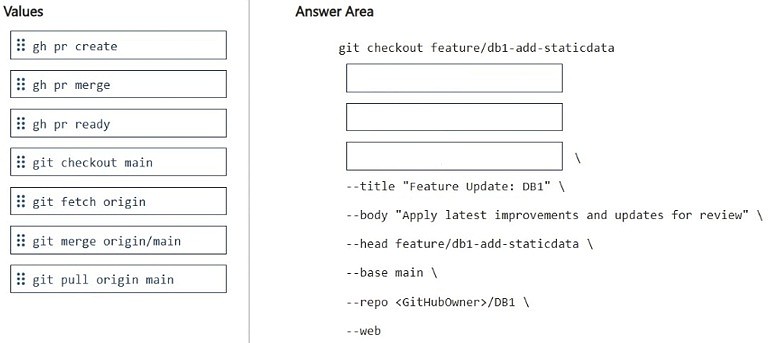
Run git fetch origin to download updates, git merge origin/main to update the feature branch, and gh pr create to open the pull request.
Question
DRAG DROP
You have a database named DB1. The schema is stored in a GitHub repository as an SDK-style SQL database project.
You use a feature branch workflow to deploy changes to DB1.
You need to update the local feature branch with the latest changes to main, and then create a pull request to merge the feature branch into main for review.
How should you complete the GitHub CLI script? To answer, drag the appropriate values to the correct targets. Each value may be used once, more than once, or not at all. You may need to drag the split bar between panes or scroll to view content.
NOTE: Each correct selection is worth one point.
Key Takeaways
This question tests Git and GitHub CLI commands for a feature branch workflow, where the common trap is confusing the order of fetch and merge or using incorrect target branches for the PR.
This scenario tests updating a local Git feature branch with remote main changes and creating a pull request using the GitHub CLI. The correct script involves fetching remote updates, merging the main branch, and issuing the pull request command.
Common mistake: Using git pull origin main directly which might not properly set up the merge context for the feature branch, or mixing up the source and target branches in the gh pr create command.
Expert Analysis
Why the Answer Is Correct
To update a local feature branch with the latest changes from main, you must first download the remote updates usinggit fetch origin. Then, you integrate those updates into your current branch using git merge origin/main. Finally, to propose merging the feature branch back into main, you use the GitHub CLI command gh pr create. This sequence accurately reflects the standard feature branch workflow.Why Other Candidate Answers Are Wrong
Usinggit pull without fetch/merge separation can obscure merge conflicts in automated scripts. Using git merge main without fetching first merges a potentially stale local main branch. Using gh repo clone or other repository-level commands is incorrect for updating an existing local workspace.Community Comment Notes
The community consensus aligns with the standard Git workflow, as one user noted the sequence is "git fetch origin... git merge origin/main... gh pr create". This confirms the step-by-step approach of fetching, merging, and then creating the pull request via the CLI.Official Reference
Exam Strategy
When faced with Git CLI questions, break the workflow into logical phases: sync, integrate, and act. Always fetch before merging to ensure you are working with the absolute latest remote state.
Discussion 1 contributions
Compiled from public community threads and reader submissions, lightly edited for clarity. Handles and vote tallies are shown as recorded.
From public community threads 1
-
gangreja 👍 1git fetch origin # 1. download the latest from GitHub (doesn't change your files) git merge origin/main # 2. merge the latest main into your feature branch gh pr create \ # 3. open the pull request
Reader comments & corrections
No reader corrections yet — spotted an error or have a note? Share it below.