How Should You Partition Table1 by Year in Azure SQL?
HOTSPOT
You have an Azure SQL database that contains a table named Table1. Table1 contains 25,000,000 rows of data and a datetime2 column named DateKey. The data in Table1 spans the years 2020 through 2021.
You need to partition the data in Table1 by year. The solution must minimize how long it takes to rebuild or reindex the table.
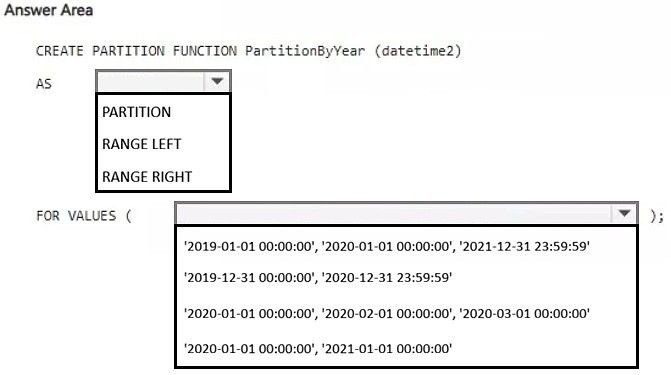
How should you complete the Transact-SQL code? To answer, select the appropriate options in the answer area.
NOTE: Each correct selection is worth one point.
Community Insight
The item tests RANGE RIGHT boundary semantics for a datetime2 partitioning column and partition-aligned index rebuilds; the trap is adding an unnecessary boundary or rebuilding an index that is not aligned to the partition scheme.
This DP-800 hotspot asks how to partition a 25-million-row Azure SQL table by calendar year so maintenance can target individual partitions. The correct completion uses a RANGE RIGHT partition function with a year-start boundary and a partition-aligned clustered index.
A common error is placing boundaries at year-end dates or adding 2020-01-01 as a required value, which creates an empty leading partition, and then rebuilding the clustered index without specifying the partition scheme so the index is not partition-aligned.
Community Discussion (1 comments)
Comments & Corrections
No comments yet — spotted an error or have a note? Share it below.
Expert Analysis
Why the Answer Is Correct
RANGE RIGHT assigns the boundary value to the partition on the right, so a boundary at 2021-01-01 cleanly places all 2020 datetime2 values into the left partition and all 2021 values into the right partition. For data that starts in 2020 and ends in 2021, that one boundary gives the two active yearly partitions needed; adding 2020-01-01 only creates an empty pre-2020 partition and does not reduce rebuild time. Rebuilding the clustered index ON the partition scheme with DROP_EXISTING = ON converts the table and keeps the index partition-aligned, which is what allows later ALTER INDEX... REBUILD PARTITION operations to target a single year.Why Other Candidate Answers Are Wrong
Using RANGE LEFT would put the boundary value itself into the left partition, so 2021-01-01 00:00:00 would incorrectly remain with the 2020 data. Year-end boundaries such as 2020-12-31 or 2021-12-31 are fragile with datetime2 because they must account for fractional seconds and can split a single day. Building the index on [PRIMARY] or another nonpartitioned destination leaves it nonaligned, so the table still must be reindexed as a whole rather than by yearly partition.Community Comment Notes
As gangreja noted, RANGE RIGHT is the right direction, and the comment specifically lists "RANGE RIGHT FOR VALUES" with 2020-01-01 and 2021-01-01. The RANGE RIGHT instinct is correct, but the 2020-01-01 value is optional for a table whose data starts in 2020 and merely creates an empty leading partition rather than a better yearly split. Treat the comment as confirmation of the RANGE RIGHT choice, not as proof that both boundary values are mandatory.Official Reference
Exam Strategy
Work out the partition count first: N boundary values produce N+1 partitions, and RANGE RIGHT places each boundary in the higher partition. Then verify the index is built on the partition scheme using the partitioning column, because only partition-aligned indexes support efficient per-partition rebuilds.
Frequently Asked Questions
Should I use RANGE RIGHT with only '2021-01-01' or also add '2020-01-01'?
For data starting in 2020, '2021-01-01' separates 2020 from 2021; adding '2020-01-01' creates an empty pre-2020 partition, not a better yearly split.
Why rebuild the clustered index on a partition scheme instead of a filegroup?
The index must be partition-aligned so a single yearly partition can be rebuilt or reindexed; rebuilding on [PRIMARY] leaves it nonaligned and forces whole-table maintenance.