How Do You Complete the REGEXP Phone Query for dbo.CustomerMessages?
DRAG DROP
You have a Microsoft SQL Server 2025 database that contains a table named dbo.CustomerMessages. dbo.CustomerMessages contains two columns named MessageID (int) and MessageRaw (nvarchar(max)).
MessageRaw can contain a phone number in multiple formats, and some rows do NOT contain a phone number.
You need to write a single SELECT query that meets the following requirements:
The query must return MessageID, RawNumber, DigitsOnly, and PhoneStatus.
RawNumber must contain the first substring that matches a phone-number pattern, or NULL if no match exists.
DigitsOnly must remove all non-digit characters from RawNumber, or return NULL.
PhoneStatus must return valid when a phone number exists in MessageRaw, otherwise return Missing.
How should you complete the Transact-SQL query? To answer, drag the appropriate values to the correct targets. Each value may be used once, more than once, or not at all. You may need to drag the split bar between panes or scroll to view content.
NOTE: Each correct selection is worth one point.
Community Insight
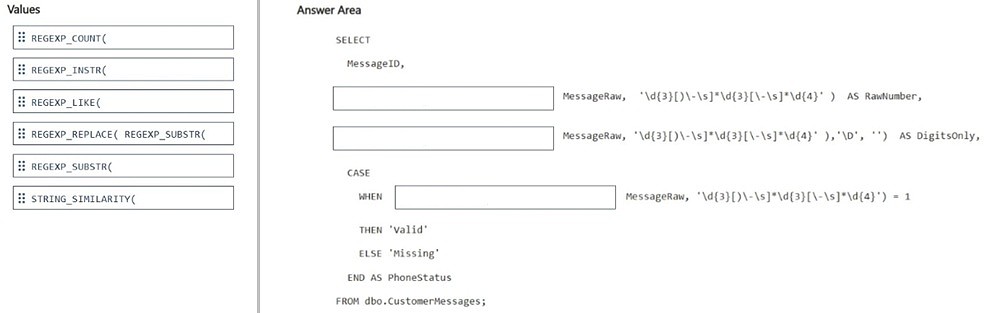
The item tests mapping regex extraction, cleanup, and existence checks to the correct T-SQL functions; the trap is treating REGEXP_REPLACE as an extractor or using REGEXP_SUBSTR where a status test is required.
This DP-800 drag-drop tests SQL Server 2025 REGEXP functions in a single SELECT over dbo.CustomerMessages. It establishes that RawNumber uses REGEXP_SUBSTR, DigitsOnly nests REGEXP_REPLACE over that match, and PhoneStatus uses REGEXP_COUNT to choose valid versus Missing.
A common mistake is applying REGEXP_REPLACE directly to MessageRaw for DigitsOnly or using REGEXP_COUNT for RawNumber; that either ignores the required RawNumber base or returns a count instead of the phone substring.
Community Discussion (2 comments)
Comments & Corrections
No comments yet — spotted an error or have a note? Share it below.
Expert Analysis
Why the Answer Is Correct
RawNumber asks for the first substring matching the phone-number pattern, which is exactly REGEXP_SUBSTR(MessageRaw, pattern); if no row matches, it returns NULL. DigitsOnly must be derived from RawNumber, so the cleaner is REGEXP_REPLACE(REGEXP_SUBSTR(MessageRaw, pattern), '[^0-9]', ''), which strips non-digits and propagates NULL when no phone exists. PhoneStatus is an existence test, and the provided CASE template uses REGEXP_COUNT(MessageRaw, pattern) > 0 so matched rows become valid and zero matches become Missing. This keeps everything in one SELECT with the required aliases.Why Other Candidate Answers Are Wrong
Using REGEXP_REPLACE alone would return a modified MessageRaw, not the first phone-number substring, so it cannot satisfy RawNumber. REGEXP_LIKE is conceptually an existence check, but it returns a match indicator rather than the extracted text needed by RawNumber, and the PhoneStatus target is built around the numeric REGEXP_COUNT comparison. Plain REPLACE, SUBSTRING, or PATINDEX are not regex-based and cannot handle multiple phone formats with the same pattern. Using REGEXP_COUNT in the RawNumber slot would return a count instead of text, and using REGEXP_SUBSTR in PhoneStatus would return a substring or NULL instead of valid/Missing.Community Comment Notes
gangreja's note matches the intended split: REGEXP_SUBSTR for the first slot, REGEXP_REPLACE(REGEXP_SUBSTR(...)) for the second, and REGEXP_COUNT for PhoneStatus "because it returns an integer if it finds the pattern". BeingAbhi summarizes the semantics as REGEXP_SUBSTR for "Give me the matching text", REGEXP_REPLACE for changing or removing matching text, and REGEXP_LIKE for "Does matching text exist?". The practical takeaway is to follow the target's syntax: the CASE slot compares a count to zero, so REGEXP_COUNT is the drag value that fits, while REGEXP_LIKE is a useful memory aid but not the function used in that expression. Treat these comments as study cues rather than vote-based proof.Official Reference
Exam Strategy
Identify the alias first: extraction needs REGEXP_SUBSTR, cleanup needs REGEXP_REPLACE wrapped around the extractor, and status needs a count comparison. Preserve NULL propagation by nesting functions instead of referencing aliases in the same SELECT list.
Frequently Asked Questions
Why is DigitsOnly written as REGEXP_REPLACE(REGEXP_SUBSTR(...)) instead of REGEXP_REPLACE on MessageRaw?
DigitsOnly must be derived from RawNumber, the extracted phone-number substring. Replacing on MessageRaw would keep unrelated message text and would not preserve the required NULL when no phone pattern matches.
Can REGEXP_LIKE be used for PhoneStatus in this DP-800 drag-drop?
Conceptually REGEXP_LIKE tests whether matching text exists, but the PhoneStatus expression is built as REGEXP_COUNT(MessageRaw, pattern) > 0; choose the drag value that matches that numeric comparison.