Optimizing Azure SQL Dashboard Queries with Nonclustered Indexes
Case Study
This is a case study. Case studies are not timed separately. You can use as much exam time as you would like to complete each case. However, there may be additional case studies and sections on this exam. You must manage your time to ensure that you are able to complete all questions included on this exam in the time provided.
To answer the questions included in a case study, you will need to reference information that is provided in the case study. Case studies might contain exhibits and other resources that provide more information about the scenario that is described in the case study. Each question is independent of the other questions in this case study.
At the end of this case study, a review screen will appear. This screen allows you to review your answers and to make changes before you move to the next section of the exam. After you begin a new section, you cannot return to this section.
To start the case study
To display the first question in this case study, click the Next button. Use the buttons in the left pane to explore the content of the case study before you answer the questions. Clicking these buttons displays information such as business requirements, existing environment and problem statements. If the case study has an All Information tab, note that the information displayed is identical to the information displayed on the subsequent tabs. When you are ready to answer a question, click the Question button to return to the question.
Existing Environment
Azure Environment
Contoso has an Azure subscription in North Europe that contains the corporate infrastructure. The current infrastructure contains a Microsoft SQL Server 2017 database. The database contains the following tables.
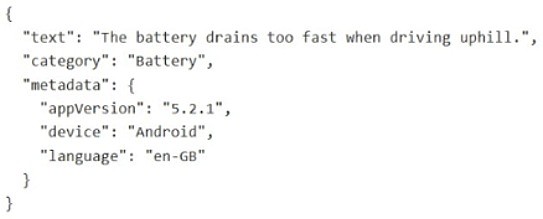
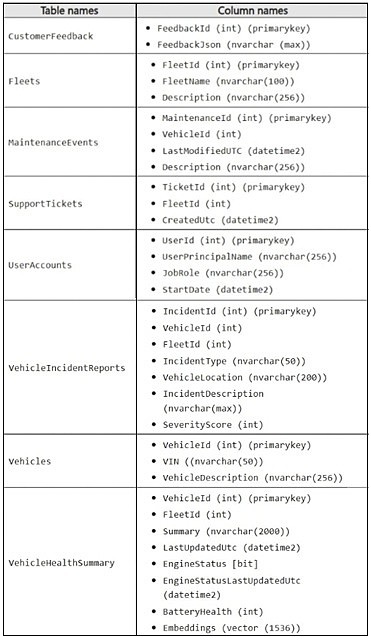 The FeedbackJson column has a full-text index and stores JSON documents in the following format.
 The support staff at Contoso never has the UNMASK permission.
Problem Statements
Contoso is deploying a new Azure SQL database that will become the authoritative data store for the following:
AI workloads
Vector search
Modernized API access
Retrieval Augmented Generation (RAG) pipelines
Sometimes the ingestion pipeline fails due to malformed JSON and duplicate payloads.
The engineers at Contoso report that the following dashboard query runs slowly.
The support staff at Contoso never has the UNMASK permission.
Problem Statements
Contoso is deploying a new Azure SQL database that will become the authoritative data store for the following:
AI workloads
Vector search
Modernized API access
Retrieval Augmented Generation (RAG) pipelines
Sometimes the ingestion pipeline fails due to malformed JSON and duplicate payloads.
The engineers at Contoso report that the following dashboard query runs slowly.
 You review the execution plan and discover that the plan shows a clustered index scan.
VehicleIncidentReports often contains details about the weather, traffic conditions, and location. Analysts report that it is difficult to find similar incidents based on these details.
Requirements
Planned Changes
Contoso wants to modernize Fleet Intelligence Platform to support AI-powered semantic search over incident reports.
Security Requirements
Contoso identifies the following security requirements:
Restrict the support staff from viewing Personally Identifiable Information (PII) data, which is full email addresses and phone numbers.
Enforce row-level filtering so that analysts see only incidents for the fleets to which they are assigned. The analysts can be assigned to multiple fleets.
Database Performance and Requirements
Contoso identifies the following telemetry requirements:
Telemetry data must be stored in a partitioned table.
Telemetry data must provide predictable performance for ingestion and retention operations.
latitude, longitude, and accuracy JSON properties must be filtered by using an index seek.
Contoso identifies the following maintenance data requirements:
Ensure that any changes to a row in the MaintenanceEvents table updates the corresponding value in the LastModifiedUtc column to the time of the change.
Avoid recursive updates.
AI Search, Embeddings, and Vector Indexing
Contoso plans to implement semantic search over incident data to meet the following requirements:
Embeddings must be stored in dedicated Azure SQL Database tables.
Embeddings must be generated from rich natural language fields.
Chunking must preserve semantic coherence.
Hybrid search must combine the following:
Vector similarity
Keyword filtering or boosting
Development Requirements
The development team at Contoso will use Microsoft Visual Studio Code and GitHub Copilot and will retrieve live metadata from the databases.
Contoso identifies the following requirements for querying data in the FeedbackJson column of the CustomerFeedback table:
Extract the customer feedback text from the JSON document.
Filter rows where the JSON text contains a keyword.
Calculate a fuzzy similarity score between the feedback text and a known issue description.
Order the results by similarity score, with the highest score first.
You need to recommend a solution to resolve the slow dashboard query issue.
What should you recommend?
You review the execution plan and discover that the plan shows a clustered index scan.
VehicleIncidentReports often contains details about the weather, traffic conditions, and location. Analysts report that it is difficult to find similar incidents based on these details.
Requirements
Planned Changes
Contoso wants to modernize Fleet Intelligence Platform to support AI-powered semantic search over incident reports.
Security Requirements
Contoso identifies the following security requirements:
Restrict the support staff from viewing Personally Identifiable Information (PII) data, which is full email addresses and phone numbers.
Enforce row-level filtering so that analysts see only incidents for the fleets to which they are assigned. The analysts can be assigned to multiple fleets.
Database Performance and Requirements
Contoso identifies the following telemetry requirements:
Telemetry data must be stored in a partitioned table.
Telemetry data must provide predictable performance for ingestion and retention operations.
latitude, longitude, and accuracy JSON properties must be filtered by using an index seek.
Contoso identifies the following maintenance data requirements:
Ensure that any changes to a row in the MaintenanceEvents table updates the corresponding value in the LastModifiedUtc column to the time of the change.
Avoid recursive updates.
AI Search, Embeddings, and Vector Indexing
Contoso plans to implement semantic search over incident data to meet the following requirements:
Embeddings must be stored in dedicated Azure SQL Database tables.
Embeddings must be generated from rich natural language fields.
Chunking must preserve semantic coherence.
Hybrid search must combine the following:
Vector similarity
Keyword filtering or boosting
Development Requirements
The development team at Contoso will use Microsoft Visual Studio Code and GitHub Copilot and will retrieve live metadata from the databases.
Contoso identifies the following requirements for querying data in the FeedbackJson column of the CustomerFeedback table:
Extract the customer feedback text from the JSON document.
Filter rows where the JSON text contains a keyword.
Calculate a fuzzy similarity score between the feedback text and a known issue description.
Order the results by similarity score, with the highest score first.
You need to recommend a solution to resolve the slow dashboard query issue.
What should you recommend?
Community Insight
The core concept tested is index selection for query performance; the common trap is choosing an index based solely on sorting requirements without considering the filter predicates and data retrieval needs.
This exam question focuses on resolving slow dashboard queries in Azure SQL Database by implementing an appropriate nonclustered index. The correct solution utilizes a covering index to transform an inefficient clustered index scan into a fast index seek.
Learners often select Option A (Clustered Index on LastUpdatedUtc) because they focus on the ORDER BY clause, failing to realize that filtering by FleetId is the primary driver of the initial I/O cost.
Community Discussion (1 comments)
Comments & Corrections
No comments yet — spotted an error or have a note? Share it below.
Expert Analysis
Why the Answer Is Correct
Option B is the correct recommendation because it creates a nonclustered index onFleetId that includes LastUpdatedUtc, EngineStatus, and BatteryHealth. Since the query filters by FleetId, this column serves as the key for an efficient index seek. Including the remaining selected columns ensures the index is 'covering,' meaning the database engine can retrieve all required data directly from the index leaf nodes without performing expensive key lookups against the clustered table.Why the Other Options Are Wrong
Option A suggests creating a clustered index onLastUpdatedUtc. Changing the clustered index structure is a major maintenance operation and does not help if the primary filter remains FleetId. Option C places FleetId as an included column, which means the index is keyed on LastUpdatedUtc; this would force a range scan over dates rather than a targeted seek on the fleet ID. Option D proposes a filtered index, which is only valid for a specific subset of data, but the requirement implies general dashboard access for assigned fleets, making a standard covering index more appropriate for broad utility.Community Comment Notes
Community consensus strongly supports Option B. As noted by user gangreja: "Key on FleetId... INCLUDE the other columns... So there are no key lookups and the index covers the query." This confirms that the covering index strategy is the intended solution to eliminate the clustered index scan.Exam Strategy
When optimizing SQL queries, always analyze the WHERE clause first to determine the best index key, then look at the SELECT clause to determine what should be included. Aim for 'covering indexes' to avoid costly key lookups after an index seek.
Frequently Asked Questions
Why not use a clustered index on LastUpdatedUtc?
A clustered index determines physical storage order. Since the query filters by FleetId, indexing on LastUpdatedUtc would require scanning many rows before filtering, whereas FleetId provides direct access.
What makes an index 'covering' in this scenario?
An index is covering when it contains all columns referenced in the query's WHERE and SELECT clauses. Here, including FleetId, LastUpdatedUtc, EngineStatus, and BatteryHealth allows the engine to satisfy the request entirely from the index.