Where to Add Genie Synonym Instructions for Sales1
You have an Azure Databricks workspace that contains the objects shown in the following table.
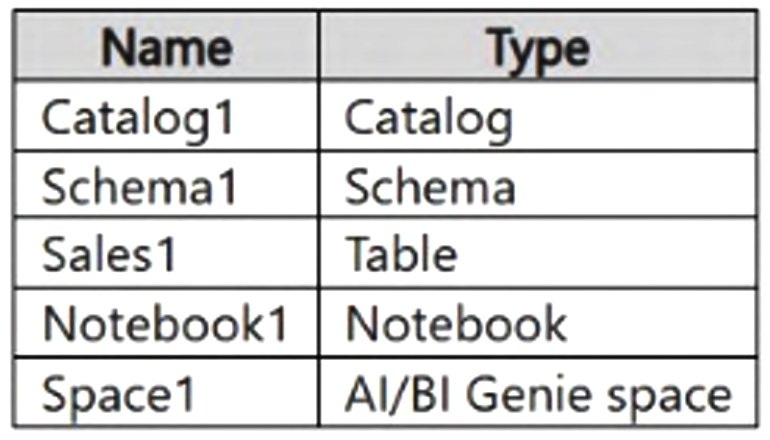 Users often use the following words to refer to a sale: transaction, event, order, and invoice.
You need to create a knowledge store. The solution must ensure that when the users use any of the words in Space1, Genie queries the Sales1 table. Any other Genie spaces must remain unaffected.
To which object should you add the instructions?
Users often use the following words to refer to a sale: transaction, event, order, and invoice.
You need to create a knowledge store. The solution must ensure that when the users use any of the words in Space1, Genie queries the Sales1 table. Any other Genie spaces must remain unaffected.
To which object should you add the instructions?
Community Insight
The question tests the scoping of AI/BI Genie space instructions, and the trap is attaching guidance to the underlying Unity Catalog table, schema, or catalog instead of the Genie space that must be affected.
This Azure Databricks question tests where AI/BI Genie instructions (synonym and routing guidance) live when you build a knowledge store that must translate words like transaction, event, order, and invoice into queries against the Sales1 table. The instructions belong on Genie space Space1 itself, because instructions are scoped to a single space and configuring them there leaves every other Genie space untouched.
Learners most often pick A (Sales1) or B (Schema1), assuming synonym guidance should be stored with the data object itself; but Genie instructions are properties of the Genie space, so setting them on Sales1 or Schema1 would not scope the behavior to Space1 and could leak across spaces.
Community Discussion (1 comments)
Comments & Corrections
No comments yet — spotted an error or have a note? Share it below.
Expert Analysis
Why the Answer Is Correct
Option C (Space1) is correct because custom instructions and synonym definitions in AI/BI Genie are configured at the Genie space level, which is exactly the object the requirement scopes: when users type any of the words in Space1, Genie should resolve the query to Sales1. Space1 is a Genie space, and its instructions act as the semantic layer that maps user vocabulary to the intended table. Since the instructions are stored inside that space, all other Genie spaces keep their own instruction sets and are unaffected, satisfying the isolation clause. This also fits the knowledge-store pattern, where curated guidance lives with the conversational surface rather than with the physical schema objects.Why the Other Options Are Wrong
Option A (Sales1) is a table, and tables do not carry Genie instruction text that Genie spaces read for query routing; putting text there would not reliably redirect Space1's questions. Option B (Schema1) and D (Catalog1) are Unity Catalog schema and catalog containers, where permissions and comments live, not conversational routing hints, and modifying them would risk affecting every consumer of those containers rather than only Space1. Option E (Notebook1) is an interactive development artifact with no role in Genie query interpretation. None of these options can satisfy the requirement that only Space1 changes behavior.Community Comment Notes
As dgerok noted, "These instructions are configured at the AI/BI Genie space level, not on the table, schema, catalog, or notebook," and he identified "The requirement that other Genie spaces remain unaffected" as the key clue pointing to the space. That reading matches the isolation constraint stated in the question, and no comment offered a substantive argument for the table, schema, catalog, or notebook options.Official Reference
Exam Strategy
When a question says one surface must change while all others must remain unaffected, choose the object that is itself the scope boundary—in Genie questions that is the Genie space, not the underlying Unity Catalog table, schema, or catalog.
Frequently Asked Questions
Why is adding instructions to Sales1 or Schema1 wrong here?
Genie instructions are stored on the Genie space, not on tables or schemas, so guidance placed on Sales1 or Schema1 would not scope queries to Space1 and could leak across spaces.
How do instructions keep other Genie spaces unaffected?
Instructions are private to each Genie space, so editing Space1's instructions changes only that space's query routing while all other spaces keep their own settings.