How should Notebook1 read storageKey from kv-secure at runtime?
Short answer
Create an Azure Key Vault-backed secret scope in the workspace, grant the Databricks identity only Get (read) permission on kv-secure, and call dbutils.secrets.get(scope, "storageKey") in Notebook1.
Question
You have an Azure Databricks workspace.
You have an Azure key vault named kv-secure that stores a secret named storageKey. The value of storageKey is managed and updated by the cloud security team at your company.
You need to enable a Databricks notebook named Notebook1 to retrieve the value of storageKey securely at runtime. The solution must follow the principle of least privilege and always retrieve the latest value.
What should you do? To answer, select the appropriate options in the answer area.
NOTE: Each correct selection is worth one point.
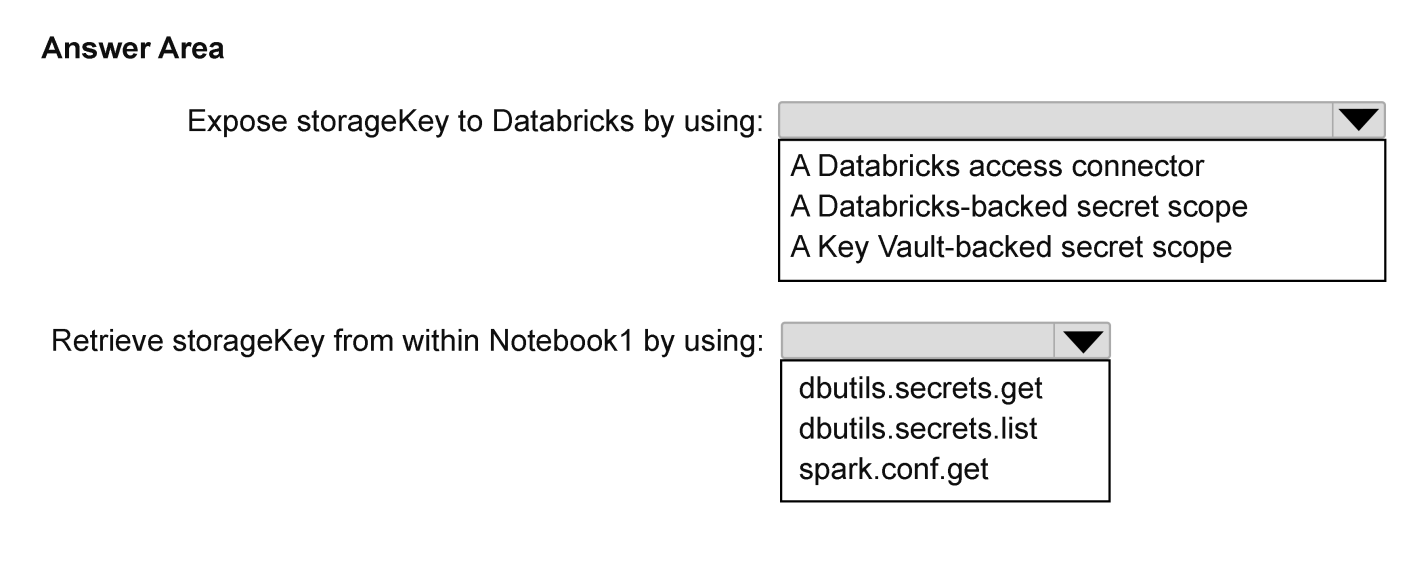
Key Takeaways
Tests whether you know that a Key Vault-backed scope resolves the secret live at call time and that least privilege means Get-only secret permission — the trap is choosing a Databricks-backed scope or a broader List/All permission.
Notebook1 must retrieve the storageKey secret from Azure Key Vault kv-secure at runtime, always getting the freshest value while holding the fewest possible permissions, so the answer hinges on the scope type, the vault permission and the retrieval API. This page confirms that a Key Vault-backed secret scope plus Get-only access and dbutils.secrets.get is the least-privilege path to the latest value.
Common mistake: Reaching for a Databricks-backed secret scope (or a widget, cluster environment variable, or init script) and granting List/All permissions on the vault — that returns a stale copy and hands out more rights than the read-only notebook needs.
Expert Analysis
Why the Answer Is Correct
A Key Vault-backed secret scope is only a pointer: Azure Databricks never copies storageKey into the workspace, so every dbutils.secrets.get call resolves the current value from kv-secure, which satisfies 'always retrieve the latest value' even when the cloud security team rotates the key. The workspace identity (managed identity or service principal) performs the vault lookup, so Notebook1 itself never handles vault credentials, and that identity needs only read (Get) access to the secret — the least-privilege baseline. Secret scope ACLs add a second layer: granting READ only to the users or group that runs Notebook1 keeps every other workspace user away from storageKey. Values returned by dbutils.secrets.get are also redacted in notebook output, so the runtime read does not leak the key into cell results or logs. The combination of a Key Vault-backed scope, Get-only vault permission and a single dbutils.secrets.get call is the minimum that meets both stated constraints.
Why Other Candidate Answers Are Wrong
A Databricks-backed secret scope keeps its own copy of the value, so it silently returns a stale key until somebody re-enters it — that fails the 'latest value' requirement. Granting List, All, or a write/Secrets Officer role on kv-secure exceeds least privilege, because Notebook1 only reads; it never creates, rotates or deletes storageKey. Calling the Azure Key Vault SDK or REST API directly from the notebook forces Notebook1 to authenticate on its own (a service principal secret or token), reintroducing a credential to protect and usually requiring a broader role. Hardcoding the key, or parking it in a cluster environment variable, init script, spark.conf or notebook output, exposes the value in workspace history and still cannot follow rotation. Storing it in a widget is equally wrong: outputs are visible to anyone who can run or view the notebook.
Community Comment Notes
The single community answer on the page, from mtc9 (2 likes), says "create a kv backed secred scope dbutils.secret.get" — the mechanism is right: a Key Vault-backed scope plus a get call. Two details matter when you copy it: the real API is dbutils.secrets.get (plural 'secrets', taking scope and key arguments), and the comment says nothing about the vault permission, which is the least-privilege half of this hotspot. No commenter disputed the approach, but that is thin agreement rather than proof; the vendor documentation below is what settles the scope type and the permission level.
Official Reference
- https://learn.microsoft.com/en-us/azure/databricks/security/secrets/secret-scopes
- https://learn.microsoft.com/en-us/azure/key-vault/general/assign-access-policy
These links open the official vendor documentation in a new tab.
Exam Strategy
Hotspot items are scored per dropdown, so decide each selection independently: scope type (Azure Key Vault-backed), permission (Get / read-only on the secret), and retrieval call (dbutils.secrets.get). Eliminate any option mentioning List, All, write, or a direct Key Vault SDK call — none of them satisfies least privilege for a read-only notebook.
Frequently Asked Questions
Does a Key Vault-backed secret scope in Databricks cache the storageKey value?
Which Azure Key Vault permission does the Databricks workspace need to read storageKey?
Discussion 1 contributions
Compiled from public community threads and reader submissions, lightly edited for clarity. Handles and vote tallies are shown as recorded, and comments reflect the views of individual contributors.
From public community threads 1
-
mtc9 👍 2create a kv backed secred scope dbutils.secret.get
Reader comments & corrections
No reader corrections yet — spotted an error or have a note? Share it below.