Which authentication and volume permission for an external Unity Catalog volume?
Short answer
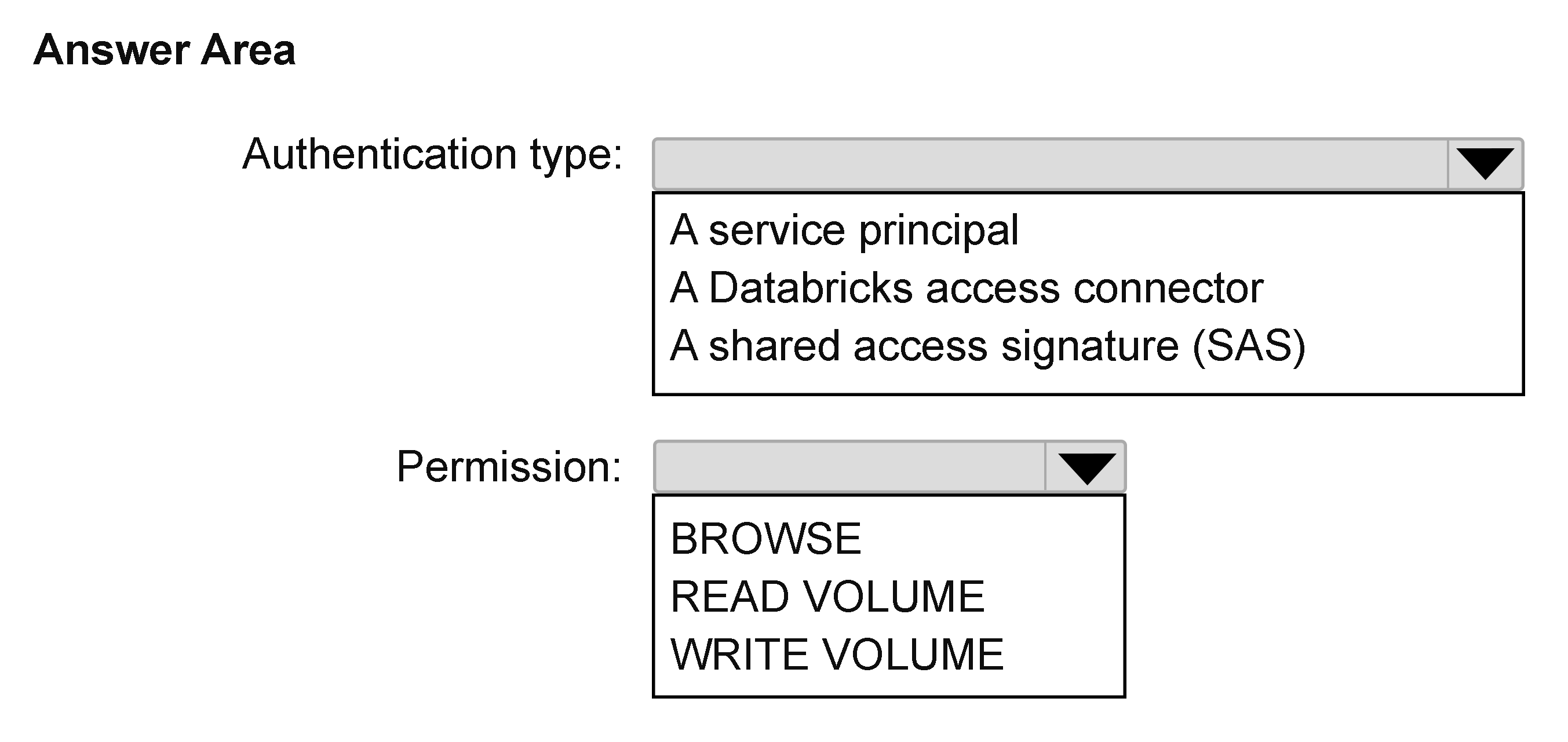
Configure an Azure managed identity (via a Databricks Access Connector) as the storage credential for the external volume, and grant users READ VOLUME on Volume1.
Question
You have an Azure Databricks workspace that is enabled for Unity Catalog.
You need to create an external volume named Volume1 in an existing schema. Volume1 must expose files from an Azure Storage container. The solution must meet the following requirements:
Ensure that authentication does NOT require storing credentials in Databricks.
Ensure that users can access the files, but NOT modify the files.
Follow the principle of least privilege.
Which type of authentication should you configure, and which permission should you grant to the users? To answer, select the appropriate options in the answer area.
NOTE: Each correct selection is worth one point.
Key Takeaways
The item tests two paired choices at once: the credential-free authentication type (Azure managed identity carried by an Azure Databricks Access Connector) and the least-privilege volume privilege (READ VOLUME), with service-principal secrets and WRITE VOLUME as the traps.
Creating an external Unity Catalog volume over an Azure Storage container without storing credentials means using an Azure Databricks Access Connector backed by a managed identity as the storage credential. Read-only access for users is delivered by granting READ VOLUME on Volume1, which satisfies least privilege.
Common mistake: Selecting a service principal (or a storage account key / SAS token) because it is a familiar 'authentication type', then granting WRITE VOLUME or ALL PRIVILEGES to keep things simple — the first violates 'no credentials stored in Databricks' and the second violates 'not modify the files' and least privilege.
Expert Analysis
Why the Answer Is Correct
An external volume in Unity Catalog always resolves its files through a storage credential plus an external location, and on Azure the credential-free path is an Azure Databricks Access Connector whose system-assigned or user-assigned managed identity is granted the Storage Blob Data Reader role on the container. Nothing is written into Databricks: no client secret, no SAS token, no account key, so the 'authentication does NOT require storing credentials in Databricks' requirement is met exactly. The requirement that users read but not modify files maps to the volume privilege READ VOLUME — WRITE VOLUME is the privilege that enables creating or altering files, and ALL PRIVILEGES is strictly broader than required. Least privilege therefore means USE CATALOG and USE SCHEMA on the parents plus READ VOLUME on Volume1, and nothing else.
Why Other Candidate Answers Are Wrong
A service principal works technically but requires a client secret to be persisted as a Databricks secret, which is precisely the storage of credentials the question forbids. Storage account access keys and SAS tokens are even worse: they are long-lived broad secrets held in the storage credential object, and an account key bypasses container-level scoping entirely. Credential or OAuth passthrough is not how a Unity Catalog external volume's storage credential is configured, so it cannot be the 'authentication type' dropdown answer here. On the permission side, WRITE VOLUME and ALL PRIVILEGES both fail the 'NOT modify the files' statement even if they are convenient, and granting MANAGE or CREATE on the schema is an unnecessary privilege escalation.
Community Comment Notes
zxc01, the only voter on this item, raises the confusion that trips most candidates: "Azure Databricks Access Connector is not authentication" — they argue the dropdown answer "should be managed identity", while noting the list did not seem to offer it and that "service principal is possible solution". The resolution is that the access connector is the Azure resource that carries the identity; the authentication mechanism is the managed identity it uses, so the credential-free choice on the exam is the managed identity option (or the connector that represents it). Their point that a service principal 'is possible' is true in general Databricks practice, but it loses here because the client secret must be stored in Databricks, contradicting the explicit constraint in the question.
Official Reference
- https://learn.microsoft.com/en-us/azure/databricks/connect/unity-catalog/cloud-storage/azure-managed-identities
- https://learn.microsoft.com/en-us/azure/databricks/volumes/
These links open the official vendor documentation in a new tab.
Exam Strategy
Split the hotspot into its two independent decisions and let each requirement eliminate options: 'no credentials stored in Databricks' kills service principal secrets, account keys and SAS; 'read but NOT modify' plus least privilege kills WRITE VOLUME and ALL PRIVILEGES. Answer the authentication dropdown before the permission dropdown so a wrong first choice does not bias the second.
Frequently Asked Questions
For the external volume, is the Azure Databricks Access Connector itself the authentication type?
Which privilege lets users read files in Volume1 without modifying them?
Discussion 2 contributions
Compiled from public community threads and reader submissions, lightly edited for clarity. Handles and vote tallies are shown as recorded, and comments reflect the views of individual contributors.
From public community threads 2
-
Pranav Neharkar 👍 1Databricks Access connector: It uses an Azure managed identity, so no secrets or tokens are stored in Databricks. A service principal requires a client secret, and a SAS requires a token, so both fail the “no stored credentials” requirement. READ VOLUME: It lets users read and list the files in the volume without modifying them. WRITE VOLUME would allow changes, which violates the requirement. BROWSE only lets users see the volume’s metadata in the catalog, not read its files, so it doesn’t give them access to the files.
-
zxc01 👍 1The first question ask authentication type which Azure Databricks Access Connector is not authentication. It should be managed identity. However I cannot get it in list. service principal is possible solution.
Reader comments & corrections
No reader corrections yet — spotted an error or have a note? Share it below.