How to create Unity Catalog assets table in finance.procurement?
Short answer
Set USE CATALOG finance, then USE SCHEMA procurement, then CREATE TABLE assets with columns asset_id, asset_type, and asset_name.
Question
You have an Azure Databricks workspace that is enabled for Unity Catalog and contains a catalog named finance, finance contains two schemas named default and procurement.
You need to create a table named assets in the procurement schema, assets must contain the following columns:
asset_id
asset_type
asset_name
How should you complete the SQL statement? To answer, drag the appropriate values to the correct targets. Each value may be used once, more than once, or not at all. You may need to drag the split bar between panes or scroll to view content.
NOTE: Each correct selection is worth one point.
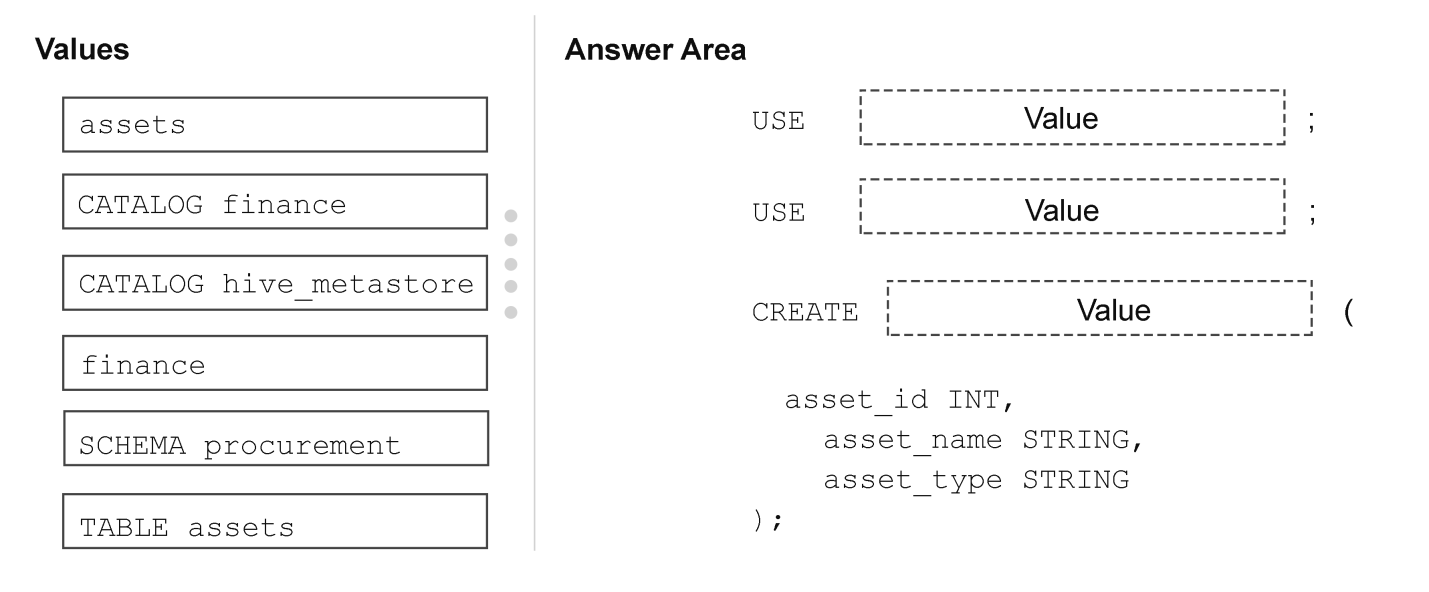
Key Takeaways
The item tests Unity Catalog context-setting with USE CATALOG and USE SCHEMA; the common trap is using only USE finance or writing a two-part name that creates assets in the wrong schema.
In an Azure Databricks Unity Catalog workspace, creating a table inside finance.procurement requires USE CATALOG finance followed by USE SCHEMA procurement before CREATE TABLE assets. This page confirms the correct drag-drop completion and explains why the three-level namespace context must be set explicitly.
Common mistake: Many candidates set only the schema or write CREATE TABLE finance.assets, forgetting that the catalog must be selected with USE CATALOG before the schema is set.
Expert Analysis
Why the Answer Is Correct
The workspace contains catalog finance with schemas default and procurement, and the assets table must live in finance.procurement. The first drag target is the catalog slot, so USE CATALOG finance switches the session out of the default catalog. The second target is the schema slot, so USE SCHEMA procurement places subsequent unqualified object names in the procurement schema. Only then does CREATE TABLE assets create the table with columns asset_id, asset_type, and asset_name in finance.procurement. The community record from dgerok matches this exact sequence and states the provided answer is correct.
Why Other Candidate Answers Are Wrong
Dragging finance into the schema slot would produce USE SCHEMA finance, which tries to select a nonexistent schema rather than the catalog. Using USE SCHEMA default instead of procurement would create assets in finance.default, not in the required schema. Writing CREATE TABLE finance.assets or CREATE TABLE procurement.assets only supplies two name parts and may resolve against the wrong catalog or schema. A fully qualified CREATE TABLE finance.procurement.assets is valid Databricks syntax, but the exhibit deliberately provides separate USE CATALOG and USE SCHEMA targets, so the intended drag values remain finance, procurement, and assets. Swapping assets into either context slot makes the USE statement reference a table as if it were a catalog or schema.
Community Comment Notes
dgerok posted the verbatim fragment "USE CATALOG finance, USE SCHEM procurement, CREATE TABLE assets" and rated it as the correct provided answer. The abbreviated "SCHEM" is clearly a typo for the USE SCHEMA keyword, but the order of operations is exactly what the exam expects. No dissenting comment challenges the sequence, so the community consensus aligns with the official Unity Catalog three-level namespace rule.
Official Reference
- https://docs.databricks.com/en/sql/language-manual/sql-ref-syntax-ddl-use-catalog.html
- https://docs.databricks.com/en/sql/language-manual/sql-ref-syntax-ddl-use-schema.html
- https://docs.databricks.com/en/sql/language-manual/sql-ref-syntax-ddl-create-table.html
These links open the official vendor documentation in a new tab.
Exam Strategy
When a drag-drop statement has separate USE CATALOG and USE SCHEMA targets, fill the catalog name in the catalog slot and the schema name in the schema slot, never swapped. Verify the final CREATE TABLE uses the unqualified table name assets because the context was already set by the two USE statements.
Frequently Asked Questions
Why does the DP-750 answer use USE CATALOG finance before USE SCHEMA procurement?
Can CREATE TABLE finance.procurement.assets replace USE CATALOG and USE SCHEMA?
Discussion 1 contributions
Compiled from public community threads and reader submissions, lightly edited for clarity. Handles and vote tallies are shown as recorded, and comments reflect the views of individual contributors.
From public community threads 1
-
dgerok 👍 1Provided answer is correct: USE CATALOG finance, USE SCHEM procurement, CREATE TABLE assets
Reader comments & corrections
No reader corrections yet — spotted an error or have a note? Share it below.