Which ingestion options match Contoso's data sources in DP-750?
Short answer
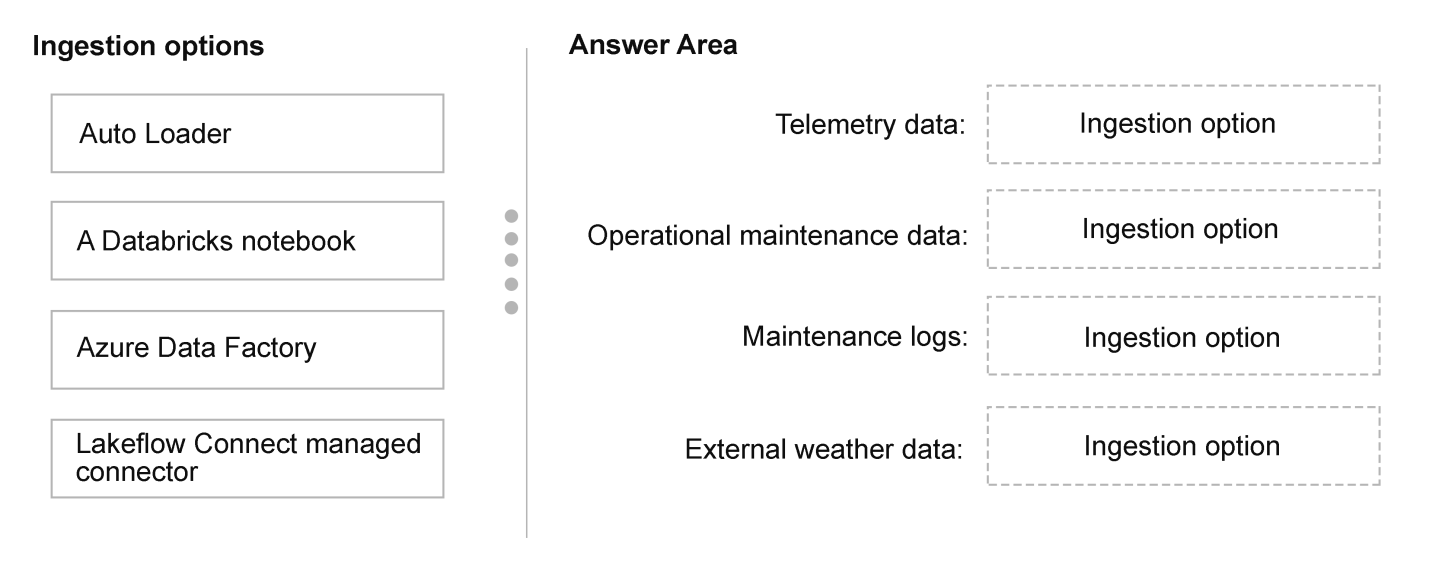
Drag Auto Loader to Telemetry data and Maintenance logs, Lakeflow Connect managed connector to Operational maintenance data, and A Databricks notebook to External weather data.
Question
This is a case study. Case studies are not timed separately from other exam sections. You can use as much exam time as you would like to complete each case study. However, there might be additional case studies or other exam sections. Manage your time to ensure that you can complete all the exam sections in the time provided. Pay attention to the Exam Progress at the top of the screen so you have sufficient time to complete any exam sections that follow this case study.
To answer the case study questions, you will need to reference information that is provided in the case. Case studies and associated questions might contain exhibits or other resources that provide more information about the scenario described in the case. Information provided in an individual question does not apply to the other questions in the case study.
A Review Screen will appear at the end of this case study. From the Review Screen, you can review and change your answers before you move to the next exam section. After you leave this case study, you will NOT be able to return to it.
To start the case study
To display the first question in this case study, select the “Next” button. To the left of the question, a menu provides links to information such as business requirements, the existing environment, and problem statements. Please read through all this information before answering any questions. When you are ready to answer a question, select the “Question” button to return to the question.
Overview
Company Information
Contoso, Inc. is a renewable energy provider that operates solar and wind farms across North America.
Existing Environment
Azure Environment
Contoso has a single Azure Databricks workspace named Workspace1 in the West US Azure region. Workspace1 is enabled for Unity Catalog.
Workspace1 contains all-purpose clusters for both development and production workloads.
The company's Azure environment contains:
In the West US, Central US, and East US Azure regions, Azure event hubs that stream telemetry data and an Azure Data Lake Storage Gen2 account in each region for each hub
A single Azure SQL database in the West US region that hosts enterprise resource planning (ERP) data
An Azure Database for PostgreSQL server in the West US region that stores operational maintenance data
Data Environment
Contoso ingests the following operational and business data:
Telemetry data: More than 40,000 IoT sensors across 28 sites emit JSON telemetry events every few seconds. Each site sends the events to the nearest event hub, which writes the data into the corresponding Data Lake Storage Gen2 account. These files frequently experience schema drift.
Maintenance logs: Maintenance systems generate historical repair logs, daily incremental updates, technician notes, and unstructured attachments that are stored in the Data Lake Storage Gen2 accounts.
Operational maintenance data: Structured operational maintenance data is stored on the Azure Database for PostgreSQL server.
External weather data: Hourly weather forecasts are retrieved from a REST API and written to the Data Lake Storage Gen2 accounts.
ERP data: Daily CSV extracts of 50 to 100 GB contain equipment metadata, work orders, and purchase order information.
Problem Statements
The company’s existing analytics environment has several issues:
Ingestion
Telemetry pipelines fall behind during peak loads.
Telemetry ingestion fails when schema drift occurs.
Streaming pipelines reprocess events after a pipeline restarts.
Compute
Production and development workloads run on the same all-purpose clusters.
Production and development workloads do NOT support autoscaling or workload isolation.
Governance
The ERP data is duplicated across systems and development teams.
Naming conventions are inconsistent across development teams, regions, and products.
Ownership of the IoT sensors changes over time, and analysts must track the full history of the ownership.
Occasionally, equipment manufacturers must correct data-entry mistakes in equipment names. Historical values are NOT required.
Pipeline operations
Pipelines lack resiliency, alerting, and centralized scheduling.
Requirements
Planned Changes
Contoso plans to implement the following changes:
Implement scalable data pipeline orchestration.
Create a managed analytics catalog in Unity Catalog.
Implement a consistent approach to creating curated datasets.
Establish a centralized governance model across ingestion, cleansed, and curated layers.
Grant data engineers access to the ERP tables by using minimal development effort.
Adopt a compute strategy that isolates production workloads and supports autoscaling.
Adopt a slowly changing dimension (SCD) approach to address current data modeling issues.
Technical Requirements
Contoso identifies the following environment and compute requirements:
Ensure that production ingestion workloads run on compute clusters that can scale automatically during telemetry spikes.
Provide fast and consistent performance for business intelligence (BI) workloads.
Prevent development activity from affecting production pipelines.
Production ingestion workloads must run as scheduled, non-interactive pipelines rather than on shared interactive development clusters.
Contoso identifies the following data ingestion and processing requirements:
Auto-scale ingestion pipelines to handle bursty workloads.
Handle schema drift for the maintenance and telemetry data.
Ingest file-based telemetry data by using minimal operational effort.
Store all the ingested data in a format that supports incremental processing.
Support the continuous ingestion of telemetry data from the event hubs by using exactly-once semantics.
Support the ingestion of the structured maintenance data from the Azure Database for PostgreSQL server.
Build a new telemetry pipeline that ingests raw events from the event hubs, cleanses the data, and publishes curated tables to Unity Catalog.
Ensure that the Apache Spark Structured Streaming pipelines reading from the event hubs write the data into a managed Delta table named telemetry.raw_events. The pipelines must support schema drift and resume processing after failures without reprocessing the data.
Contoso identifies the following data modeling and optimization requirements:
Build curated tables that standardize business logic.
Overwrite equipment metadata attributes, such as name, manufacturer, model, and commissioning date, when the attributes change. Historical values are NOT required.
Contoso identifies the following pipeline deployment and operation requirements:
Orchestrate multi-step ingestion and transformation workflows.
Define a clear execution order and dependencies.
Automatically retry failed steps and notify operators.
Schedule ingestion and transformation workloads consistently.
Governance Requirements
Contoso identifies the following governance requirements:
Centralize the metadata catalog.
Provide isolated development areas that follow standard naming conventions.
Establish a consistent structure for organizing raw, cleansed, and curated data.
Provide a read-only mechanism to reference the ERP data through a foreign catalog.
Business Requirements
Contoso identifies the following business requirements:
Improve ingestion reliability and reduce operational effort.
Standardize data definitions across development teams.
Which ingestion option should you recommend for each data source? To answer, drag the appropriate options to the correct data sources. Each option may be used once, more than once, or not at all. You may need to drag the split bar between panes or scroll to view content.
NOTE: Each correct selection is worth one point.
Key Takeaways
Tests selection of Databricks ingestion tools based on source type and schema-drift requirements; the trap is forcing one tool to fit all or confusing file-based ingestion with database connectors.
This DP-750 case study requires matching Contoso's four data sources to the correct Databricks ingestion options. The page confirms Auto Loader for telemetry and maintenance logs, Lakeflow Connect for operational maintenance data, and a Databricks notebook for external weather data.
Common mistake: A frequent error is choosing Azure Data Factory for the PostgreSQL source or a notebook for schema-drifting file sources, missing that Auto Loader is purpose-built for incremental file ingestion with schema evolution.
Expert Analysis
Why the Answer Is Correct
The case explicitly requires schema drift handling for maintenance and telemetry data, and both are file-based in ADLS Gen2. Auto Loader is Databricks' recommended solution for incremental file ingestion with schema evolution, so it fits both. For operational maintenance data from PostgreSQL, Lakeflow Connect managed connector provides a native, low-effort ingestion path. The external weather data is retrieved from a custom REST API, which is best handled by a Databricks notebook with dedicated HTTP logic.
Why Other Candidate Answers Are Wrong
Using Azure Data Factory for the PostgreSQL source adds an external orchestration service when Lakeflow Connect is the managed, in-platform option. Assigning a notebook to maintenance logs ignores the schema-drift requirement that Auto Loader directly addresses. Choosing Lakeflow Connect for external weather assumes a supported connector that the case does not confirm, whereas a notebook offers the flexibility needed for a custom API. Mixing these options would fail to meet the stated reliability and minimal-effort goals.
Community Comment Notes
Frazer1 posted a mapping that aligns with the case requirements, and their answer was upvoted, reflecting community consensus. DimaH offered an alternative with Azure Data Factory and a notebook for maintenance logs, but that contradicts the explicit schema-drift requirement. As Frazer1 noted, "Telemetry data → Auto Loader" and "Maintenance logs → Auto Loader" fit the need for schema evolution. The comments show that most learners recognize Auto Loader for file-based schema drift but may debate the weather and database sources.
Official Reference
- https://learn.microsoft.com/en-us/azure/databricks/ingestion/auto-loader/
- https://learn.microsoft.com/en-us/azure/databricks/ingestion/lakeflow-connect/
These links open the official vendor documentation in a new tab.
Exam Strategy
Read the requirements carefully: if schema drift is mentioned for file sources, choose Auto Loader. For database sources, prefer Lakeflow Connect over Azure Data Factory unless minimal effort is not required. For REST APIs, a notebook is usually the flexible answer.
Frequently Asked Questions
Why is Auto Loader recommended for both telemetry and maintenance logs?
Why not use Lakeflow Connect for external weather data?
Discussion 2 contributions
Compiled from public community threads and reader submissions, lightly edited for clarity. Handles and vote tallies are shown as recorded, and comments reflect the views of individual contributors.
From public community threads 2
-
Frazer1 👍 3Answer Telemetry data → Auto Loader Operational maintenance data → Lakeflow Connect managed connector Maintenance logs → Auto Loader External weather data → A Databricks notebook
-
DimaH 👍 1Telemetry data: Auto Loader Operational maintenance data: Azure Data Factory Maintenance logs: A Databricks notebook External weather data: Lakeflow Connect managed connector
Reader comments & corrections
No reader corrections yet — spotted an error or have a note? Share it below.