Running a deployment pipeline overwrites already-paired items with minimal effort
Short answer
D Because the items are already paired by name, running the deployment pipeline directly overwrites the corresponding target items with the least effort.
Question
Key Takeaways
Deployment pipelines overwrite only paired items during deployment; you do not need to delete or rename items in the target workspace to refresh the matched ones.
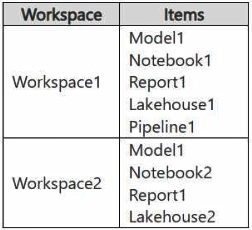
When items in the source and target workspaces are already paired by name, simply running the Fabric deployment pipeline overwrites the corresponding target items. This meets the overwrite requirement with the least effort and leaves unpaired target items untouched.
Common mistake: Deleting all items in the target workspace first, which is extra effort and also removes unpaired items that the requirement did not ask to delete.
Expert Analysis
Why the Answer Is Correct
Fabric deployment pipelines deploy items based on pairing. Items in the source workspace that share a name with items in the target workspace are already paired, so running the pipeline overwrites the corresponding target items. This satisfies 'ensure items in Workspace1 overwrite the corresponding items in Workspace2' with no extra steps, fulfilling the minimize-effort constraint.
Why the Other Options Are Wrong
Option A (delete all items in Workspace2 first) is far more effort and would also delete unpaired items not in scope. Option B (rename items) is unnecessary because the items are already paired by name. Option C (back up Workspace2) adds a step that does not help achieve the overwrite.
Community Comment Notes
Community voting strongly favors D (92). Comments note that minimal effort requires only running the pipeline, and that unpaired items in Workspace2 (such as a notebook only present there) are simply left unchanged.
Official Reference
https://learn.microsoft.com/en-us/fabric/cicd/deployment-pipelines/understand-the-deployment-process
This link opens the official vendor documentation in a new tab.
Community Votes
100% of anonymous learners picked answer D. Votes are pick records left by other test-takers — they are not the verified answer.
Discussion 6 contributions
Compiled from public community threads and reader submissions, lightly edited for clarity. Handles and vote tallies are shown as recorded, and comments reflect the views of individual contributors.
From public community threads 6
-
GHill1982 👍 4 Answered DThis requires minimal effort as it has no additional steps such as renaming of deleting items.
-
benni_ale 👍 3 Answered DGiven minimal effort is required deploying the deploymentpipeline is enough
-
Tuki93 👍 2 Answered DI believe the provided answer 'D' is correct.
-
Zoran_S 👍 1 Answered DI interpret it as, the items in Workspace1 that are paired with Workspace2 need to be overwritten. Those that are not paired remain the same. Therefore just run the deployPipeline1 and everything should be good. If I delete everything in Workspace2 and then run deployPipeline1 then it would be the same as to sync Workspace1 to Workspace2
-
giraf 👍 1 Answered ADuring deployment, notenook2 will not be deleted from Workspace2. So, you need to delete all items (or at least those not in Workspace1) and then run the pipeline.
Show 1 more comment
-
galacaw 👍 1 Answered Dhttps://learn.microsoft.com/en-us/fabric/cicd/deployment-pipelines/understand-the-deployment-process?tabs=new-ui#deployment-process
Reader comments & corrections
No reader corrections yet — spotted an error or have a note? Share it below.