Deployment Pipeline: Overwriting Paired Items in the Target Workspace
You have two Fabric workspaces named Workspace1 and Workspace2.
You have a Fabric deployment pipeline named deployPipeline1 that deploys items from Workspace1 to Workspace2. DeployPipeline1 contains all the items in Workspace1.
You recently modified the items in Workspaces1.
The workspaces currently contain the items shown in the following table.
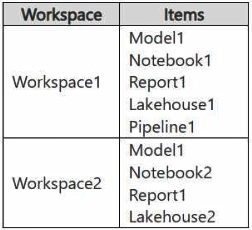 Items in Workspace1 that have the same name as items in Workspace2 are currently paired.
You need to ensure that the items in Workspace1 overwrite the corresponding items in Workspace2. The solution must minimize effort.
What should you do?
Items in Workspace1 that have the same name as items in Workspace2 are currently paired.
You need to ensure that the items in Workspace1 overwrite the corresponding items in Workspace2. The solution must minimize effort.
What should you do?
Community Insight
Tests whether you understand item pairing in Fabric deployment pipelines — paired items are overwritten in place, while unpaired ones are copied as new (clean deploy) items.
Fabric deployment pipelines overwrite already-paired items in the target stage when you deploy, so no manual cleanup of Workspace2 is required. The page confirms that simply running deployPipeline1 unchanged is the minimal-effort solution.
Choosing to delete or rename the items in Workspace2 first; those steps are only needed to remove or reconcile items that do not exist in the source, and they add effort the question explicitly asks you to avoid.
Community Discussion (12 comments)
Comments & Corrections
No comments yet — spotted an error or have a note? Share it below.
Expert Analysis
Why the Answer Is Correct
Fabric deployment pipelines compare the source stage with the target stage and, for every item that is paired, replace the target item's definition with the source item's definition during deployment. The question states that Workspace1 items sharing a name with Workspace2 items are already paired, so any modification made in Workspace1 is carried over to the corresponding Workspace2 item the moment deployPipeline1 runs. Nothing has to be renamed, deleted, restored or backed up first, which satisfies the "minimize effort" constraint exactly. Option D is therefore the only action required.Why the Other Options Are Wrong
Option A (deleting the items in Workspace2) is destructive and unnecessary: deleting a target item breaks its pairing, and a subsequent deployment would then be a clean deploy that recreates the item from scratch rather than an in-place overwrite. Option B (renaming items in Workspace2) addresses nothing — pairing is by item identity and type, and once items are paired the names are already aligned, so renaming only risks breaking the association. Option C (backing up Workspace2) is a prudent operational habit but not a technical requirement of the deployment and adds work without changing the deployment outcome. Option A is also motivated by a different goal — removing items that exist only in the target — which this scenario does not ask for.Community Comment Notes
Most learners converged on D. As exnaniantwort explains, pairing is what makes the overwrite happen: "A deploy of an unpaired item is known as a clean deploy" and creates a copy, so the pre-existing pairing in this scenario is the decisive detail. benni_ale and GHill1982 both stress that running the pipeline satisfies the minimal-effort requirement with no renaming or deleting. giraf argued for A because items unique to Workspace2 (such as an extra notebook) are not removed by deployment — true, but irrelevant here, since the requirement is only that Workspace1 items overwrite their counterparts. alqazqzy.asseel summarised the behaviour as name-based auto-merging for existing items plus creation of brand-new objects in the target.Note: the exhibit image could not be inspected, but the wording of the question (items with matching names are already paired) makes the pairing rule controlling.
Official Reference
Exam Strategy
When a scenario says items are already paired, the answer is almost always "just deploy" — look for the option with the fewest manual steps. Reserve delete/rename/backup options for questions that explicitly require removing items that exist only in the target stage.
Frequently Asked Questions
Why doesn't deployPipeline1 need Workspace2 items deleted or renamed first?
Because the items with matching names are already paired, deployment overwrites them in place. Deleting or renaming would break that pairing and force a clean deploy instead.
Does running deployPipeline1 remove items that exist only in Workspace2?
No. Items unique to the target stage stay untouched, and new source items are created as copies. The question only requires overwriting the corresponding items.