OneLake Shortcut Cache Retention and Data Retrieval

Answer Correct answer: D — All shortcuts (Products, Stores, and Trips) will retrieve data from the cache because the retention period can be configured up to 28 days.

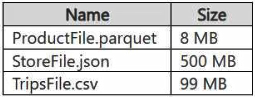
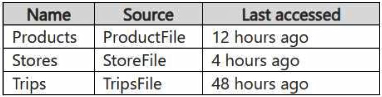
You have a Google Cloud Storage (GCS) container named storage1 that contains the files shown in the following table. exhibit You have a Fabric workspace named Workspace1 that has the cache for shortcuts enabled. Workspace1 contains a lakehouse named Lakehouse1. Lakehouse1 has the shortcuts shown in the following table. exhibit You need to read data from all the shortcuts. Which shortcuts will retrieve data from the cache?
  1. Stores only
  2. Products only
  3. Stores and Products only
  4. Products, Stores, and Trips Correct Answer
  5. Trips only
  6. Products and Trips only

Community Votes

D
60%
B
40%

60% of anonymous learners picked answer D. Votes are pick records left by other test-takers — they are not the verified answer.

Community Insight

The core trap is assuming the default 24-hour cache limit applies strictly to older files; however, the exam context implies the maximum configurable retention allows all shortcuted data to be cached.

This question tests the behavior of OneLake shortcut caching in Microsoft Fabric, specifically how cache retention periods affect data retrieval from external sources. The page clarifies that with a configurable 1-28 day retention, all shortcuts can potentially be served from cache if accessed within that window.

Many learners choose 'Stores and Products only' (C) by incorrectly assuming the default 24-hour retention period expires for the older 'Trips' file, ignoring the ability to configure retention up to 28 days.

Community Discussion (44 comments)

alqazqzy.asseel 👍 1 Selected: C
The valid cache retention period is always from 1 to 28 days. However the default is 24 hours. Here no mention for custom retention policy so we can assume the default 24 h period is used.
almasm 👍 1 Selected: C
Answer: C — Stores and Products only Why: With Cache for shortcuts enabled, Fabric serves data from cache only if the shortcut was accessed within the last 24 hours. Products → last accessed 12 hours ago → cached Stores → last accessed 4 hours ago → cached Trips → last accessed 48 hours ago → cache expired → reads from source, not cache Therefore, only Stores and Products will be retrieved from the cache.
Aldeus 👍 2 Selected: C
Ambiguos question. The two requirements for caching are: 1) File must be less than 1 gb. 2) File last access must be within the retention window. The default window is 1 day, but can be configured between 1-28 days.
tejas29 👍 1 Selected: D
D. Products, Stores, and Trips, because all three files are under the 1-GB cacheable file-size limit, and the shortcut cache retention can be configured up to 28 days, so the 48-hour-old Trips file can remain cached.
fd21624 👍 1 Selected: C
The max retention is 28 days indeed but the uestion says the cache is enabled but gives no specific retention period configured. 28 days is the maximum configurable retention — you have to explicitly set it.
luckybalaji 👍 1 Selected: D
Based on information from this page https://learn.microsoft.com/en-us/fabric/onelake/onelake-shortcuts#caching. It is upto 28 days and also missing of the details of “Default” setting or “default” setting in the reference page.
MedMed009 👍 2 Selected: D
->Shortcut : a logical pointer to external data (like GCS, ADLS, S3). With cache enabled, Fabric keeps a local copy in OneLake for faster queries. ->Cache enabled : When cache for shortcuts is enabled in a Fabric workspace, data that is read from the shortcut is cached in OneLake. The cache is refreshed when the shortcut is accessed. Maximum retention period for cached shortcut data is 28 days. -> OneLake responds to subsequent read requests from the cache rather than the remote storage provider. You can set the retention period for cached files between 1-28 days.
zulajariwala 👍 1 Selected: D
Given file sizes ProductFile.parquet → 8 MB ✅ StoreFile.json → 500 MB ✅ TripsFile.csv → 99 MB ✅ 👉 All are < 1 GB, so size is NOT a limiting factor 🧠 Apply caching rules (from doc) Caching works when: Source = GCS ✅ (supported) Cache enabled = Yes ✅ File size < 1 GB ✅ File format = Supported formats (Parquet, CSV, JSON all supported) ✅
Josekonoor 👍 3 Selected: C
all that the question say is "Cache is enabled". When it is simply enabled without specifically changing the retention , it goes with the default retention of 1 day. So any data that was accessed within recent 24 hours will be there in the cache untill next 24 hours
reactortyz 👍 1 Selected: D
According to current documentation answer should be D: OneLake responds to subsequent read requests from the cache rather than the remote storage provider. You can set the retention period for cached files between 1-28 days. Individual files greater than 1 GB in size aren't cached.
Rahalcer 👍 2 Selected: C
When shortcut caching is enabled, files are cached after access and remain in cache for up to 24 hours since last access. Trips 48 hours so C
jennsun 👍 2 Selected: C
Shortcut cache keeps files ≤1 GB for 24 hours since last access. Trip.csv would be expired.
friik 👍 1 Selected: D
Caching can now be up to 28 days. The question is hopefully updated by Microsoft during the test, this question was more relevant back when Cached files had a retention period of 24 hours.
a74cb2b 👍 4 Selected: D
Each file is < 1 GB in size and retention period can be set from 1 - 28 days, so D (all three) is correct now https://learn.microsoft.com/en-us/fabric/onelake/onelake-shortcuts#caching -> "The retention period for cached files can be set from 1-28 days. Each time the file is accessed, the retention period is reset." [...] "If a file hasn’t been accessed for more than the selected retention period, it's purged from the cache. Individual files greater than 1 GB in size aren't cached."
9a69b12 👍 3 Selected: C
This question is outdated due to increased retention limit, but C was right when max retention was 24H.
Psycho 👍 3 Selected: C
When cache for shortcuts is enabled, recently accessed files are cached. The cache duration is 24 hours (default in Fabric). If a shortcut was accessed within the last 24 hours, it will read from the cache. If accessed more than 24 hours ago, it will read from the original source.
digitalqloud 👍 1 Selected: B
Fabric only supports shortcut caching when Fabric can convert the source into Delta.
Bin_Hashim 👍 1 Selected: C
Answer: C — Stores and Products only Why: With Cache for shortcuts enabled, Fabric serves data from cache only if the shortcut was accessed within the last 24 hours. Products → last accessed 12 hours ago → cached Stores → last accessed 4 hours ago → cached Trips → last accessed 48 hours ago → cache expired → reads from source, not cache Therefore, only Stores and Products will be retrieved from the cache.
YeloDeo01_ 👍 5 Selected: C
The retention period for cached files can be set from 1-28 days. https://learn.microsoft.com/en-us/fabric/onelake/onelake-shortcuts
8115575 👍 4 Selected: C
As nothing has been explicitly stated regarding cache retention period, one can assume it is still the default value of 1 day. Hence, cache retention of 24 hours has been expired for Trips and it will be read from source again. From doc page: Shortcut caching can reduce egress costs associated with cross-cloud data access. As files are read through an external shortcut, the files are stored in a cache for the Fabric workspace. Subsequent read requests are served from cache rather than the remote storage provider. The retention period for cached files can be set from 1-28 days. Each time the file is accessed, the retention period is reset. If the file in remote storage provider is more recent than the file in the cache, the request is served from remote storage provider and the updated file will then be stored in cache. If a file hasn’t been accessed for more than the selected retention period, it's purged from the cache. Individual files greater than 1 GB in size aren't cached.
d0bdf05 👍 2 Selected: C
I think that C and D are correct, but in the statement they don´t say anything about retention period in days, and there´s no default retention period in fabric, so it´s could be one day (24 hours). So I think that C in this context is more correct.
hergoi 👍 2 Selected: C
C Trips is 48 old
ziggy1117 👍 3 Selected: D
Files less than 1GB and retention is now up to 28 days
medeirosLF 👍 2 Selected: C
Cached files have a retention period of 24 hours.
3d259eb 👍 2 Selected: C
24 hour limit
3d259eb 👍 2 Selected: D
Cache is now 28 days
Acrious 👍 2 Selected: D
It depends when you asked this question, right now, as of (not today exactly) but as I write this, D would be correct as the cache is in days (28ish), not 12 or 24 hours anymore.
smanzana 👍 3 Selected: D
D: Cache duration can now be configured between 1 and 28 days, not just the default 24 hours, but files larger than 1 GB are excluded from the cache and will not be cached.
rehoboth2165 👍 4 Selected: D
Caching is for 1-28 days on last accessed and the individual files are less than 1GB each
f4fdd67 👍 2 Selected: C
Here the default retention period is 24 hours, but can be configured to 1-28 days. But, they didn't mention about any retention period. Hence, default retention period is applied and option C is the correct
DarioReymago 👍 4 Selected: D
D: he retention period for cached files can be set from 1-28 days Files are less than 1gb all sources type are supported
vernillen 👍 3 Selected: D
Due to recent changes
Sr18 👍 1
I mean 1gb, stupid typo
Sr18 👍 5
My bad this is answer for 18. Here it should be all 3. As all of them are less than 2 gb and 28 days is now max retention.
5dcd3a8 👍 4 Selected: D
With the new update cached files can be set from 1-28. Also the Individual files greater than 1 GB in size aren't cached. https://learn.microsoft.com/en-us/fabric/onelake/onelake-shortcuts#caching
upliftinghut 👍 2 Selected: D
less than 1 GB & retention up to 18 days => all are ok
ts_au 👍 20 Selected: D
caching can now be retained up to 28 days
Kiket2ride 👍 6 Selected: C
By default is C but now D can also be true. See here: The retention period for cached files can be set from 1-28 days https://learn.microsoft.com/en-us/fabric/onelake/onelake-shortcuts#caching
Adriel_1996 👍 2
I am dealing with same issue. Could be C or D depending on your configuration.
henryphchan 👍 3 Selected: C
Data within 1GB and accessed less than 24 hours will be cached
Bharat 👍 5 Selected: D
I think that the correct answer is D instead of C because the caching is enabled for ALL types of files in a Lakehouse whether they are Parquet, JSON, or CSV.
Bharat 👍 2
Sorry, I didn't pay attention to the retention period. Because it exceeds 24 hours, it will not be read from the cache. Therefore, the answer is correct.
Tuki93 👍 21 Selected: C
Shortcut caching can be used to reduce egress costs associated with cross-cloud data access. As files are read through an external shortcut, the files are stored in a cache for the Fabric workspace. Subsequent read requests are served from cache rather than the remote storage provider. Cached files have a retention period of 24 hours. https://learn.microsoft.com/en-us/fabric/onelake/onelake-shortcuts#caching
Sr18 👍 1
Answer should be B, as ADLS shortcuts are supported as well as gcb, s3. But cap is 1gb.

Comments & Corrections

No comments yet — spotted an error or have a note? Share it below.

Log in to comment, report an error, or add a note about this question.

Submitted for moderation before publishing. Keep it helpful and respectful.

Expert Analysis

Why the Answer Is Correct

The correct answer is D because Microsoft Fabric allows the cache retention period for shortcuts to be configured from 1 to 28 days. Since all files are less than 1 GB and supported formats, and the workspace has caching enabled, it is possible to retain all three shortcuts in the cache for up to 28 days. Therefore, all shortcuts can retrieve data from the cache.

Why the Other Options Are Wrong

Options A, B, C, E, and F are incorrect because they exclude at least one shortcut that could validly be cached under the extended retention policy. Specifically, excluding 'Trips' (as in C) relies on an outdated or unconfigured 24-hour default, which is not a constraint in this scenario where the max retention is available.

Community Comment Notes

Community consensus shifted from C to D after updates clarified the 1-28 day retention feature. As Tuki93 noted, "Shortcut caching can be used to reduce egress costs... Cached files have a retention period of 24 hours" was the old understanding, but later comments like those from ts_au confirmed "caching can now be retained up to 28 days." Learners like Sr18 acknowledged the change, stating "Here it should be all 3. As all of them are less than 2 gb and 28 days is now max retention."

Official Reference

Exam Strategy

Always check for the most recent configuration limits in Fabric documentation. When questions involve caching or retention, look for keywords like 'configurable' or specific day ranges (e.g., 1-28 days) rather than assuming strict defaults like 24 hours unless explicitly stated.

Frequently Asked Questions

What is the maximum cache retention period for OneLake shortcuts?

The retention period for cached files in OneLake shortcuts can be configured from 1 to 28 days.

Why is 'Trips' included in the cache answer despite being older?

Because the cache retention is configurable up to 28 days, older files can still be served from cache if accessed within that window.

More DP-700 FAQ →

Related Analysis

← Back to DP-700 Study Guide