Cache serves Products and Stores but Trips expired after 48 hours without access
Short answer
C Products and Stores were accessed within the 24-hour cache retention, while Trips was last accessed 48 hours ago, so only they are served from cache.
Question
 -
- 
Key Takeaways
Shortcut caching eligibility depends on source type (GCS/S3 supported), file size (up to 1 GB), and cache retention (24 hours by default); a cached file not accessed within the retention window is evicted.
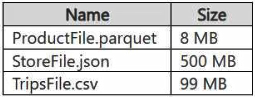
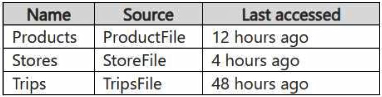
With shortcut caching enabled, GCS files under 1 GB that were read within the cache retention period are served from cache: ProductFile (8 MB, accessed 12 hours ago) and StoreFile (500 MB, 4 hours ago) hit the cache, while TripsFile (99 MB) was last accessed 48 hours ago, beyond the default 24-hour retention, so it re-reads from Google Cloud Storage.
Common mistake: Checking only the source type or file size and forgetting the 24-hour retention: TripsFile is small and on a supported GCS source, but 48 hours since last access means the cached copy expired.
Expert Analysis
Why the Answer Is Correct
All three shortcuts point to files in a GCS container, a supported caching source, and all files are under the 1 GB caching limit (8 MB, 500 MB, 99 MB). The discriminator is retention: cached files are kept for a retention period (24 hours by default) and subsequent reads within that window are served from cache. ProductFile was accessed 12 hours ago and StoreFile 4 hours ago, so both are still cached; TripsFile was last accessed 48 hours ago, beyond the default 24-hour retention, so its cached copy expired and reading it fetches from Google Cloud Storage.
Why the Other Options Are Wrong
Options A, B, and E each drop one of the two still-cached shortcuts. Option D (all three) ignores the retention window - TripsFile's cache entry expired after 48 hours without access.
Community Comment Notes
The community strongly favors C (90). Tuki93 (14 likes) cites the shortcuts documentation stating cached files have a 24-hour retention period, and henryphchan summarizes the rule as files under 1 GB accessed within 24 hours are cached. Kiket2ride notes retention is now configurable from 1 to 28 days, but the workspace here only says caching is enabled, so the 24-hour default applies.
Official Reference
https://learn.microsoft.com/en-us/fabric/onelake/onelake-shortcuts
This link opens the official vendor documentation in a new tab.
Community Votes
100% of anonymous learners picked answer C. Votes are pick records left by other test-takers — they are not the verified answer.
Discussion 4 contributions
Compiled from public community threads and reader submissions, lightly edited for clarity. Handles and vote tallies are shown as recorded, and comments reflect the views of individual contributors.
From public community threads 4
-
Tuki93 👍 14 Answered CShortcut caching can be used to reduce egress costs associated with cross-cloud data access. As files are read through an external shortcut, the files are stored in a cache for the Fabric workspace. Subsequent read requests are served from cache rather than the remote storage provider. Cached files have a retention period of 24 hours. https://learn.microsoft.com/en-us/fabric/onelake/onelake-shortcuts#caching
-
Kiket2ride 👍 2 Answered CBy default is C but now D can also be true. See here: The retention period for cached files can be set from 1-28 days https://learn.microsoft.com/en-us/fabric/onelake/onelake-shortcuts#caching
-
Bharat 👍 2 Answered DI think that the correct answer is D instead of C because the caching is enabled for ALL types of files in a Lakehouse whether they are Parquet, JSON, or CSV.
-
henryphchan 👍 2 Answered CData within 1GB and accessed less than 24 hours will be cached
Reader comments & corrections
No reader corrections yet — spotted an error or have a note? Share it below.