Choosing Starter Pool vs Custom Spark Pool per Notebook
Short answer
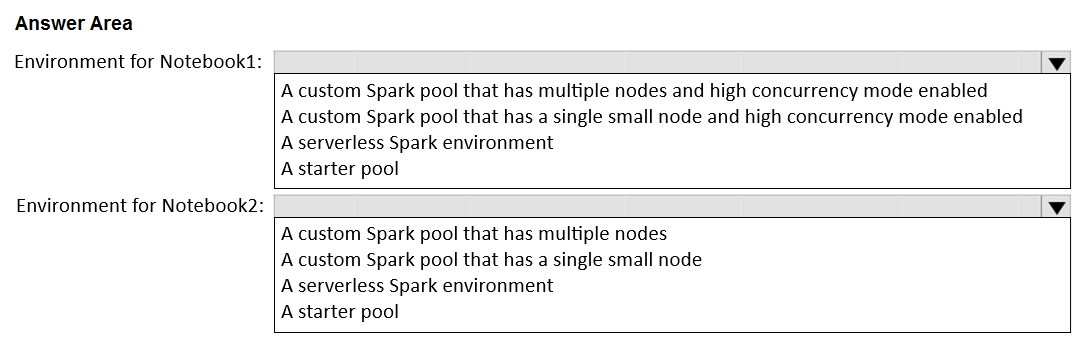
Environment for Notebook1: a Starter pool (serverless Spark environment), since scheduled jobs pay only for consumed compute. Environment for Notebook2: a custom Spark pool with multiple nodes, so many concurrent interactive sessions can run.
Question
You have a Fabric workspace.
You plan to deploy two Apache Spark environments that will each contain one of the following notebooks:
• Notebook1: A data ingestion notebook that will run as a scheduled Spark job
• Notebook2: An ad hoc notebook for interactive data analysis that will be used by a team of analysts and data scientists
You need to configure the Spark environments to meet the following requirements:
• For the environment that contains Notebook1, minimize compute costs.
• For the environment that contains Notebook2, support multiple concurrent users.
What should you use for each environment? To answer, select the appropriate options in the answer area.
NOTE: Each correct selection is worth one point.
Key Takeaways
It tests matching Spark environment types to workload patterns; the trap is believing Fabric has no serverless Spark option or defaulting a batch job to a paid custom pool.
This DP-700 hotspot tests Microsoft Fabric Spark environment selection: a scheduled, cost-sensitive ingestion notebook belongs on the serverless Starter pool, while a shared ad hoc analysis notebook belongs on a multi-node custom Spark pool for concurrency.
Common mistake: Selecting a custom multi-node pool for both environments (or claiming Fabric has no serverless Spark). That inflates the scheduled job's cost and ignores that the Starter environment is Fabric's serverless option, billed only for compute actually used.
Expert Analysis
The scenario being tested
This hotspot pairs a Fabric environment type with a workload pattern. Notebook1 runs as a scheduled Spark job — it starts, executes, and stops with no human waiting on an interactive session — so the priority is the lowest possible idle and per-session cost. Notebook2 is shared by analysts and data scientists doing ad hoc work, so the priority is concurrent session capacity, not price.
Environment for Notebook1: a Starter pool (serverless Spark)
Fabric's Starter environment is provisioned automatically on the workspace's default serverless Spark capacity. It has no fixed cluster you pay to keep warm, jobs bill only for the compute actually consumed, and there is no administrative overhead of maintaining an attached pool. For a fire-and-forget scheduled notebook that is exactly the low-cost profile. A comment arguing that "Microsoft Fabric doesn't have serverless Spark environment" is a misreading: the Starter environment is precisely Fabric's serverless Spark offering.
Environment for Notebook2: a custom Spark pool with multiple nodes
Ad hoc interactive analysis by a team means several sessions must run side by side. A Starter pool is shared and can throttle under concurrent demand, so the environment should attach a custom Spark pool sized with multiple worker nodes (and enough cores and memory per node) so that many notebooks and clusters can be launched simultaneously without queuing.
The adjacent decision that flips the answer
If Notebook1 needed high-volume, continuously running ingestion with libraries or job clusters held for hours, the cost logic would reverse and a fixed custom pool attached to the environment would be cheaper than repeated serverless cold starts. Likewise, if Notebook2 were a single analyst's occasional notebook, a Starter environment would suffice and the multi-node pool would be wasted spend.
Operational consequence of getting it wrong
Attaching a multi-node custom pool to the scheduled ingestion environment raises cost for no benefit; leaving the analysts on the Starter environment produces session contention, slow starts and abandoned work. Note also that the custom pool must be attached to the environment and the environment attached to the workspace — configuring the pool alone changes nothing.
Official Reference
https://learn.microsoft.com/en-us/fabric/data-engineering/create-and-use-environment
This link opens the official vendor documentation in a new tab.
Exam Strategy
Read each half of the hotspot as an independent mini-question: match one notebook to one environment type. Rank the stated constraint first (cost vs concurrency), map cost to the serverless Starter pool and concurrency to a sized custom pool, and avoid assuming an environment works without attaching the pool to it and the environment to the workspace.
Frequently Asked Questions
Does Microsoft Fabric really offer serverless Spark for notebooks?
Why not use a Starter pool for the analysts' ad hoc notebooks?
Does creating a custom Spark pool automatically make notebooks use it?
Discussion 4 contributions
Compiled from public community threads and reader submissions, lightly edited for clarity. Handles and vote tallies are shown as recorded, and comments reflect the views of individual contributors.
From public community threads 4
-
Beshko 👍 3I believe Starter pool and Custom Spark pool that has multiple nodes is the right choice here.
-
Beshko 👍 3I changed my mind, the serverless is better when it comes to minimizing costs.
-
Eva_rou 👍 1Environment for Notebook1: A serverless Spark environment Environment for Notebook2: A custom Spark pool that has multiple nodes
-
examgang 👍 1Microsoft Fabric doesnt have serverless Spark environment. So first one is small node pool and second multiple nodes
Reader comments & corrections
No reader corrections yet — spotted an error or have a note? Share it below.