Does Replacing > 0 with >= 0 Optimize DAX Query Performance?
Short answer
B Replacing > 0 with >= 0 changes the query logic but does not reduce execution time.
Question
Key Takeaways
This question tests DAX performance optimization; the common trap is confusing a logical filter change with a performance improvement.
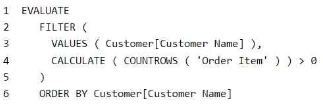
Replacing a greater-than-zero condition with greater-than-or-equal-to-zero in a DAX CALCULATE function alters the query logic but does not improve execution time. This page confirms that the proposed solution does not meet the performance optimization goal.
Common mistake: Choosing 'Yes' because the code modification executes without error, ignoring that it changes the business logic without reducing execution time.
Expert Analysis
Why the Answer Is Correct
The correct answer is No because the proposed solution changes the filter logic from> 0 to >= 0, which includes customers with zero orders. This alters the query's output and does nothing to optimize the DAX engine's execution plan or reduce the execution time. Performance optimization requires reducing computational load, not changing the filter criteria to be less restrictive.Why the Other Options Are Wrong
Option A ("Yes") is incorrect because it assumes that modifying the filter condition inherently improves performance. Adding an equals sign simply broadens the result set; it does not speed up how the VertiPaq engine resolves the CALCULATE function. The query still has to evaluate the same relationships and table scans.Community Comment Notes
The community unanimously agrees that the solution fails to meet the goal. As user VAzureD noted, "By adding the = the only thing we achieve is changing the logic, not the performance." User 282b85d also pointed out that it "does not correctly filter out customers without orders and does not provide an optimization in terms of performance."Official Reference
https://learn.microsoft.com/en-us/power-bi/guidance/dax-optimizations
This link opens the official vendor documentation in a new tab.
Exam Strategy
When evaluating DAX optimization solutions, strictly separate logic changes from performance improvements. If the proposed code alters the filter context or result set without reducing computational complexity, it does not meet a performance optimization goal.
Community Votes
100% of anonymous learners picked answer B. Votes are pick records left by other test-takers — they are not the verified answer.
Discussion 7 contributions
Compiled from public community threads and reader submissions, lightly edited for clarity. Handles and vote tallies are shown as recorded, and comments reflect the views of individual contributors, not of islever. The comments shown first are the most substantive of the thread — ranked by depth, community endorsement and relevance; expand the list below to read the rest.
From public community threads 7
-
282b85d 👍 8 Answered BThe provided solution does not meet the goal as it does not correctly filter out customers without orders and does not provide an optimization in terms of performance.
-
VAzureD 👍 4 Answered BNo. By adding the = the only thing we achieve is changing the logic, not the performance.
-
bigdave987 👍 3 Answered BNo, adding the = does not improve performance.
-
stilferx 👍 3 Answered BIMHO, NO, as below in comments
-
Test_1132 👍 13No - Good luck everyone :)
Show 2 more comments
-
b6daab0 👍 4A silly question..
-
Mitchell12345 👍 3Well, we made it boys!
Reader comments & corrections
No reader corrections yet — spotted an error or have a note? Share it below.
Related Analysis
Practice All DP-600 Questions
Access 115 questions with complete answers and detailed explanations.
View Full DP-600 Practice Test →