Optimizing DAX Query Performance with NOT ISEMPTY
Short answer
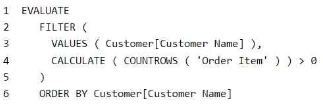
A Replacing COUNTROWS with NOT ISEMPTY CALCULATETABLE reduces execution time by performing a more efficient existence check rather than a full row count.
Question
Key Takeaways
The question tests the ability to optimize DAX expressions; the trap is assuming COUNTROWS is efficient for simple existence checks, whereas EXISTS-style logic is superior.
This page explains why replacing COUNTROWS with NOT ISEMPTY CALCULATETABLE improves DAX query performance by avoiding full aggregation overhead. It establishes that checking for row existence is faster than counting all matching rows.
Common mistake: Many learners select 'No' due to perceived syntax errors or confusion about CALCULATETABLE behavior, but the solution is a valid and optimized pattern.
Expert Analysis
Why the Answer Is Correct
The proposed solution replacesCALCULATE(COUNTROWS('Order Item')) > 0 with NOT ISEMPTY(CALCULATETABLE('Order Item')). This is a recognized optimization technique in DAX because ISEMPTY (often referred to as an EXISTS check) stops evaluation as soon as it finds one matching row, whereas COUNTROWS must scan and count every single matching row to return the total. By avoiding the aggregation of the entire result set, execution time is significantly reduced, especially on large datasets.Why the Other Options Are Wrong
Selecting 'No' would imply the solution does not meet the goal. While some users questioned the syntax (e.g., missing parentheses around NOT), in standard DAX practice,NOT ISEMPTY(...) is valid and widely used. The core logic correctly shifts from a counting operation to a boolean existence check, which directly addresses the performance bottleneck described.Community Comment Notes
Community consensus strongly supports Option A, with many noting that this pattern acts like SQL's EXISTS. Users highlighted that aggregations like COUNTROWS are computationally intensive compared to simple existence checks. One user noted the efficiency gain scales with data size, confirming the performance benefit.Official Reference
https://www.sqlbi.com/articles/check-empty-table-condition-with-dax/
This link opens the official vendor documentation in a new tab.
Exam Strategy
When optimizing DAX queries involving filters, prefer functions that short-circuit or check existence (like ISEMPTY or HASONEVALUE) over those that aggregate entire sets (like COUNTROWS or SUMX) when you only need a true/false result.
Frequently Asked Questions
Is NOT ISEMPTY(CALCULATETABLE(...)) valid DAX syntax?
Why is COUNTROWS slower than ISEMPTY?
Community Votes
84% of anonymous learners picked answer A. Votes are pick records left by other test-takers — they are not the verified answer.
Discussion 10 contributions
Compiled from public community threads and reader submissions, lightly edited for clarity. Handles and vote tallies are shown as recorded, and comments reflect the views of individual contributors.
From public community threads 10
-
282b85d 👍 11 Answered AThe original query uses the COUNTROWS function inside a CALCULATE function to count the number of rows in the 'Order Item' table. This approach can be inefficient because it involves counting rows even if just one row exists, which might be resource-intensive especially with large datasets. The suggested solution NOT ISEMPTY ( CALCULATETABLE ( 'Order Item' ) ) simplifies the logic to check if the 'Order Item' table related to the customer is empty or not. This approach can be faster as it stops as soon as it finds one row, rather than counting all rows.
-
hello2tomoki 👍 4 Answered AYes, replacing CALCULATE ( COUNTROWS( 'Order Item' ) ) > 0 with NOT ISEMPTY ( CALCULATETABLE ( 'Order Item ' ) ) should reduce the execution time of the query. It is a simpler, more meaningful, and faster way to check if a table is empty. https://www.sqlbi.com/articles/check-empty-table-condition-with-dax/
-
neoverma 👍 4 Answered Bisnt the syntax incorrect? NOT(ISEMPTY(Calculate ... there should be a ( after NOT
-
bigdave987 👍 3 Answered AYes. Answer is correct. CALCULATETABLE will accept the row context for each of the rows returned by VALUES, and in turn NOT ISEMPTY will check if the calculated table has rows. This is like using EXISTS in T-SQL. It will check if any rows exists, but doesn't return rows, thus improving performance.
-
andrewkravchuk97 👍 2answer is correct. its faster because it only needs to check if at least one row exists that meets the filter criteria, rather than counting all rows that do.
Show 5 more comments
-
dp600 👍 2 Answered AIt's correct, it returns the ones with values (not isempty).
-
nappi1 👍 1 Answered AThinking about the option in SQL-like terms, we filter out the customers without the need for an aggregation step, but by using a boolean condition after a join. Aggregations are generally one of the most computationally intensive operations, so I expect the performance to diverge as the fact table grows. Indeed, when running the DAX code, the SQL queries executed by the PBI engine underneath are:
-
klashxx 👍 1A — The proposed solution improves efficiency by reducing the number of calculations required. Instead of counting all the rows for each customer and then checking if the count is greater than zero, it simply checks if there are any rows at all, which requires fewer computational resources and execution time
-
stilferx 👍 1IMHO, YES, Because IS NOT EMPTY replicates the logic
-
Test_1132 👍 1what if order item is negative?
Reader comments & corrections
No reader corrections yet — spotted an error or have a note? Share it below.
Related Analysis
Practice All DP-600 Questions
Access 115 questions with complete answers and detailed explanations.
View Full DP-600 Practice Test →