Optimizing DAX Queries with ISEMPTY in Fabric
Short answer
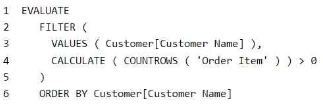
B The solution does not meet the goal because ISEMPTY returns TRUE for empty tables, inverting the expected filter logic for non-empty related items.
Question
Key Takeaways
The core concept is using ISEMPTY for efficient row existence checks; the trap is confusing the boolean return value of ISEMPTY with the desired filter logic (empty vs. not empty).
This question tests the correct use of the ISEMPTY function in DAX to optimize query performance on semantic models. The proposed solution fails because it reverses the logical condition required for the filter context.
Common mistake: Learners often select 'Yes' because they recognize ISEMPTY as a valid, fast function, but fail to realize that wrapping it directly in a filter argument without NOT inverts the result, showing empty tables instead of populated ones.
Expert Analysis
Why the Answer Is Correct
The correct answer is B (No) because the proposed codeISEMPTY( RELATEDTABLE('Order Item') ) returns TRUE when the related table is empty and FALSE when it has rows. In a typical filtering scenario aimed at finding records with associated items, you need to keep rows where the table is NOT empty. Therefore, the logic is inverted.Why the Other Options Are Wrong
Option A is incorrect because the solution does not meet the goal of reducing execution time while maintaining correctness; it produces wrong results. Even if performance were improved by using ISEMPTY over COUNTROWS, the data output would be incorrect due to the missing NOT operator.Community Comment Notes
The community consensus strongly supports Option B. Users like Chrys941 and Lucetmi noted that "NOT ISEMPTY" is the required syntax. Bigdave987 pointed out that the current logic shows where COUNTROWS equals zero, which is the opposite of the likely intent. Stilferx also confirmed that "NOT EMPTY" is needed to preserve the original meaning.Exam Strategy
When optimizing DAX queries, always verify the logical outcome of your functions. If replacing a slow function like COUNTROWS with a faster one like ISEMPTY, ensure you apply the necessary boolean operators (NOT) to maintain the correct filter semantics.
Frequently Asked Questions
Why is ISEMPTY faster than COUNTROWS?
ISEMPTY checks for the existence of any row without counting them, which avoids aggregation overhead.
How do I fix the ISEMPTY logic error?
Wrap the function in NOT, e.g., NOT ISEMPTY(...), to keep rows where the table is not empty.
Community Votes
100% of anonymous learners picked answer B. Votes are pick records left by other test-takers — they are not the verified answer.
Discussion 8 contributions
Compiled from public community threads and reader submissions, lightly edited for clarity. Handles and vote tallies are shown as recorded, and comments reflect the views of individual contributors, not of islever. The comments shown first are the most substantive of the thread — ranked by depth, community endorsement and relevance; expand the list below to read the rest.
From public community threads 8
-
klashxx 👍 2B is correct (NO) because the suggested change does not meet the goal because it reverses the logic of the query.
-
bigdave987 👍 2 Answered BNo. The suggested logic would show where COUNTROWS = 0, not > 0. Answer is correct
-
Mr_Fabricator 👍 2Hence the answer B is only correct!!
-
Unbounded 👍 1 Answered AI think, CALCULATE would take more processing time than using a native FUNCTION like ISEMPTY
-
stilferx 👍 1 Answered BIMHO, No It should be NOT EMPTY, to have same meaning
Show 3 more comments
-
Chrys941 👍 4 Answered BNOT ISEMPTY IS THE CORRECT.
-
Lucetmi 👍 2 Answered BShould be NOT ISEMPTY
-
VAzureD 👍 1The answers is correct
Reader comments & corrections
No reader corrections yet — spotted an error or have a note? Share it below.
Related Analysis
Practice All DP-600 Questions
Access 115 questions with complete answers and detailed explanations.
View Full DP-600 Practice Test →