Continuous Percentile Calculation in Fabric Eventstreams
Short answer
D Add an Aggregate transformation to Eventstream1 to enable continuous percentile calculations on the Payload column using built-in statistical functions.
Question
Eventstream1 reads data from an Azure event hub named Eventhub1.
Eventhub1 contains the following columns.
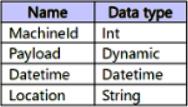
You need to add a continuous percentile calculation to the Payload column. The solution must minimize development effort.
What should you do?
Key Takeaways
The question tests knowledge of Fabric Eventstream transformations, specifically distinguishing between field management, grouping, and aggregation. The trap is confusing KQL (for querying stored data) with Eventstream transformations (for real-time processing).
To add a continuous percentile calculation to a Payload column in a Fabric Eventstream, you should add an Aggregate transformation. This minimizes development effort by leveraging native statistical functions.
Common mistake: Candidates might choose 'Add a KQL queryset' because KQL is powerful for analytics. However, KQL queries are executed against data in OneLake/Eventhouse, not as a transformation step within the Eventstream itself during ingestion.
Expert Analysis
The scenario requires adding a continuous percentile calculation to the Payload column within an Eventstream1 that ingests data from an Azure Event Hub. The key constraint is minimizing development effort while performing real-time statistical analysis on streaming data.
In Microsoft Fabric, Eventstreams support various transformations to process data in motion. Among these, the Aggregate transformation is specifically designed for computing statistics such as sum, count, average, min, max, and percentiles over time windows or continuously. It provides native functions for percentile calculations (e.g., P50, P90, P95) directly within the stream processing pipeline. This allows for real-time insights without requiring downstream batch processing or complex custom code.
Let's evaluate the options:
- A. Add a KQL queryset: Kusto Query Language (KQL) is used for querying data stored in OneLake tables or Eventhouse instances, not for transforming data within the Eventstream itself. While KQL can calculate percentiles, it operates on historical or landed data, not as a continuous transformation step inside the streaming ingestion path defined by the Eventstream.
- B. Add a Group by transformation: The Group By transformation is typically used for aggregating data into buckets based on specific keys, often for joining or shaping data. While it can involve aggregation, the specific feature for statistical metrics like percentiles in a streaming context is more directly handled by the Aggregate transformation which offers built-in percentile functions optimized for this use case.
- C. Add a Manage fields transformation: This transformation is limited to adding, removing, renaming, or changing the data types of columns. It does not perform any mathematical or statistical calculations.
- D. Add an Aggregate transformation: This is the correct choice. The Aggregate transformation in Fabric Eventstreams supports continuous percentile calculations. It is designed to compute statistical summaries over incoming data streams with minimal configuration, aligning perfectly with the requirement to minimize development effort.
Therefore, adding an Aggregate transformation to Eventstream1 is the most efficient and appropriate method to achieve a continuous percentile calculation on the Payload column.
Official Reference
https://learn.microsoft.com/en-us/fabric/data-engineering/event-streams
This link opens the official vendor documentation in a new tab.
Exam Strategy
When dealing with Fabric Eventstreams, always distinguish between transformations applied during ingestion (like Aggregate, Group By, Manage Fields) and queries applied after landing (like KQL). For real-time statistical metrics like percentiles, averages, or sums within the stream, the Aggregate transformation is the primary tool. Remember that 'minimize development effort' usually points towards built-in features rather than custom code or complex post-processing steps.
Frequently Asked Questions
What is the difference between Group By and Aggregate transformation in Eventstreams?
Can I use KQL to calculate percentiles in an Eventstream?
Community Votes
66% of anonymous learners picked answer D. Votes are pick records left by other test-takers — they are not the verified answer.
Discussion 6 contributions
Compiled from public community threads and reader submissions, lightly edited for clarity. Handles and vote tallies are shown as recorded, and comments reflect the views of individual contributors.
From public community threads 6
-
Adi618 👍 1 Answered DD. Add an Aggregate transformation to Eventstream1 Here's why this is the best choice: Aggregate transformation is specifically designed for statistical calculations like percentiles: Built-in percentile functions - Provides native support for percentile calculations (P50, P90, P95, P99, etc.) Continuous processing - Works with streaming data to provide real-time percentile calculations Minimal effort - No-code/low-code interface within the eventstream designer Direct integration - Works seamlessly within the existing eventstream flow Why other options require more effort: A. Add a KQL queryset - This would require: Writing custom KQL code Additional development and testing More complex setup outside the eventstream Higher maintenance overhead
-
Aiden90 👍 1 Answered DD. Add an Aggregate transformation to Eventstream1 Aggregate transformations in Fabric allow functions like avg, sum, min, max, percentile on a column. Since your Payload column is dynamic, Fabric can parse numeric values from dynamic columns if needed. This is the simplest way to calculate continuous percentiles directly within the eventstream. A. Add a KQL queryset to Workspace1 KQL (Kusto Query Language) can calculate percentiles, including continuous percentiles, with the percentile() or percentile_cont() function. This approach would work if you are allowed to query the eventstream with KQL. However, the question emphasizes minimizing development effort inside the eventstream itself, not post-query.
-
f69e51a 👍 1 Answered BA. Add a KQL queryset ❌ It queries data after it lands in an Eventhouse. It can calculate percentiles, but it isn’t a continuous calculation inside the stream, and it’s more work. B. Group by transformation ✅ Offers Percentile (continuous) over time windows, configured with no code. C. Manage fields transformation ❌ Only adds, removes, renames or retypes fields. No statistics. D. Aggregate transformation ❌ (the trap) Its name sounds right, but it only supports Sum, Minimum, Maximum and Average as running calculations. No percentile.
-
kaushikcbs 👍 1 Answered DAdd an aggregate transformation to event stream
-
maquint 👍 1 Answered Apercentile(expr, percentile)
Show 1 more comment
-
Sowwy1 👍 1 Answered DI think it s D
Reader comments & corrections
No reader corrections yet — spotted an error or have a note? Share it below.
Related Analysis
Practice All DP-600 Questions
Access 115 questions with complete answers and detailed explanations.
View Full DP-600 Practice Test →