Does this Azure SQL Database firewall rule solution meet the goal?
Note: This question is part of a series of questions that present the same scenario. Each question in the series contains a unique solution that might meet the stated goals. Some question sets might have more than one correct solution, while others might not have a correct solution. After you answer a question in this section, you will NOT be able to return to it. As a result, these questions will not appear in the review screen. You have the on-premises networks shown in the following table. You have an Azure subscription that contains an Azure SQL Database server named SQL1. SQL1 contains two databases named DB1 and DB2. You need to configure access to DB1 and DB2. The solution must meet the following requirements: • Ensure that DB1 can be accessed only by users in Branch1. • Ensure that DB2 can be accessed only by users in Branch2. Solution: You connect to DB1 and run the following command. EXECUTE sp_set_firewall_rule ‘Allow db1 users’, ‘131.107.10.0’, ‘131.107.10.255’ You connect to DB2 and run the following command. EXECUTE sp_set_database_firewall_rule ‘Allow db2 users’, ‘131.107.11.0’, ‘131.107.11.255’ Does this meet the goal? - 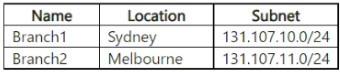
Community Votes
100% of anonymous learners picked answer B. Votes are pick records left by other test-takers — they are not the verified answer.
Community Insight
The exam tests whether you can distinguish between sp_set_firewall_rule (server-level, applies to all databases) and sp_set_database_firewall_rule (database-specific); the trap is assuming either command works when connected to a user database.
This question tests your understanding of server-level vs. database-level firewall rules in Azure SQL Database. The community unanimously agrees the answer is No because the solution incorrectly uses a server-level firewall rule for DB1.
Many candidates choose 'Yes' because the IP ranges appear correctly scoped, overlooking that sp_set_firewall_rule is a server-level stored procedure that must be executed against the master database and applies to all databases on the server.
Community Discussion (3 comments)
Comments & Corrections
No comments yet — spotted an error or have a note? Share it below.
Expert Analysis
Why the Answer Is Correct
The correct answer is B (No) because the solution usessp_set_firewall_rule for DB1, which is a server-level firewall rule. Server-level firewall rules are configured on the master database and apply to all databases on the Azure SQL logical server. This means DB1's rule would also grant Branch1 users access to DB2, violating the requirement that DB2 be accessible only by Branch2 users. As community member [2] points out, running this command while connected to a user database will actually throw an error: Msg 5001, Level 16, State 5... User must be in the master database.Why the Other Options Are Wrong
Option A (Yes) is incorrect because it ignores the fundamental difference between server-level and database-level firewall rules. Even if the command succeeded, a server-level rule on DB1 would not restrict access to DB1 alone — it would open the entire server to the specified IP range. The correct solution requires usingsp_set_database_firewall_rule for both DB1 and DB2, as noted by community members [1] and [3].Community Comment Notes
The community is in 100% agreement that the answer is No. Comment [1] correctly identifies thatsp_set_database_firewall_rule should have been used for DB1. Comment [2] adds valuable technical depth by noting the command would actually fail with an error if run from a user database context. Comment [3] clearly explains the security implication: a server-level rule allows access to all databases, breaking the isolation requirement. Official Reference
- https://learn.microsoft.com/en-us/azure/azure-sql/database/firewall-configure
- https://learn.microsoft.com/en-us/sql/relational-databases/system-stored-procedures/sp-set-firewall-rule-azure-sql-database
- https://learn.microsoft.com/en-us/sql/relational-databases/system-stored-procedures/sp-set-database-firewall-rule-azure-sql-database
Exam Strategy
For Azure SQL firewall questions, always verify whether the scenario requires server-level or database-level rules. Remember that sp_set_firewall_rule must be executed in the master database context and applies globally, while sp_set_database_firewall_rule is scoped to the current database.
Related Analysis
Practice All DP-300 Questions
Access 105 questions with complete answers and detailed explanations.
View Full DP-300 Practice Test →