Implementing Azure Synapse Link for SQL Database
You have an Azure subscription that contains the resources shown in the following table. You need to implement Azure Synapse Link for Azure SQL Database. Which two actions should you perform on sql1? Each correct answer presents a part of the solution. NOTE: Each correct selection is worth one point. - 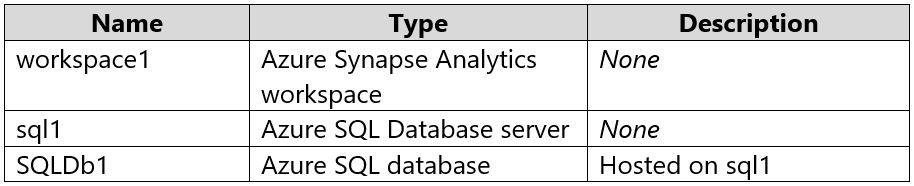
Community Votes
71% of anonymous learners picked answer AB. Votes are pick records left by other test-takers — they are not the verified answer.
Community Insight
The exam tests the distinction between infrastructure connectivity (firewall) and identity enablement (managed identity) versus role assignment (IAM). A common trap is assigning high-privilege roles like Contributor when only identity enablement is needed for the feature to function.
This question tests the prerequisites for enabling Azure Synapse Link on Azure SQL Database, specifically network connectivity and identity management. The community consensus confirms that allowing Azure services via firewall rules and enabling the system-assigned managed identity are the required steps.
Many candidates choose AC, incorrectly believing they must assign the Contributor role to the workspace's managed identity. This is wrong because Synapse Link uses specific internal mechanisms and does not require the workspace to have full Contributor access to the SQL DB.
Community Discussion (6 comments)
Comments & Corrections
No comments yet — spotted an error or have a note? Share it below.
Expert Analysis
Why the Answer Is Correct
To implement Azure Synapse Link for Azure SQL Database, you must ensure the Synapse workspace can connect to the database and that the database supports the necessary identity-based authentication. Option A is correct because Azure Synapse Link requires the ability to connect to the SQL Database; thus, firewall rules must allow Azure services. Option B is correct because enabling the system-assigned managed identity on the SQL Database is a prerequisite for Synapse Link to authenticate and manage the replication process securely.Why the Other Options Are Wrong
Option C is incorrect because assigning the Contributor role is excessive and not part of the standard implementation guide. Synapse Link handles permissions internally or uses specific roles if manual configuration is needed, but Contributor is not a prerequisite. Option D is incorrect because Transparent Data Encryption (TDE) should remain enabled for security; it does not prevent Synapse Link from functioning, provided the encryption keys are accessible.Community Comment Notes
Comment [1] and [2] cite the official Microsoft Learn documentation, confirming options A and B as the correct actions. Comment [3] provides a detailed explanation of why firewall rules are necessary for connectivity. Comments [4] and [5] represent the common misconception regarding IAM roles, which the official guidance refutes by focusing on managed identity enablement rather than role assignment.Official Reference
Exam Strategy
Focus on the specific prerequisites listed in Microsoft Learn for each Azure service integration. Do not assume that 'more access' (like Contributor role) is better; often, enabling identities or adjusting network settings is sufficient and preferred.