Optimizing Azure Stream Analytics Job Performance
You have an Azure Stream Analytics job named Job1. The metrics of Job1 from the last hour are shown in the following table. The late arrival tolerance for Job1 is set to five seconds. You need to optimize Job1. Which two actions achieve the goal? Each correct answer presents a complete solution. NOTE: Each correct answer is worth one point. - 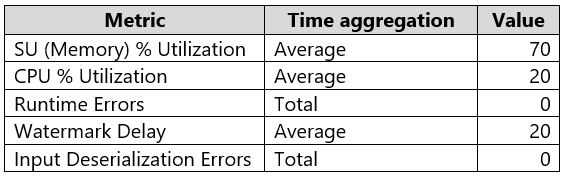
Community Votes
100% of anonymous learners picked answer AB. Votes are pick records left by other test-takers — they are not the verified answer.
Community Insight
The exam tests the ability to distinguish between performance bottlenecks and error handling; the trap is selecting error resolution options when the metrics only show high usage without failure logs.
This question focuses on optimizing Azure Stream Analytics jobs using Streaming Units (SUs) and query parallelization. The community consensus is that increasing SUs and parallelizing the query are the correct actions when no processing errors are present.
Candidates often select C or D because they assume 'optimization' implies fixing broken processes, but the scenario explicitly states there are no errors in input/output processing.
Community Discussion (3 comments)
Comments & Corrections
No comments yet — spotted an error or have a note? Share it below.
Expert Analysis
Why the Answer Is Correct
Increasing the number of Streaming Units (SUs) directly provides more computational resources, reducing latency and processing backlog for a single job. Parallelizing the query distributes the workload across multiple partitions, significantly improving throughput for high-volume data streams.Why the Other Options Are Wrong
Options C and D suggest resolving errors in output or input processing. However, the scenario does not indicate any failed events or error rates; it only shows resource utilization metrics. Therefore, troubleshooting errors is unnecessary and does not address the optimization goal.Community Comment Notes
Community comments unanimously agree on AB, noting that since there were no errors to resolve, the focus must be on scaling and distribution. Users highlighted that parallelization is a key technique for handling increased load without simply throwing hardware at the problem.Official Reference
Exam Strategy
Always check for error indicators in the scenario before choosing troubleshooting steps. If the job is running but slow or under heavy load, prioritize scaling (SUs) and parallelization strategies.