AWS Glue DataBrew NEST_TO_MAP Transformation
Short answer
B Use AWS Glue DataBrew to read the files. Use the NEST_TO_MAP transformation to create the new column.
Question
Key Takeaways
The key insight is distinguishing between NEST_TO_ARRAY (which creates an ordered list of objects) and NEST_TO_MAP (which creates a key-value JSON object), as the target format requires key-value pairs.
This question tests the use of AWS Glue DataBrew's NEST_TO_MAP transformation to consolidate multiple columns into a single JSON object with minimal coding.
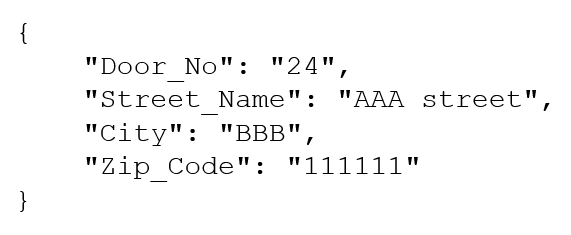
Common mistake: Many learners choose Option A (NEST_TO_ARRAY) because they focus on the square brackets in the example image, failing to recognize that the content inside represents key-value pairs rather than a simple array of values.
Expert Analysis
Why the Answer Is Correct
Option B is correct because the required output is a JSON object where each address component (Door_No, Street_Name, etc.) serves as a key and its value is the corresponding data. The NEST_TO_MAP transformation in AWS Glue DataBrew specifically converts selected columns into a map (JSON object) with key-value pairs, which matches the desired structure {"Door_No": "123",...}. This requires zero custom code, satisfying the 'least coding effort' constraint.
Why the Other Options Are Wrong
Option A (NEST_TO_ARRAY) produces an array of objects like [{"key": "Door_No", "value": "123"}], which does not match the flat key-value JSON object shown in the prompt. Option C (PIVOT) rotates column headers into row values or vice versa, which is unrelated to creating a nested JSON structure from existing columns. Option D involves writing Python code in Lambda, which violates the 'least coding effort' requirement compared to using a visual tool like DataBrew.
Community Comment Notes
The community largely agreed on Option B. As user FuriouZ noted, "NEST_TO_ARRAY would result in: [ {"key": "key1", "value": "value1"}...] while NEST_TO_MAP results: { "key1": "value1"...}". User Ousseyni correctly identified that DataBrew allows easy transformation without extensive coding. Although some users like GiorgioGss argued for A due to the visual appearance of brackets, the internal structure is clearly a map, not an array of primitives.
Official Reference
- https://docs.aws.amazon.com/databrew/latest/dg/recipe-actions.NEST_TO_MAP.html
- https://docs.aws.amazon.com/databrew/latest/dg/recipe-actions.NEST_TO_ARRAY.html
These links open the official vendor documentation in a new tab.
Exam Strategy
When asked for 'least coding effort', prioritize managed services with visual interfaces or built-in transformations over custom scripting. Always inspect the exact data structure requested; if it looks like a dictionary or JSON object with keys, look for MAP-based transformations.
Frequently Asked Questions
What is the difference between NEST_TO_ARRAY and NEST_TO_MAP in DataBrew?
Why is PIVOT not suitable for this task?
Community Votes
100% of anonymous learners picked answer B. Votes are pick records left by other test-takers — they are not the verified answer.
Discussion 6 contributions
Compiled from public community threads and reader submissions, lightly edited for clarity. Handles and vote tallies are shown as recorded, and comments reflect the views of individual contributors.
From public community threads 6
-
FuriouZ 👍 12 Answered BNEST_TO_ARRAY would result in: [ {"key": "key1", "value": "value1"}, {"key": "key2", "value": "value2"}, {"key": "key3", "value": "value3"}] while NEST_TO_MAP results: { "key1": "value1", "key2": "value2", "key3": "value3" } Therefore go with B
-
Ousseyni 👍 4 Answered BAWS Glue DataBrew is a visual data preparation tool that allows for easy transformation of data without requiring extensive coding. The NEST_TO_MAP transformation in DataBrew allows you to convert columns into a JSON map, which aligns with the desired JSON format for the address data.
-
pypelyncar 👍 3 Answered BThe NEST_TO_MAP transformation is specifically designed to convert data from nested structures (like rows in a CSV) into key-value pairs, perfectly matching the requirement of creating a new column with address components as key-value pairs
-
kj07 👍 2Option B: NEST_TO_MAP: Converts user-selected columns into key-value pairs, each with a key representing the column name and a value representing the row value. The order of the selected column is not maintained while creating the resultant map. The different column data types are typecast to a common type that supports the data types of all columns. https://docs.aws.amazon.com/databrew/latest/dg/recipe-actions.NEST_TO_MAP.html PIVOT: Converts all the row values in a selected column into individual columns with values. NEST_TO_ARRAY: Converts user-selected columns into array values. The order of the selected columns is maintained while creating the resultant array. The different column data types are typecast to a common type that supports the data types of all columns.
-
damaldon 👍 1Ans. A NEST_TO_ARRAY Converts user-selected columns into array values. The order of the selected columns is maintained while creating the resultant array. https://docs.aws.amazon.com/databrew/latest/dg/recipe-actions.NEST_TO_ARRAY.html
Show 1 more comment
-
GiorgioGss 👍 1 Answered ACome on guys. That's and array there so...
Reader comments & corrections
No reader corrections yet — spotted an error or have a note? Share it below.
Related Analysis
Practice All DEA-C01 Questions
Access 100 questions with complete answers and detailed explanations.
View Full DEA-C01 Practice Test →