Combining Tables with Union vs Join in SQL
Short answer
C Use Union to vertically stack rows from the two separate tables into a single combined report.
Question
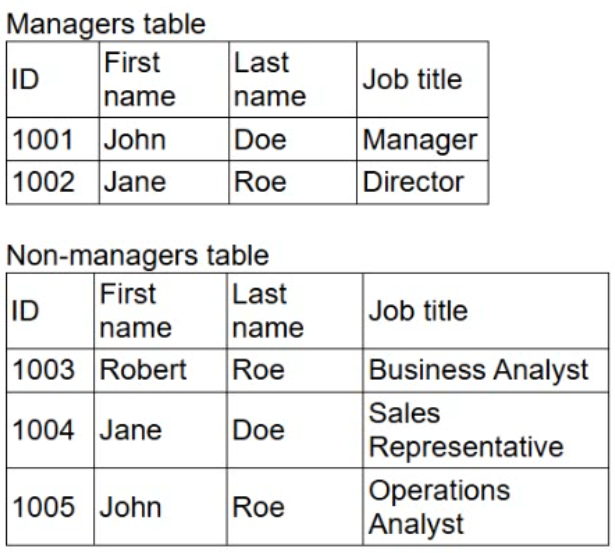
Which of the following query methods should the analyst use for this task?
Key Takeaways
The trap is choosing Join for any 'combine' request; Union is required when stacking rows from disparate sources rather than linking related rows.
Learn why Union is the correct query method to combine two tables with non-overlapping keys in DA0-002 exams.
Common mistake: Selecting Join (B) because it sounds like 'combining' tables, ignoring that Joins require matching keys to link columns, whereas these tables have no shared IDs.
Expert Analysis
The question asks for a method to create a combined report from two tables containing different entities (IDs 1001-1002 vs 1003-1005). The options are Group, Join, Union, and Nested.
Why 'Join' is the distractor: Option B (Join) is the most common wrong answer because analysts associate 'combining tables' with JOINs. However, as noted in the comments, an INNER JOIN on ID yields no results because there are no matching keys. A natural join on names would produce incorrect pairings (e.g., John Doe with Jane Doe). Joins are designed to merge columns horizontally based on relationships, not to stack unrelated rows.
Why 'Union' is correct: Option C (Union) is the correct choice. In SQL, UNION combines the result sets of two or more SELECT statements vertically (stacking rows). It requires that the selected columns have compatible data types. Since the analyst wants to include information from both tables into a single list/report without implying a row-by-row relationship between specific IDs, stacking the records is the appropriate operation. This aligns with Data Analysis objective 2.3 (Apply data transformation) where combining datasets is a key task.
Group (A) aggregates data, and Nested (D) refers to subqueries, neither of which primarily serves to simply combine two distinct table sources into one flat list.
Exam Strategy
When asked to 'combine' or 'merge' tables, first check if there is a logical relationship between the rows (keys). If the goal is to add new rows to a dataset and the tables have no matching primary/foreign keys, choose Union. If the goal is to add new columns by matching specific records, choose Join.
Frequently Asked Questions
Can I use Union to combine tables with different column names?
What happens if I try to Join these two tables?
Community Votes
50% of anonymous learners picked answer C. Votes are pick records left by other test-takers — they are not the verified answer.
Discussion 2 contributions
Compiled from public community threads and reader submissions, lightly edited for clarity. Handles and vote tallies are shown as recorded, and comments reflect the views of individual contributors.
From public community threads 2
-
6b7911d 👍 1 Answered CC, UNION Join combines tables side by side, matching rows on a shared key. The IDs don’t overlap (1001-1002 vs. 1003-1005), so an inner join on ID returns nothing. Joining on first or last name would wrongly pair people like John Doe with Jane Doe. Joins are for adding columns from related tables, not adding rows. Group (GROUP BY) aggregates rows within a result, such as counting employees per job title. It doesn’t combine tables. Nested (a subquery) puts one query inside another, for example to filter. It doesn’t merge two row sets on its own. Remember; if the tables share a structure, use UNION to add rows. If they share a key, use JOIN to add columns.
-
Amelia233 👍 1 Answered BThe correct answer is B. Join. A JOIN is used to combine information from two tables based on a related field or key. It allows the analyst to bring columns from both tables into one report. GROUP is used for summarizing data, UNION combines rows from similar tables, and nested queries are mainly used to place one query inside another.
Reader comments & corrections
No reader corrections yet — spotted an error or have a note? Share it below.
Related Analysis
Practice All DA0-002 Questions
Access 100 questions with complete answers and detailed explanations.
View Full DA0-002 Practice Test →