WDAC Supplemental Allow List for Pilot Servers
Short answer
Create a supplemental allow list containing the App1 certificate rule, then configure Group Policy to apply this supplemental allow list exclusively to the pilot servers.
Question
You have 40 application servers that run Windows Server and use the same enforced Windows Defender Application Control (WDAC) base policy.
You designate six of the 40 application servers as pilot servers that will run a vendor app named App1. The vendor signs the binaries for App1 by using a single certificate and releases monthly updates.
You need to enable App1 on only the pilot servers. The solution must minimize policy maintenance and prevent changing the base policy allow rules.
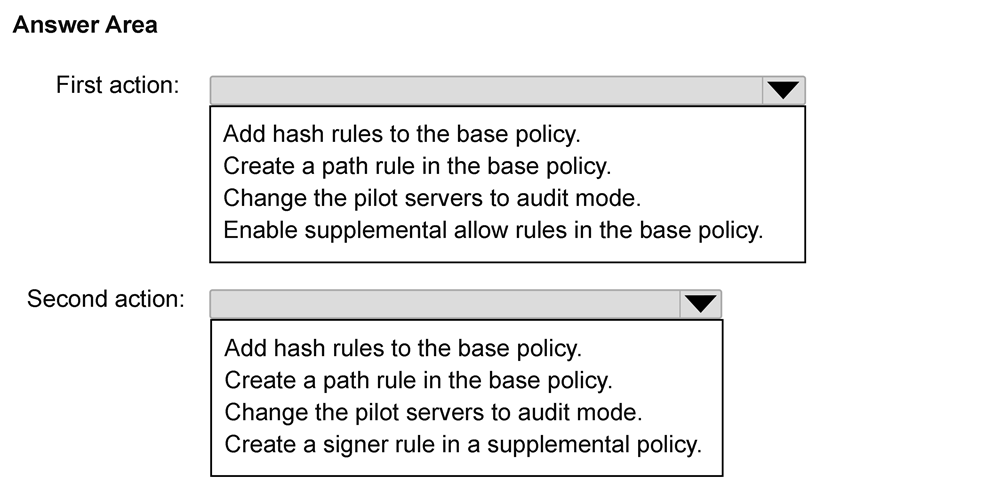
Which two actions should you perform in sequence before deploying App1 to the pilot servers? To answer, select the appropriate options in the answer area.
NOTE: Each correct selection is worth one point.
Key Takeaways
The main trap is modifying the base policy directly; the correct approach uses supplemental allow lists targeted via GPO to specific server groups.
Learn how to enable a specific app on limited servers using WDAC supplemental allow lists without modifying the base policy. This guide covers creating the list and scoping it via Group Policy.
Common mistake: Adding a direct path or code integrity rule to the base policy, which violates the constraint of not changing base policy allow rules and would enable the app on all 40 servers.
Expert Analysis
The scenario involves a Windows Defender Application Control (WDAC) base policy enforced on 40 servers, with a need to allow a specific vendor application (App1) only on six pilot servers without modifying the existing base policy allow rules. The key constraints are: 1) App1 must run ONLY on pilot servers. 2) Base policy allow rules cannot be changed. 3) Minimize policy maintenance.
To achieve this, we must use the WDAC supplemental allow lists feature, which allows adding exceptions or allowances without altering the core base policy XML directly in a way that affects all machines. However, simply creating a supplemental allow list isn't enough; it must be linked correctly.
Step 1: Create a supplemental allow list. This list should contain the rule allowing App1. Since the vendor uses a single certificate for monthly updates, a certificate-based rule is appropriate and maintainable. Crucially, this supplemental list must be scoped to the pilot servers. In WDAC, scoping can be achieved via Group Policy settings that target specific OUs or collections containing only the pilot servers. Alternatively, if using a unified management approach, the supplemental list itself might not inherently restrict scope unless the deployment mechanism does. However, the question asks for actions before deploying. The most effective way to ensure the app runs ONLY on pilots without changing the global base policy is to create a supplemental allow list that includes the App1 certificate rule.
Step 2: Configure the Group Policy Object (GPO) or management setting to apply this supplemental allow list specifically to the pilot servers. By linking the supplemental allow list configuration via GPO to an OU containing only the six pilot servers, you ensure that these servers will accept the new allow rule while the other 34 servers continue to use the unmodified base policy alone. This minimizes maintenance because you don't need to update the base policy file for every change; you just manage the supplemental list's linkage.
Therefore, the two actions are: 1. Create a supplemental allow list containing the rule for App1 (based on the vendor's certificate). 2. Configure Group Policy to apply this supplemental allow list exclusively to the pilot servers (e.g., by linking it to the relevant OU).
Common mistakes include trying to add a path rule to the base policy (violates constraint), or enabling 'Enforce Supplemental Allow Rules' globally (which might affect all servers if not scoped correctly, or implies a different configuration step). The focus is on the creation of the supplemental list and its targeted application.
Official Reference
This link opens the official vendor documentation in a new tab.
Exam Strategy
When asked to modify access for a subset of systems without changing a global policy, always look for 'supplemental' or 'exception' mechanisms. In Windows security contexts, these are often paired with targeted Group Policy deployments (OU-specific links) rather than global policy edits. Prioritize solutions that isolate the change to the specific target group.
Frequently Asked Questions
Why can't I just add a path rule to the base policy?
How do supplemental allow lists minimize maintenance?
Discussion 1 contributions
Compiled from public community threads and reader submissions, lightly edited for clarity. Handles and vote tallies are shown as recorded, and comments reflect the views of individual contributors.
From public community threads 1
-
linux_admin 👍 1According to Microsoft Learn, creating a path rule in the base policy is wrong because it directly modifies the base policy allow rules—violating the constraint to prevent changing base policy allow rules—and enables the app across all 40 servers rather than just the pilot machines. Enabling supplemental allow rules in the base policy is right because it simply permits the base policy to accept linked supplemental policies without altering base allow rules, allowing you to deploy a supplemental policy containing the signer rule strictly to the six pilot servers.
Reader comments & corrections
No reader corrections yet — spotted an error or have a note? Share it below.
Related Analysis
Practice All AZ-802 Questions
Access 125 questions with complete answers and detailed explanations.
View Full AZ-802 Practice Test →