Share and NTFS effective access with ABE on Share1
Short answer
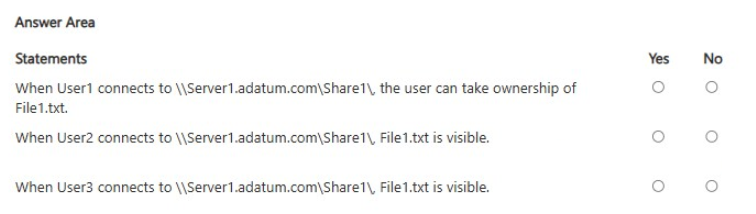
User1 and User2: Yes — their share and NTFS rights overlap, so File1.txt is accessible. User3: No — NTFS grants Write only, and ABE lists an object only for users with Read, so File1.txt is hidden in Share1.
Question
Your network contains an Active Directory Domain Services (AD DS) domain named adatum.com. The domain contains a file server named Server1 and three users named User1, User2, and User3.
Server1 contains a shared folder named Share1 that has the following configurations:
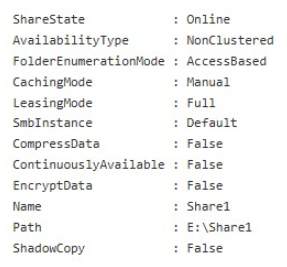
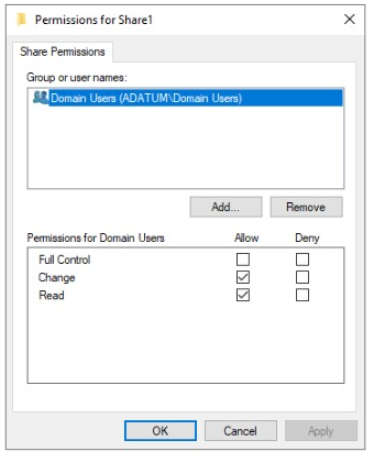
The share permissions for Share1 are configured as shown in the Share Permissions exhibit.
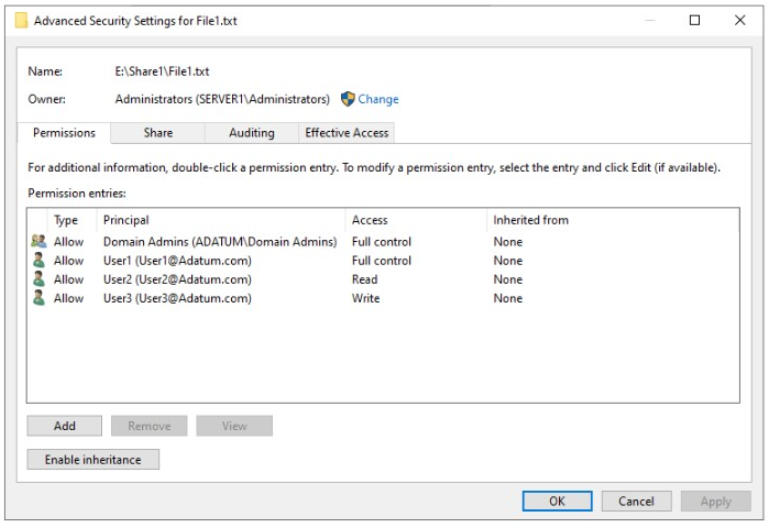
Share1 contains a file named File1.txt. The advanced security settings for File1.txt are configured as shown in the file Permissions exhibit.
For each of the following statements, select Yes if the statement is true. Otherwise, select No.
Key Takeaways
It tests whether you can combine share and NTFS permissions and know that ABE exposes an object only to users with Read access, not Write.
This AZ-802 hotspot tests effective access on Server1's Share1: access survives only where share permissions and the NTFS ACL for File1.txt both allow it, and Access-Based Enumeration hides File1.txt from User3 because Write alone lacks the required Read right.
Common mistake: Marking User3 as able to see or use File1.txt because NTFS grants Write — ABE filters by Read, so a write-only entry makes the file invisible when browsing Share1.
Expert Analysis
The governing rule Two documented Windows Server behaviours decide every Yes/No box here. First, when a user reaches a file through an SMB share, effective access is the intersection of the share permissions and the NTFS (file-system) permissions — the resulting right can never exceed what either layer grants, and share permissions only matter on the network path. Second, Access-Based Enumeration on Share1 filters the browse list so that an object is listed only for a user whose NTFS rights on that object include Read (List Folder Contents / read data). Anything weaker is simply not shown.
Mapping the scenario Share1's share permissions and File1.txt's advanced NTFS entries must be read together: for User1 and User2, the rights they hold in the file's security descriptor overlap with what the share allows, so the surviving right is sufficient to open File1.txt — those statements are Yes. For User3 the outcome flips. As discussion notes in the thread observe, User3 carries Write-only NTFS permissions on File1.txt. Write alone neither satisfies the ABE read test nor produces a usable browsing result, so even though the file could technically be written to if reached by full path, User3 does not see File1.txt when enumerating Share1 — that statement is No.
The trap Many learners treat "permission granted" as "file visible". ABE is independent of write capability: visibility requires Read, so a Write-only entry hides the object rather than exposing it.
Exam Strategy
For hotspot items on shares, first compute effective access by intersecting the share permission with the file's NTFS entries — write down the surviving right before judging. Then apply a visibility check: if Access-Based Enumeration is on, ask whether the surviving right includes Read; Write, Change-without-Read context, or no entry means the object is not listed. Use this two-step order on any Windows Server permission question, because visibility and access are graded separately.
Frequently Asked Questions
Why can't User3 with Write permissions on File1.txt see the file in Share1?
How do share permissions and NTFS permissions combine for Share1?
Does removing ABE change the answer for User3?
Discussion 1 contributions
Compiled from public community threads and reader submissions, lightly edited for clarity. Handles and vote tallies are shown as recorded, and comments reflect the views of individual contributors.
From public community threads 1
-
linux_admin 👍 1User3 has Write-only NTFS permissions, so Access-Based Enumeration (ABE) hides the file since ABE requires Read access to display objects.
Reader comments & corrections
No reader corrections yet — spotted an error or have a note? Share it below.
Related Analysis
Practice All AZ-802 Questions
Access 125 questions with complete answers and detailed explanations.
View Full AZ-802 Practice Test →