Hyper-V VM Hibernation Support by Configuration Version
Short answer
Only VM1 can be hibernated because it is on Configuration Version 10.0, which supports Guest OS Hibernation; VM2 and VM3 use older versions that do not support this feature.
Question
You have a server named Server1 that has the Hyper-V server role installed. Server1 hosts the virtual machines shown in the following exhibit.
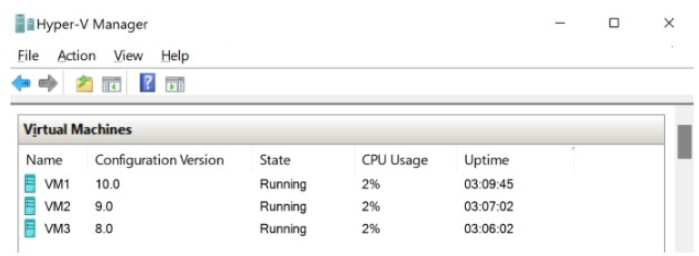
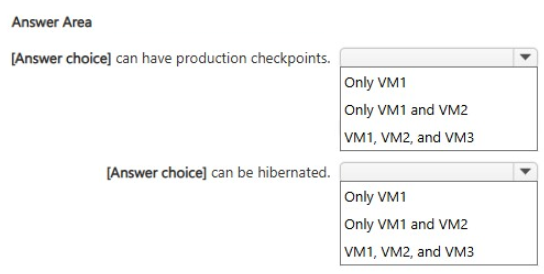
Use the drop-down menus to select the answer choice that completes each statement based on the information presented in the graphic.
Key Takeaways
Guest OS Hibernation is exclusively supported on VM Configuration Version 10.0 (Windows Server 2022), making older versions incompatible.
Determines which Hyper-V VMs support hibernation based on their configuration version, identifying VM1 as the only supported instance due to its version 10.0 status.
Common mistake: Learners may incorrectly assume all modern Hyper-V VMs support hibernation regardless of configuration version, missing the strict requirement for Version 10.0.
Expert Analysis
The question tests the specific compatibility requirements for Hyper-V VM hibernation across different configuration versions. The core principle is that Guest OS Hibernation is a feature introduced in Windows Server 2022, which corresponds to VM Configuration Version 10.0. Older VM configurations do not support this feature.
VM1 is running on Configuration Version 10.0. Since this version was introduced alongside the hibernation feature in Windows Server 2022, VM1 supports guest OS hibernation. Therefore, it can be placed into a hibernated state.
VM2 and VM3 are running on older configuration versions (9.0 and 8.0 respectively). These versions predate the introduction of the hibernation feature. Consequently, they lack the necessary firmware and integration services support to handle guest OS hibernation. Attempting to hibernate these VMs would fail or not be an available option.
Thus, the correct completion of the statements is that only VM1 can be hibernated. This distinction highlights the importance of understanding feature availability tied to specific VM generation and configuration versions when managing modern Hyper-V environments.
Exam Strategy
When evaluating Hyper-V features, always check the VM Configuration Version first. Features are often gated behind specific versions (e.g., Secure Boot, Hibernation). If a feature is new, associate it with the latest server release and corresponding version number to quickly eliminate older VMs from consideration.
Frequently Asked Questions
What is the minimum VM configuration version for hibernation?
Can I upgrade an old VM to support hibernation?
Discussion 1 contributions
Compiled from public community threads and reader submissions, lightly edited for clarity. Handles and vote tallies are shown as recorded, and comments reflect the views of individual contributors.
From public community threads 1
-
linux_admin 👍 1Only VM1 can be hibernated. Guest OS hibernation in Hyper-V requires VM Configuration Version 10.0 (introduced in Windows Server 2022). VM2 (Version 9.0) and VM3 (Version 8.0) run older configuration versions that do not support VM hibernation.
Reader comments & corrections
No reader corrections yet — spotted an error or have a note? Share it below.
Related Analysis
Practice All AZ-802 Questions
Access 125 questions with complete answers and detailed explanations.
View Full AZ-802 Practice Test →