Configuring IPsec Connection Security Rules for Specific Host Pairs
Short answer
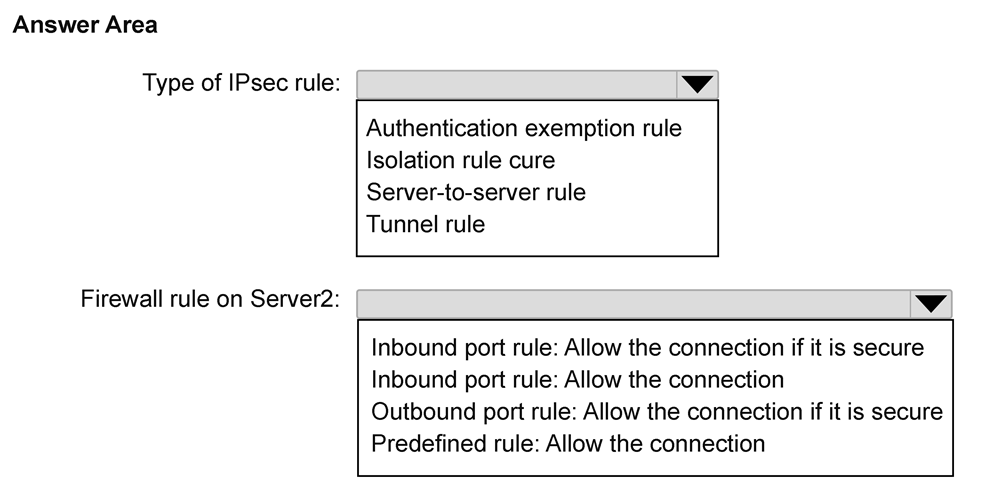
Configure a Server-to-server rule using Computer and user authentication (Kerberos) with Require security with encryption enabled for the specific host pair.
Question
Your network contains an Active Directory Domain Services (AD DS) domain. The domain contains two servers named Server1 and Server2 that run Windows Server.
You need to use connection security rules to control the connections between Server1 and Server2. The solution must meet the following requirements:
IPsec protection for Server1 and Server2 must be limited.
Traffic between Server1 and Server2 must be authenticated and encrypted.
Server2 must accept traffic from Server1 only if Server2 is authenticated by using IPsec.
How should you configure the connection security rules? To answer, select the appropriate options in the answer area.
NOTE: Each correct selection is worth one point.
Key Takeaways
The trap is choosing 'Isolation' mode which enforces IPsec globally rather than targeting specific hosts; the correct approach uses 'Server-to-server' rules for granular control.
Learn how to configure Windows Server IPsec connection security rules to limit protection to specific host pairs using Server-to-server rules, Kerberos authentication, and mandatory encryption.
Common mistake: Selecting 'Isolation' rule type instead of 'Server-to-server'. Isolation applies to all computers in a domain or subnet, failing the 'limited protection' requirement for just two servers.
Expert Analysis
The scenario requires a precise configuration of Windows Defender Advanced Threat Protection (ATP) or IPsec Connection Security Rules to secure traffic between two specific servers, Server1 and Server2. The core constraint is that protection must be "limited" to this pair, meaning it cannot apply globally to the domain or subnet.
First, select Server-to-server as the rule type. This setting ensures that IPsec enforcement applies only to the specified host pair. As noted in community feedback, an "Isolation" rule would enforce IPsec across the entire domain or subnet, violating the requirement for limited protection. A "Client" rule would only protect outbound connections from a client, which does not fit the server-to-server mutual authentication requirement.
Second, under the Authentication Method, select Computer and user authentication (Kerberos). Since both machines are part of the same AD DS domain, Kerberos is the most efficient and standard method for authenticating computer identities without requiring pre-shared keys or certificates. It allows mutual authentication where both parties verify each other's identity.
Third, set the Encryption settings to Require security with encryption. This directly satisfies the requirement that traffic must be "authenticated and encrypted." Selecting "Allow security" would permit unencrypted traffic if negotiation fails, and "No security" disables IPsec entirely. "Require security" ensures that if either party cannot authenticate or encrypt, the connection is dropped, meeting the strict security posture required.
Finally, ensure the rule applies to the specific IP addresses or names of Server1 and Server2. The combination of Server-to-server rule type, Kerberos authentication, and Require Encryption creates a secure tunnel exclusively for this pair, fulfilling all constraints.
Official Reference
This link opens the official vendor documentation in a new tab.
Exam Strategy
When asked to restrict IPsec to specific hosts, always choose 'Server-to-server' or 'Client' rules over 'Isolation'. For domain-joined servers, prefer Kerberos authentication for efficiency unless cross-domain scenarios require certificates. Always select 'Require security' when encryption is mandated to prevent fallback to clear text.
Frequently Asked Questions
Why use Kerberos instead of Certificate authentication?
What happens if 'Allow security' is selected?
Discussion 1 contributions
Compiled from public community threads and reader submissions, lightly edited for clarity. Handles and vote tallies are shown as recorded, and comments reflect the views of individual contributors.
From public community threads 1
-
linux_admin 👍 1According to Microsoft Learn, a Server-to-server rule is correct because it restricts IPsec protection strictly to specific host pairs like Server1 and Server2. An Isolation rule is incorrect because it applies broadly across an entire domain or subnet and cannot target just two specific servers.
Reader comments & corrections
No reader corrections yet — spotted an error or have a note? Share it below.
Related Analysis
Practice All AZ-802 Questions
Access 125 questions with complete answers and detailed explanations.
View Full AZ-802 Practice Test →