Configuring Azure VM RDP Access and Boot Diagnostics
Short answer
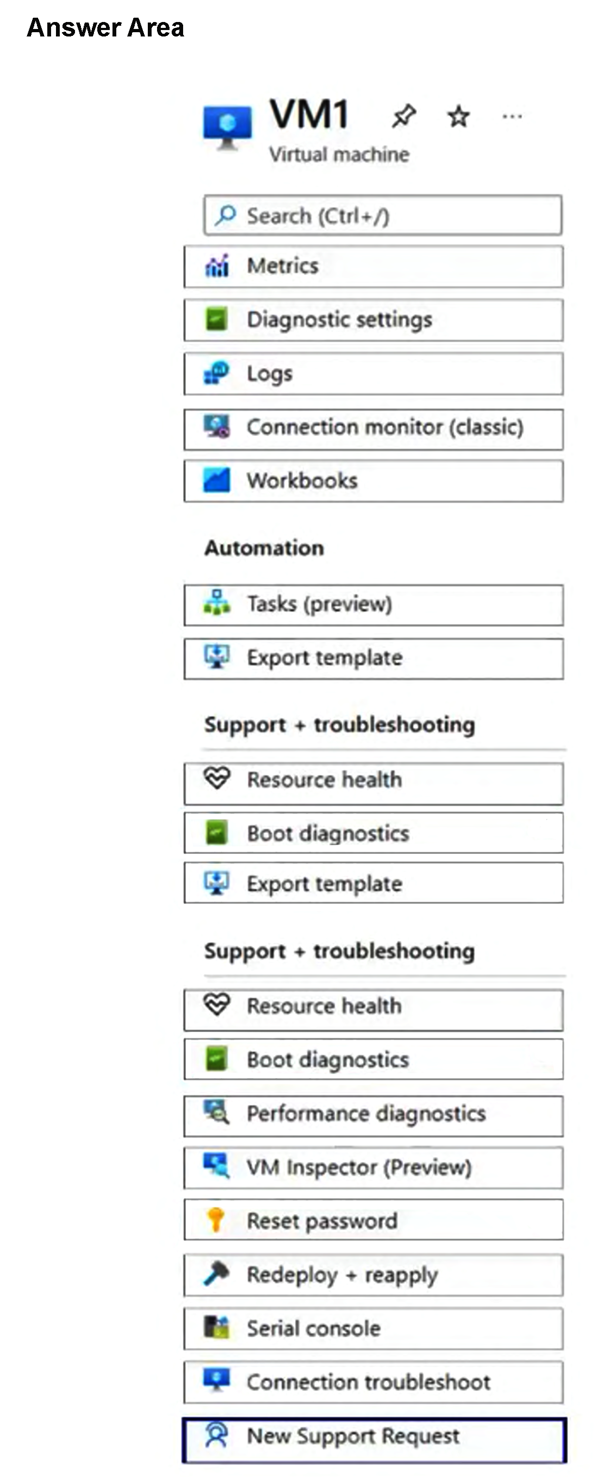
Use the 'Reset password' setting to configure Windows Defender Firewall for Remote Desktop connections, and use the 'Boot diagnostics' setting to configure where to store the virtual machine console logs.
Question
You have an Azure virtual machine named VM1 that runs Windows Server.
You need to perform the following tasks on VM1:
Configure Windows Defender Firewall to allow Remote Desktop connections.
Configure where to store the logs of the virtual machine console.
Which two settings should you use? To answer, select the settings in the answer area.
NOTE: Each correct selection is worth one point.
Key Takeaways
The question tests knowledge of Azure-specific VM management blades rather than manual OS configuration, specifically linking RDS enablement to the Reset Password tool and console logs to Boot Diagnostics.
This page explains how to use the Azure Portal's 'Reset password' and 'Boot diagnostics' settings to manage remote access and console logging for Windows Server VMs in AZ-802.
Common mistake: Candidates often attempt to manually configure Windows Defender Firewall via the OS or select 'Network Security Groups' for RDP access, missing the automated Azure Portal 'Reset password' shortcut. Others may confuse 'Boot diagnostics' with standard 'Event Logs' or 'Backup' options.
Expert Analysis
The scenario involves managing a Windows Server VM in Azure with two distinct operational requirements: enabling Remote Desktop (RDP) access and configuring virtual machine console log storage. These tasks map directly to specific Azure Portal management features designed for infrastructure maintenance.
For the first requirement, allowing Remote Desktop connections typically involves modifying the Windows Firewall or the Network Security Group (NSG). However, the most efficient method provided by Azure is the "Reset password" feature found under the Virtual Machine's Settings blade. As noted in community discussions, this tool utilizes the VMAccess extension to automatically enable the RDS service and configure the necessary firewall rules, ensuring connectivity without manual OS-level configuration. This makes it the correct selection for the "Allow Remote Desktop connections" setting.
For the second requirement, storing logs of the virtual machine console refers to boot diagnostics. Azure provides a "Boot diagnostics" setting within the VM's Monitoring section. This feature allows administrators to capture serial console output and screen shots during boot failures. Crucially, it requires selecting a target Azure Storage account where these logs are persisted. Therefore, the "Boot diagnostics" setting is the correct choice for configuring log storage.
A common trap is confusing "Backup" or "Disks" settings with diagnostic logging. While backups protect data integrity, they do not store console logs. Similarly, while NSGs control traffic, they do not manage internal OS services like RDS as effectively as the Reset Password tool in this context.
Official Reference
- https://learn.microsoft.com/en-us/azure/virtual-machines/windows/snapshot-copy-diagnostic-boot-diagnostics
- https://learn.microsoft.com/en-us/azure/virtual-machines/windows/reset-rdp
These links open the official vendor documentation in a new tab.
Exam Strategy
When asked about VM maintenance tasks in the Azure portal, look for the dedicated Management blades (like 'Reset password' or 'Boot diagnostics') rather than assuming manual OS-level changes are required. These tools automate complex configurations like firewall rules and log persistence, which are frequently tested in performance-based questions.
Frequently Asked Questions
Does the Reset Password tool modify the actual user password?
Where are Boot Diagnostics logs stored if no storage account is specified?
Discussion 1 contributions
Compiled from public community threads and reader submissions, lightly edited for clarity. Handles and vote tallies are shown as recorded, and comments reflect the views of individual contributors.
From public community threads 1
-
linux_admin 👍 1Reset password: In the Azure portal, the "Reset password" tool includes an option to reset the Remote Desktop Services (RDS) configuration. This uses the VMAccess extension to automatically enable the service and configure the required firewall rules. Boot diagnostics: This setting captures virtual machine startup logs and requires a designated Azure Storage account. The Azure Serial Console directly uses this configured boot diagnostics storage account to connect to and store console output.
Reader comments & corrections
No reader corrections yet — spotted an error or have a note? Share it below.
Related Analysis
Practice All AZ-802 Questions
Access 125 questions with complete answers and detailed explanations.
View Full AZ-802 Practice Test →